NETGEAR is aware of a growing number of phone and online scams. To learn how to stay safe click here.
Forum Discussion

Steve49G
Aug 12, 2024Aspirant
RBS750 Connectivity / Firmware
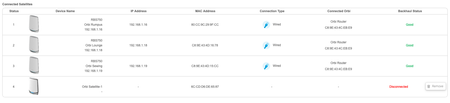
I have been through the wonderful community to try and get this working, I simply want to add another satellite. I believe that its firmware related, the RBR and 3 other RBS are all ok, this new ...
Steve49G
Aug 13, 2024Aspirant
Appreciate the help, I have tried everything without success, I cannot get the laptop or a Mac to connect to either of the IP addresses. I have scanned the QR code but it will not join that wifi point either, or tried to connect to the RBS wifi from the laptop, no success.
I have even turned off off the RBR and the other RBS's so there is no confusion at all, its so frustrating I feel like dumping all the Orbi's as its just not user friendly compared to others I have used.
There has to be an easier way to get the firmware on this device.

FURRYe38
Aug 14, 2024Guru - Experienced User
Did you happen to set a static IP address and sub net mask on your ethernet connected PC that was connected behind the RBS after it was factory reset? Might set this to 192.168.1.49/255.255.255.0 then see if you can access 192.168.1.250 or 192.168.10.250 after doing a factory reset on the RBS and waiting 5 minutes.
Could see if maybe NMRPFlash app could work with a windows PC:
https://github.com/jclehner/nmrpflash
Video walk through using a tftp client. Use the built in one for windows 10 though. the video is more of an example of how its done:
https://www.youtube.com/watch?v=hXhMgQS5k1o
https://www.youtube.com/watch?v=R9DLrLQrpaw