NETGEAR is aware of a growing number of phone and online scams. To learn how to stay safe click here.
Forum Discussion

Norhtstarjoe
Dec 28, 2020Aspirant
RBS850 Satellite Not Syncing after power outage
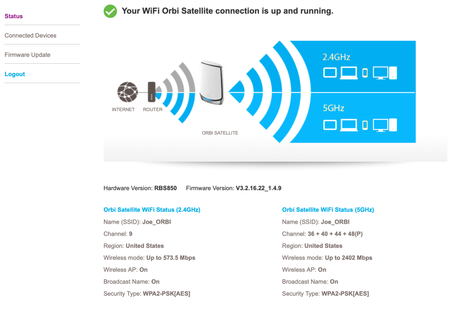
Hello, I purchased a RBR850 with a single satellite (I'll call this Sat 1). I ended up buying another sattelite separately (I'll call this Sat 2), it is the same model, RBS850 and all three devices ...
- Dec 29, 2020
Ok. Sounds good. Ya, thats alot of hassle sometimes. The PW reset should work but I've found that doing a reset and setup from scratch is just the best way to clear anything out. Sometimes odd things get hung up on the system so a reset is needed. Also browser caches can be problematic as well or saved passwords in browsers can cause some problems too. I try to keep to one router browser I only use for accessing the routers web page and doing FW updates. Then use others for all other general uses.
Glad you got it working finally. Please mark your post as solved so others will know.
Enjoy. :smileywink:

FURRYe38
Dec 28, 2020Guru - Experienced User
Turn OFF the 1st working RBS. Then try to re-sync the 2nd RBS to the RBR using the sync button in back of the RBS then press on the RBR. I would do this with the RBS near the RBR or in same room, 6-10feet away..See if the 2nd RBS will sync correctly.
What is the distance between the router and satellite(s)? 30 feet or more is recommended in between RBR and RBS to begin with depending upon building materials when wirelessly connected.
Has a factory reset been performed and setup from scratch since last FW update?
Norhtstarjoe
Dec 28, 2020Aspirant
Thank you FURRYe38
I unplugged my Sat 1. Then I power cycled both my Sat 2 and RBR. Since Sat 2 will not re-sync I then pressed the reset button on Sat 2 then pressed the sync button on RBR and Sat 2. It reconnected but shows the same issue.
My Sat 2 is about 12 feet from RBR while I've been trying to troubleshoot this throught the day.
I have not reset the RBR after any of the firmware update as I have ton of home automation devices on it. How likely would that fix this issue if I reset it?
- FURRYe38Dec 28, 2020Guru - Experienced User
Probable. Reset on both RBS and RBR.
- NorhtstarjoeDec 29, 2020Aspirant
FURRYe38 Thank you for your help. My last resort was doing a reset. I spent several hours this morning doing different things, all to no avail. I then got myself into an issue with the password reset that I could not recover from. At that point I had no choice but to do a factory reset by holding the rest button for 10 seconds.
Thankfully I had saved a config backup last night. Now my Sat 2 seems to be working and it has devices connected to it. With the backup config it was no issue to restore all my previous SSID and password and my devices all connected without me having to do anything manual or time consuming.
Wow! What a lot of time spent on this. I was about ready to ditch my RBR850 system and go buy a new 3 pack from Costco when I had my password problem.
- FURRYe38Dec 29, 2020Guru - Experienced User
Ok. Sounds good. Ya, thats alot of hassle sometimes. The PW reset should work but I've found that doing a reset and setup from scratch is just the best way to clear anything out. Sometimes odd things get hung up on the system so a reset is needed. Also browser caches can be problematic as well or saved passwords in browsers can cause some problems too. I try to keep to one router browser I only use for accessing the routers web page and doing FW updates. Then use others for all other general uses.
Glad you got it working finally. Please mark your post as solved so others will know.
Enjoy. :smileywink: