NETGEAR is aware of a growing number of phone and online scams. To learn how to stay safe click here.
Forum Discussion

moramar
Jul 08, 2023Aspirant
RBS850 wired backhaul out of sync and service unreachable
One of my RBS850 satellites is showing "out of sync" backhaul status. This status is the same whether connected wirelessly or hardwired (which is how I normally connect to the router). Other threads ...

FURRYe38
Jul 08, 2023Guru - Experienced User
Is Fw version one the one RBS the same as whats on the rest of the units?
- moramarJul 09, 2023Aspirant
Impossible to say for sure, but I doubt it is on the same version. One of the satellites was already on 4.6.14.3, but two of them needed to be updated. So my guess is that the unreachable one was not updated. I'm not even aware of a method to check the firmware version given the circumstances.
- FURRYe38Jul 09, 2023Guru - Experienced User
So the one RBS even connected to the back of the RBR wont get an IP address? If it does you could access it's web page there.
If not, try this, factory reset the RBS. Press the reset button in back for 15 seconds then release. Connect one wired PC to the back of the RBS. Set a static IP address of 192.168.10.49 on the wired PCs networking adapter. Wait about 5 minutes. See if you can access the RBS web page at 192.168.10.250 in a web browser. Log in will be admin and password. If you can get in, you can manually download the FW file for the RBS directly. Have the file downloaded to the PC.
- moramarJul 09, 2023Aspirant
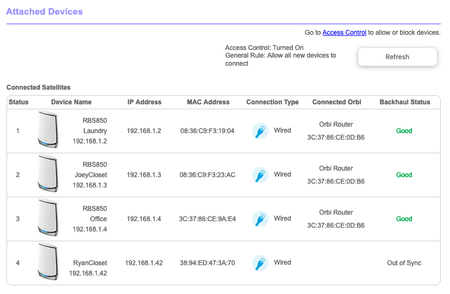
Actually, take a look at the screenshot of the "Attached Devices" section. Interestingly, it does assign an IP address there. However, I couldn't access the satellite's web page through a browser at that assigned IP address.
Regardless, I followed the instructions you provided because I figured there would be no harm in trying. I factory reset the satellite, disconnected my desktop from Wi-Fi, and directly connected the satellite to my desktop computer after manually setting the IP address to 192.168.10.49. It showed the ethernet port as "Connected" on my desktop. However, I could not get the satellite's web page at 192.168.10.250 through three different browsers. Browsers displayed "unable to connect" messages.
Are there any other steps I can take to update the satellite's firmware? Perhaps rolling the router's firmware back to an earlier version would offer a means to connecting to the satellite on an older firmware version? No idea if this could work or how far back to go if I did.