NETGEAR is aware of a growing number of phone and online scams. To learn how to stay safe click here.
Forum Discussion

Ericasjourney
Oct 03, 2023Aspirant
RBS860 Satellite Won't stay connected to RBR860 Router
I have my primary router which has always been rock solid. I also have a satellite located ~50' away in an accessory building where my home office is located. It's generally worked great with no issu...

FURRYe38
Oct 03, 2023Guru - Experienced User
Has a power off for 1 minute then back ON with the ISP modem and router been performed since last update?
Be sure to restart your network in this sequence:
Turn off and unplug modem.
Turn off router and computers.
Plug in and turn on modem. Wait 2 minutes for it to connect.
Turn on the router and wait 2 minutes for it to connect.
Turn on computers and rest of network.
Might update RBS first then RBR lastly.
- EricasjourneyOct 03, 2023Aspirant
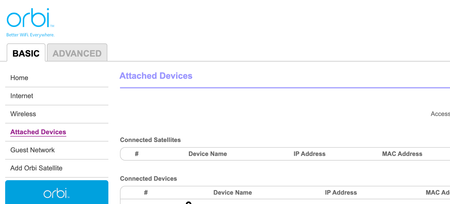
Unfortunately the RBS device is not visible anywhere in the browser or app configuration in order to push an update to it. The instructions on step 5 state to "Select the check box next to your satellite’s model name" and this is the exact problem - it's not listed. Any other recommendations?
- FURRYe38Oct 03, 2023Guru - Experienced User
Have you power OFF both RBR and RBS for 1 minute then back ON to see if it will reappear on the RBRs web page and get and see it's IP address? If we can get it to appear again, then log in to the RBS IP address, then you can update the RBS directly there.
- EricasjourneyOct 03, 2023Aspirant
Yes have unplugged for 2+ min multiple times and same. Has never appeared in my list of satellites which tells me some sort of either configuration issue or an issue elsewhere I cannot seem to locate. The RBR always gets an IP and is what I'm currently connected to with amazing speed and quality but it's just the fact the satellite appears unable to be seen despite showing blue each time I attempt to connect it after a reset.
- EricasjourneyOct 03, 2023Aspirant
Forgot to answer your others, apologies:
Has a power off for 1 minute then back ON with the ISP modem and router been performed since last update? Yes did all that earlier in the day when the issue wouldn't go away. I always unplug all the network devices for 5 min, plug in ISP modem, wait 5 minutes, plug in main orbi router, wait 5 min, then plug in the satellite. I've also done a hard reset 3x on the satellite and attempted to reconnect. Always get the blue light but never appears in the list on both app and browser.