NETGEAR is aware of a growing number of phone and online scams. To learn how to stay safe click here.
Forum Discussion

SkywalkerPD
Jun 25, 2024Apprentice
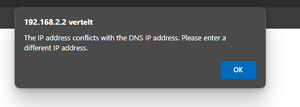
Add reservation error
Trying to add a reservation for my setup box. I get the following error when clicking apply.. The reservation itself I selected from the selection list. So it has to be correct. Any ...
- Jul 01, 2024
Glad you got it working. Please mark your thread as solved so others will know. Be sure to save off a back up configuration to file for safe keeping. Saves time if a reset is needed.
https://kb.netgear.com/000062080/How-do-I-back-up-the-configuration-settings-on-my-Orbi-WiFi-System
Enjoy. 📡


CrimpOn
Jun 26, 2024Guru - Experienced User
I did the experiment on an RBR750 with firmware v7.2.6.31
This router is connected to a primary Orbi system, so by default when it detects that IP assigned to the WAN port is in the 192.168.1.x subnet, it creates a LAN IP subnet of 10.0.0.x (Netgear engineers could have chosen any of the remaining 192.168.??? subnets, but they chose 10.0.0.x. No idea why.)
When a device is connected to the Guest WiFi network on this router, it is assigned an IP in the 10.0.1.x subnet. This is a similar behavior to when the primary default is 192.168.1.x and the Guest subnet is 192.168.2.x (i.e. "one bigger")
Then changed the primary LAN to 192.168.2.x and connected devices to the Guest WiFi network. Both were assigned IP's in the 10.0.1.x subnet. What appears to be the situation is that when the firmware detects that the primary subnet is anywhere in 192.168, it creates Guest as a 10.0.x.x subnet.
Thus, creating the primary IP subnet as 192.168.2.x will simply cause the Guest WiFi subnet to be switched from 192.168 to 10.0 Thus, there would appear to be no conflict between primary and Guest networks.
None of this explains what would cause assigning a device a reserved address in 192.168.2.x would display an error message.
Perhaps more information about the reservation would be helpful. Was the assignment within the DHCP 'pool' or outside the range of the pool?
SkywalkerPD
Jun 27, 2024Apprentice
Thanks for the replies and testing guys!
So I have the GN enabled
My primary LAN is set to 192.168.2.x With the router having 192.168.2.2 en both sattelites .3 and .4 (by reservation)
I make reservations for my 'known' devices, basically so I know wich device has what IP.
My DHCP range is 20-120 the reservation I make are either below or above this range.
My DNS was configured to 192.18.2.160. That is a Raspberry Pi with Pi-hole running on it that acts as DNS and use Cloudflare DNS as provider.
I changed the DNS setting on the router to 1.1.1.1 and now the error is not displayed anymore. But now I'm not routing my traffic through Pi-hole....
Hope I explain this so you can understand.
- FURRYe38Jun 27, 2024Guru - Experienced User
Might not be a good idea to use .2.x on the main LAN with GN enabled. GN is a separate network for guest devices that this network is isolated from the main LAN for security reasons. I would recommend changing the main LAN to 192.168.1.1 or something other than .2.x if you have GN enabled. Can only presume this maybe the cause of what your seeing.
- SkywalkerPDJun 28, 2024ApprenticeOk.. My main network is now set to 192.168.1.x but now I have the problem that devices keep getting 192.168.2.x addresses assigned bu DHCP?? DHCP settings are set to 192.168.1.x in the settings of the router…
- FURRYe38Jun 28, 2024Guru - Experienced User
Has a power OFF of the RBR and RBS for 1 minute then back ON and those devices connecting as well been tried?
Might disable the GN temporarily while you get the devices to get on the main lan with refreshed IP addresses.