NETGEAR is aware of a growing number of phone and online scams. To learn how to stay safe click here.
Forum Discussion

msinex
Jul 27, 2020Apprentice
Intermittent DNS Errors and WiFi Issues
I have had the Orbi AX6000 for a few months now. While there are many things I love about it (great wifi coverage, great speed, looks nice, software, ease of setup, etc.), there are two very frustra...

FURRYe38
Apr 22, 2021Guru - Experienced User
You can try the following to see if blocking the update services will work:
https://community.netgear.com/t5/Orbi/Firmware-auto-update-domain/m-p/1499659/highlight/true#M22873
stsh wrote:
FURRYe38 wrote:I think v25 was last version that you could enabletelnet and it worked. :smileyembarrassed:
guess what. You are correct.
This crap updated itself, most likely a few days ago. This might also be the reason I started having this upnp issue all of a sudden. In any case the dns change is most likely gone and the telnet access is also gone.
At the moment I only see one solution. Unplug the internet to block it from updating itself. Downgrade the router and ap. Enable telnet and change all the nvram parameters related to auto update to disabled. And then do the same as above.
It's just an untested idea but looks like too much pain to go through this. Might be easier to eat the cost and get a decent router from a different vendor.
stsh
Apr 22, 2021Star
Why am I not surprised?
FURRYe38 wrote:You can try the following to see if blocking the update services will work:
https://community.netgear.com/t5/Orbi/Firmware-auto-update-domain/m-p/1499659/highlight/true#M22873
stsh wrote:
FURRYe38 wrote:I think v25 was last version that you could enabletelnet and it worked. :smileyembarrassed:
guess what. You are correct.
This crap updated itself, most likely a few days ago. This might also be the reason I started having this upnp issue all of a sudden. In any case the dns change is most likely gone and the telnet access is also gone.
At the moment I only see one solution. Unplug the internet to block it from updating itself. Downgrade the router and ap. Enable telnet and change all the nvram parameters related to auto update to disabled. And then do the same as above.
It's just an untested idea but looks like too much pain to go through this. Might be easier to eat the cost and get a decent router from a different vendor.
- FURRYe38Apr 22, 2021Guru - Experienced User
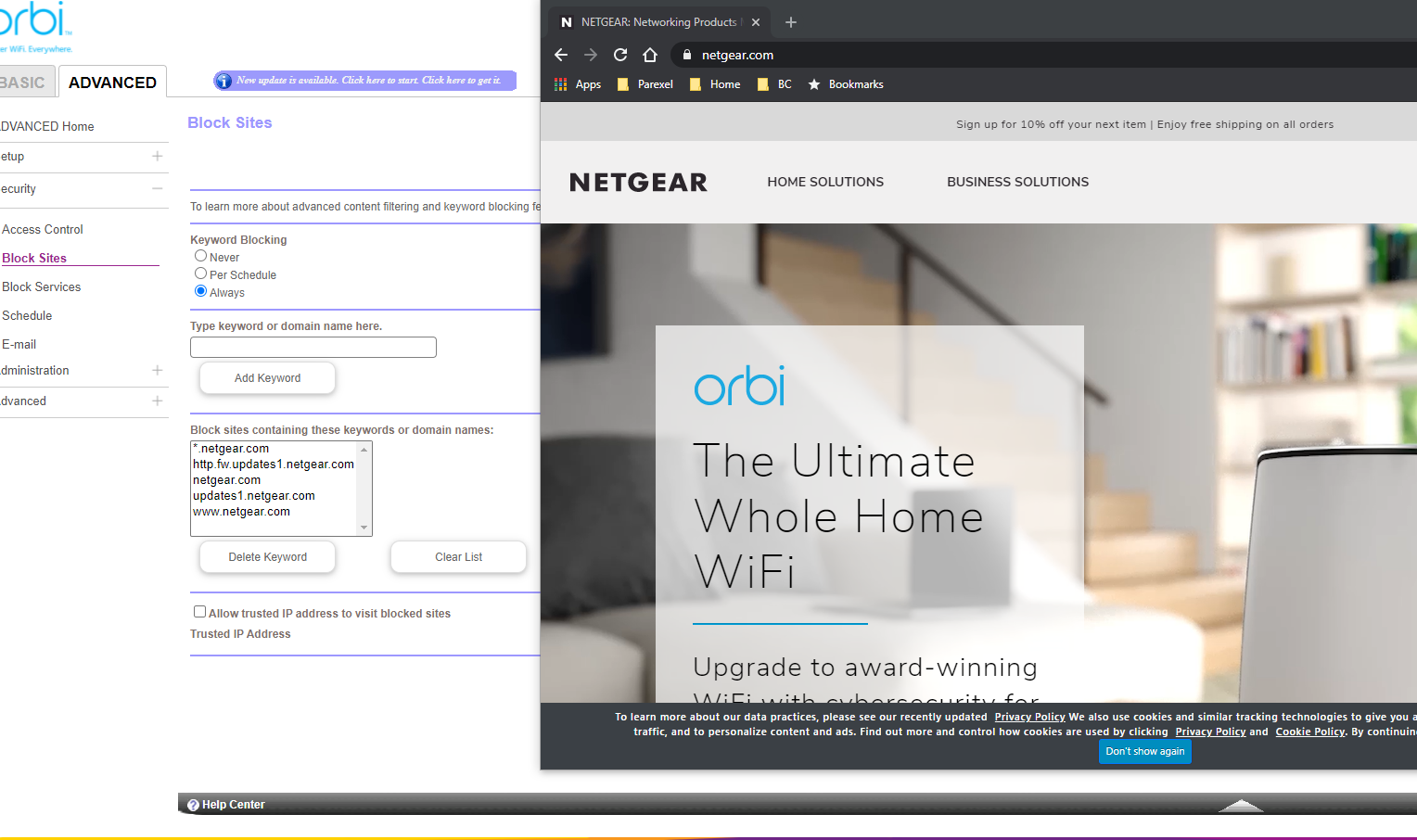
Block only the specific update addresses. Do not block netgear.com as a wild card or to there main site. Just try to block the update addresses to see if that prevents the system from updating. I believe I tried it once and tested it by checking for FW and the RBR displayed a message that "services were not available".
stsh wrote:Why am I not surprised?
FURRYe38 wrote:You can try the following to see if blocking the update services will work:
https://community.netgear.com/t5/Orbi/Firmware-auto-update-domain/m-p/1499659/highlight/true#M22873
stsh wrote:
FURRYe38 wrote:I think v25 was last version that you could enabletelnet and it worked. :smileyembarrassed:
guess what. You are correct.
This crap updated itself, most likely a few days ago. This might also be the reason I started having this upnp issue all of a sudden. In any case the dns change is most likely gone and the telnet access is also gone.
At the moment I only see one solution. Unplug the internet to block it from updating itself. Downgrade the router and ap. Enable telnet and change all the nvram parameters related to auto update to disabled. And then do the same as above.
It's just an untested idea but looks like too much pain to go through this. Might be easier to eat the cost and get a decent router from a different vendor.
- stshApr 22, 2021Star
I tried. Does not work. The screenshot demonstrates that even blocking netgear.com page does not work. They must have some sort of override for this domain.
- FURRYe38Apr 22, 2021Guru - Experienced User
Is that on older version of FW? If so, then I get they may have an override. Only other suggestion would be to put a different router in front of the RBR and block those addresses from that router. That would stop that I presume.
stsh wrote:I tried. Does not work. The screenshot demonstrates that even blocking netgear.com page does not work. They must have some sort of override for this domain.
- stshApr 22, 2021Star
FURRYe38 wrote:Is that on older version of FW? If so, then I get they may have an override. Only other suggestion would be to put a different router in front of the RBR and block those addresses from that router. That would stop that I presume.
stsh wrote:I tried. Does not work. The screenshot demonstrates that even blocking netgear.com page does not work. They must have some sort of override for this domain.
Yes, that's on the older version. apparently you cannot block anything netgear. I'm sure I could come up with some creative way to edit the hosts file or something via telnet but I'm getting really tired of messing with this junk. Adding another box in front of it just to block the updates so we can hack into it to solve a problem sounds like too much effort. Easier choice would be to add a small separate dns server inside the network and not rely on this router for dns at all.
- energieMay 05, 2021LuminaryJust to let everyone know. I switched on the Orbi AX with latest firmware. It still has the DNS error. Based on the whole 'turn on ip v6 to 4 tunnel' I tried that workaround too. That also does not work. Which is to be expected.
Conclusion. Netgear firmware / DNS resolving is still broken.
Only real solution is to ditch the Orbi AX in the bin or put it in to AP mode with a third party router in front of it. Which is the most economical solution if you cannot return the Orbi AX. - inZaniaMay 05, 2021Initiate
I am in shock. I have spent the last 4 months trying to debug frequent DNS resolution problems, exactly as described through this thread. I never suspected that the Orbi firmware itself was responsible; I had been running in circles debugging everything else, even building a PiHole to bring DNS lookup under my control. When that didn't solve the problem, I realized that the problem had to be with my RBR850, and ended up finding this thread.
We both run businesses from home and have this problem multiple times per DAY. NetGear's defective product has literally cost us thousands and thousands of dollars in lost productivity.
- msinexMay 05, 2021Apprentice
My new TP link wired router came in the mail today, going to shift the Orbi over to AP mode over the weekend and hopefully put this mess behind me. Will certainly be the last NetGear product I ever purchase.
- stshMay 06, 2021Star
inZania wrote:I am in shock. I have spent the last 4 months trying to debug frequent DNS resolution problems, exactly as described through this thread. I never suspected that the Orbi firmware itself was responsible; I had been running in circles debugging everything else, even building a PiHole to bring DNS lookup under my control. When that didn't solve the problem, I realized that the problem had to be with my RBR850, and ended up finding this thread.
We both run businesses from home and have this problem multiple times per DAY. NetGear's defective product has literally cost us thousands and thousands of dollars in lost productivity.
pihole definitely solves this problem. Or replacing the builtin router dns with any other functional dns server.
I've added one myself and it is working 100% without any issues.
If it didn't work for you - you must've done something wrong.