NETGEAR is aware of a growing number of phone and online scams. To learn how to stay safe click here.
Forum Discussion

Redlow
May 26, 2024Aspirant
Re: Major Firmware 7.2.6.31 issues
I am experiencing the same situation as you are on my RBR853. I am thinking of downloading 7.2.6.21 as I am out of ideas. (I was originally still on 4.x version, then upgraded a few weeks ago to 7.2...
Redlow
May 27, 2024Aspirant
FURRYe38 wrote:
Redlow wrote:Thanks FURRYe38
This size of home, the RBR and just 1 RBS would be and should be enough. IF you have two RBS deployed, try lowering the power on the RBR to 25% first.
FURRYe38
Am I able to lower the Router separately from the Satellites? Last time I tried reducing the power I pretty much lost all camera access completely (and I only choose 50%)
Also, I just now disabled the 6Hz Wifi on the Bell router as well just to eliminate the possibility this is a factor. It did seem to have a small effect on the signal -- I am fluctuating now between -20 dBm and -32/-37 dBm... regardless, still experiencing cameras dropping and streaming dropping, so although it improved it, it didn't resolve it 😑
Interesting though that the 6Ghz signal caused interference with the 2.4 Ghz signal.

FURRYe38
May 28, 2024Guru - Experienced User
So is yours taken with just the RBR alone and the RBS turned OFF as well along with ALL wifi disabled on the ISP router?
I put my 850 online yesterday and took this from just the RBR alone:
- RedlowMay 28, 2024Aspirant
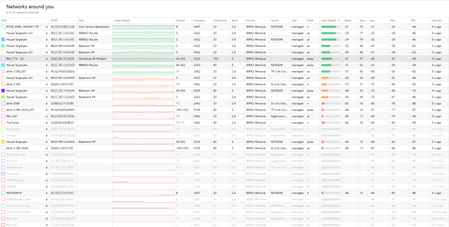
Hi FURRYe38 . I had tried just the RBR alone in the past, and it had made my home network unusable -- the cameras wouldn't connect at all. However, I just now disabled the satellites, and the signal has definitely improved compared to the last scan (see graphs). It isn't spiking to the low 40's, but it is still not as smooth as your results - yours have very little variance within the second, unlike mine which varies a lot within the second. That being said, my google cameras are working...
I will run it like this for a bit, but I am confused and/or bothered by a few things...
1) Why did it work on older firmware, but not this firmware.
2) The fact that I have disabled my satellites seems like a waste. I would want to use them. I would be unhappy if they just sit idle. I am concerned that my Orbi 853 isn't working as well as my Orbi 53 system did. I feel that we shouldn't have to disable the satellites, and every other Wifi signal nearby (including my Arlo cameras)
3) Considering the nature of Orbi, I would think it would be better at managing cross signal and power. I feel that my old Cisco Aironet access points would adjust power levels to accommodate other friendly signals. I would expect a similar setup for Orbi.
Thanks for all the help... I will leave it like this for now but I do feel that this isn't an ideal setup. I do feel there is a firmware issue that needs to be fixed as we shouldn't need to do this for such an expensive system -- it should make our network better not worse.
I will need to test turning my arlo cameras back on... tomorrow night.
Oh, how did you get Netspot into Dark mode?!?
- FURRYe38May 29, 2024Guru - Experienced User
Redlow wrote:
Hi FURRYe38 . I had tried just the RBR alone in the past, and it had made my home network unusable -- the cameras wouldn't connect at all. However, I just now disabled the satellites, and the signal has definitely improved compared to the last scan (see graphs). It isn't spiking to the low 40's, but it is still not as smooth as your results - yours have very little variance within the second, unlike mine which varies a lot within the second. That being said, my google cameras are working...
I will run it like this for a bit, but I am confused and/or bothered by a few things...
1) Why did it work on older firmware, but not this firmware. Possible something in the RBS or RBR FW. Would need to see same graph with NetSpot on prior version to compare. How was the RBS and RBR FW updated? Automatic? Manually? Update ALL?
Possible with the size if your home, placement and RBS deployed, with newer FW, may show that for the size of home, one RBR and just one RBS would be needed here. And you said your RBR is in the basement which will be a factor as well. Would be great if you can get this one the main level of the home and then recheck NetSpot.
2) The fact that I have disabled my satellites seems like a waste. I would want to use them. I would be unhappy if they just sit idle. I am concerned that my Orbi 853 isn't working as well as my Orbi 53 system did. I feel that we shouldn't have to disable the satellites, and every other Wifi signal nearby (including my Arlo cameras)
The disabling of the RBS was only to check NetSpot analysis only with the RBR, you can turn the RBS back ON. Might try just turning ON one RBS for now then run NetSpot again. I checked mine yesterday before I had to take the 850 series offline yesterday, I had one RBS online and connected and NetSpot showed similar graph with the one RBS as with just RBR alone. I didn't see any kind of drops like you have with yours.
3) Considering the nature of Orbi, I would think it would be better at managing cross signal and power. I feel that my old Cisco Aironet access points would adjust power levels to accommodate other friendly signals. I would expect a similar setup for Orbi.
Also again, size if home and placement is a factor. The RBR and just one RBS should be enough. And if you can get the RBR up to the main level and out from in the basement.
Thanks for all the help... I will leave it like this for now but I do feel that this isn't an ideal setup. I do feel there is a firmware issue that needs to be fixed as we shouldn't need to do this for such an expensive system -- it should make our network better not worse.
I will need to test turning my arlo cameras back on... tomorrow night.
Oh, how did you get Netspot into Dark mode?!? Mines from Apple Mac OS.
Are the dlink entries listed in netspot yours or someone else's?
- RedlowMay 29, 2024Aspirant
1) Why did it work on older firmware, but not this firmware. Possible something in the RBS or RBR FW. Would need to see same graph with NetSpot on prior version to compare. How was the RBS and RBR FW updated? Automatic? Manually? Update ALL?
I updated Manually. The update wasn't showing up as an automatic update.
And you said your RBR is in the basement which will be a factor as well. Would be great if you can get this one the main level of the home and then recheck NetSpot.
It used to be, but I ran a Cat 6 Cable to the basement and moved it to the main floor. It is now in the very middle of the house. The netspot charts all reflect the RBR in the middle of the house.
I had one RBS online and connected and NetSpot showed similar graph with the one RBS as with just RBR alone. I didn't see any kind of drops like you have with yours.
I wish I knew why this was happening. Overall, my RBK853 hasn't been as stable as my RBK53 was. I wonder if this is why.. it just got worse with the latest update. As mentioned, my google cameras are definitely working better now with all the other wifi signals disabled, and the satellites off. I will try soon to turn at least one satellite back on. My one second floor satellite is at the front of the house - technically very close to the cameras if you were to ignore the floors and walls. I wonder if I should move it further away 😐
Are the dlink entries listed in netspot yours or someone else's?
The d-link entries are my neighbors wifi. It was strong enough that I felt I would leave it on the graphs.