NETGEAR is aware of a growing number of phone and online scams. To learn how to stay safe click here.
Forum Discussion

KevinLiT
Aug 22, 2022NETGEAR Moderator
New - RBR750/RBS750 Firmware Version 4.6.9.11 Released
RBR750/RBS750 Firmware Version 4.6.9.11 Released
New Features:
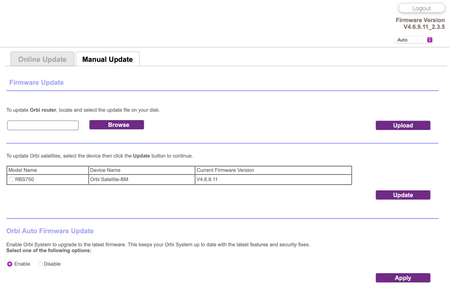
Adds an auto-firmware upgrade enable/disable option <Long awaited feature is FINALLY HERE!
https://kb.netgear.com/...

FURRYe38
Sep 28, 2022Guru - Experienced User
Does this happen with just the RBR alone while the RBS are turned OFF?
Is Wifi Private IP address enabled on the apple devices? Be sure to disable this feature while at home.
RockTheGlobe wrote:
I’m finding significant lag in this update on my RBK753 system, causing several seconds’ worth of hold when I try to access the Internet on my devices — once the connection is made, the page/app loads quickly, but getting to that connection is taking several seconds, like when I bring up the Apple App Store on my iDevices, I get a spinning wheel with “LOADING” for at least 6-10 seconds before the App Store presents. I had initially attributed it to the iOS and iPadOS updates I’d made, but I’m at my mother’s house using her Xfinity WiFi modem/router, and while her Internet speeds are half what I have at home, the response/load time is within 1-3 seconds.
I have a Motorola MB8600 cable modem at home, and yes, I’ve rebooted the modem several times and factory reset the Orbi system after installing this update.

RockTheGlobe
Sep 28, 2022Apprentice
FURRYe38 wrote:Does this happen with just the RBR alone while the RBS are turned OFF?
Is Wifi Private IP address enabled on the apple devices? Be sure to disable this feature while at home.
RockTheGlobe wrote:I’m finding significant lag in this update on my RBK753 system, causing several seconds’ worth of hold when I try to access the Internet on my devices — once the connection is made, the page/app loads quickly, but getting to that connection is taking several seconds, like when I bring up the Apple App Store on my iDevices, I get a spinning wheel with “LOADING” for at least 6-10 seconds before the App Store presents. I had initially attributed it to the iOS and iPadOS updates I’d made, but I’m at my mother’s house using her Xfinity WiFi modem/router, and while her Internet speeds are half what I have at home, the response/load time is within 1-3 seconds.
I have a Motorola MB8600 cable modem at home, and yes, I’ve rebooted the modem several times and factory reset the Orbi system after installing this update.
Yes, happens when the RBS satellites are unplugged and only the RBR is running.
Private WiFi addresses are turned off, but the lag remains.
- FURRYe38Sep 29, 2022Guru - Experienced User
How was the FW loaded on the RBR and RBS?
After the factory reset, how was the RBR configured? What additional Features did you enable or make changes too?
RockTheGlobe
Private WiFi addresses are turned off, but the lag remains.
- RockTheGlobeOct 02, 2022Apprentice
FURRYe38 wrote:How was the FW loaded on the RBR and RBS?
After the factory reset, how was the RBR configured? What additional Features did you enable or make changes too?
RockTheGlobe
Private WiFi addresses are turned off, but the lag remains.
Sorry for the delay in response, was down for a couple of days due to COVID booster dose.
FW was loaded on the RBR and RBS via web browser upload, connected by Ethernet at the time.
After the factory reset, I pretty much kept things as-is -- didn't even enable the Guest network. The only thing I did enable was dual-band 2.4GHz and 5GHz.
- FURRYe38Oct 02, 2022Guru - Experienced User
What version of FW had been loaded prior to v.11?
- RockTheGlobeOct 02, 2022Apprentice
FURRYe38 wrote:What version of FW had been loaded prior to v.11?
4.6.8.5
- FURRYe38Oct 02, 2022Guru - Experienced User
You might downgrade and report your findings.