NETGEAR is aware of a growing number of phone and online scams. To learn how to stay safe click here.
Forum Discussion

ReLFrEoD
Jan 26, 2024Aspirant
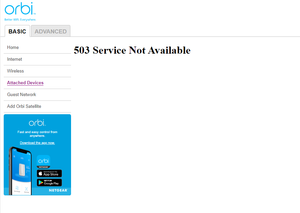
No longer showing attached devices after firmware updated to 7.2.6.21
Please help.

FURRYe38
Feb 06, 2024Guru - Experienced User
Was RBS updated prior to the RBR being updated?
Business or not, sometimes steps need to be taken to troubleshoot. Do it after business hours.
Not sure I'd be using a home class router system in a business of that size. Not really designed for business or that size of business.
If power cycling doesn't return the connected devices, a factory reset and setup from scratch maybe needed:
Should have a backup configuration on file as well to help save time if and when factory resets maybe needed:
https://kb.netgear.com/000062080/How-do-I-back-up-the-configuration-settings-on-my-Orbi-WiFi-System
ReLFrEoD
Feb 06, 2024Aspirant
Most of the RBS were updated before the RBR. I discovered after the fact that I had skipped one and had to update that one RBS after the RBR.
I did come in on a Saturday and had much better luck viewing the attached devices on the browser-based management. That brought me to the conclusion that user network traffic must be prioritized over network monitoring or management, and I must be reaching the outer limits of this equipment capabilities. (This was somewhat anticipated)
This equipment was only put in place to allow business to continue while the primary network is being repaired due to an outage. (New ISP fiber optic broadband and new equipment running alongside the primary network.)
I didn't mention before that half of the wired backhauls are fiber optic, due to the distances that are being covered.
PS. I can see the attached devices on the cell phone app.
PSS. I would love to see a network map on the desktop browser-based management GUI similar to the cell phone app.
