NETGEAR is aware of a growing number of phone and online scams. To learn how to stay safe click here.
Forum Discussion

AwkAndy
Nov 14, 2021Aspirant
Orbi RBK852 - Unable to connect Big Ass Fans - Haiku series
I've just switched from an Orbi RBR50 to an Orbi RBK852 to extend the reach of our mesh network. I had no problems connecting our Big Ass Haiku fans to the Orbi RBR50 but I'm unable to conne...
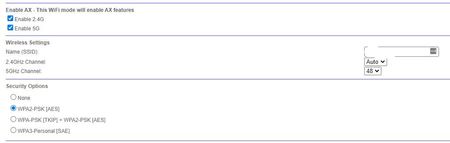
- Nov 15, 2021
Try CTS avalues to 2347 under Advanced Tab/Advanced Settings/Wireless Settings and see.

FURRYe38
Nov 15, 2021Guru - Experienced User
Use the same SSID name that you used on the older Orbi system on the new system.
Try disabling AX mode on 2.4Ghz.
Contact the devices mfr for additional help and support regarding there product.
AwkAndy
Nov 15, 2021Aspirant
Thanks for the advice. I have used the same SSID name and other devices on the network (iPads, Sonos) automatically connected. I had to reconnect a Ring device but that worked without a problem. I also tried disabling AX mode on 2.4Ghz but that didn't work. As for contacting Big Ass Fans (BAF), I tried that too but they came back with a proforma response that was completely useless (thanks for nothing BAF!). I have a feeling we'll be stuck with using the remote controls for the fans. Oh well, I suppose it's a first world problem.
- FURRYe38Nov 15, 2021Guru - Experienced User
Try CTS avalues to 2347 under Advanced Tab/Advanced Settings/Wireless Settings and see.
 sharmyNov 15, 2021Apprentice
Is your network SSID hidden?
In my environment, the Haiku fans only connected when the network SSID is being broadcast.
Sharmy
- AwkAndyNov 15, 2021Aspirant
Thanks for asking but no, it's not hidden.
- AwkAndyNov 15, 2021Aspirant
That did the trick. Thanks!
- FURRYe38Nov 15, 2021Guru - Experienced User
Orbi AX SSID by default is always broadcast and can not be hidden.
So did you get these devices working?