NETGEAR is aware of a growing number of phone and online scams. To learn how to stay safe click here.
Forum Discussion

AwkAndy
Nov 14, 2021Aspirant
Orbi RBK852 - Unable to connect Big Ass Fans - Haiku series
I've just switched from an Orbi RBR50 to an Orbi RBK852 to extend the reach of our mesh network. I had no problems connecting our Big Ass Haiku fans to the Orbi RBR50 but I'm unable to conne...
- Nov 15, 2021
Try CTS avalues to 2347 under Advanced Tab/Advanced Settings/Wireless Settings and see.

FURRYe38
Nov 16, 2021Guru - Experienced User
So what did you do to get them working?
AwkAndy
Nov 16, 2021Aspirant
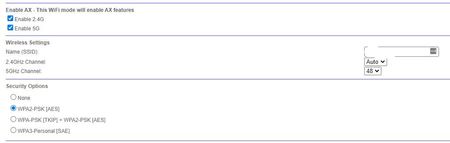
My apologies for not being clearer. After some experimentation, I've discovered that I can get the fans to connect if I disable AX mode on 2.4Ghz AND set the CTS value for 2.4Ghz to 2347. Either one by itself won't work. And it's a real pain because if you change either of those settings after you've managed to reconnect the fans, you have to go through the whole process again in order to connect the fans again. So once you've changed those settings, don't change them again!
- FURRYe38Nov 17, 2021Guru - Experienced User
Ok, thanks for the details. Be sure to save off a back up configuration to file for safe keeping. Saves time if a reset is needed.
https://kb.netgear.com/000062080/How-do-I-back-up-the-configuration-settings-on-my-Orbi-WiFi-System
Enjoy.