NETGEAR is aware of a growing number of phone and online scams. To learn how to stay safe click here.
Forum Discussion

AKLGUY
Feb 23, 2023Apprentice
RBK852 in Router Mode Internet Slows to 100MB up/down
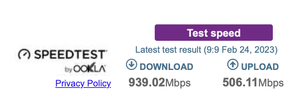
Hi team I have had the 852 for a while now always had it behind another router and in AP mode but I wanted to use the VPN function of the Orbi. So I changed to the Orbi set it up in Router Mode. Got...

FURRYe38
Feb 25, 2023Guru - Experienced User
As a comparison test, yes.

AKLGUY
Feb 26, 2023Apprentice
Will try this next time the speed drops to 100/100 seems to be stable at the moment
- FURRYe38Feb 27, 2023Guru - Experienced User
👍
- AKLGUYMar 11, 2023Apprentice
No, even when I disable the VPN service on the Orbi. at random times the speed still drops to 100/100
- CrimpOnMar 11, 2023Guru - Experienced User
The next time this happens, would it be convenient to record what appears on the
- Orbi web interface
- Advanced Tab
- WAN port in the "Show Statistics" box
Number just slightly under 100Mbps are highly suspicious. Often this indicates that the router and ISP device hardware has negotiated a speed of 100Mbps. See:
https://en.wikipedia.org/wiki/Autonegotiation100Mbps requires only two pairs of wire inside the Ethernet cable and 1000Mbps requires all four pairs. Not only do they have to be connected, they have to be connected correctly. For example, if the RJ45 plug is slightly loose in the RJ45 jack, it might be OK one minute and not OK another. Sometimes changing the cable fixes this.
Of course, if the speed drops to just slightly under 100Mbps and the Orbi continues to report that the speed is 1000Mbps/Full, then I have wasted your time.
