NETGEAR is aware of a growing number of phone and online scams. To learn how to stay safe click here.
Forum Discussion

christoepherr
Mar 31, 2022Tutor
Really at a loss? Self-Assigned IP with Ethernet
I'm really at a loss here and need some help. I'm not sure what happened or what I did. Will try and explain the best I can. I have CenturyLink Fiber Internet and was given a CX4000 modem/router....
christoepherr
Apr 01, 2022Tutor
When I contacted CenturyLink they gave me the PPoE and just said the VLAN is 3501. That was it.
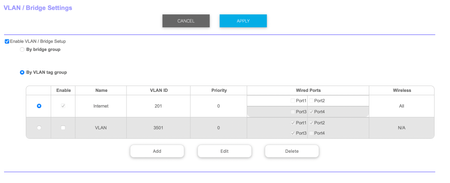
When I went to the Orbi router settings to setup VLAN everything I read online said to enable 201 and I did for all ports.
Then I added 3501 but it says I have to leave at least one port unchecked.
Same setup I had before and everything worked fine. I could connect my devices to the Ethernet jacks on the wall and received Internet. But after I did a reset of the Orbi router I just get Self Assigned IP from all the ports in my house.

Validus
Apr 01, 2022Luminary
I would suggest deleting both VLAN tag groups and setting up a new one. You probably just need the one, unless you are setting up a special internal network? If not, consider doing this. Note that this will temporary drop your Internet connection.
So you would want to:
Administration > Backup Settings > Save a Copy of Current Settings > Backup
Just incase you wish to go back to the settings you have now.
Advanced > VLAN / Bridge Settings
Tick the circle of each VLAN group and select Delete on them.
Enable VLAN / Bridge Setup again > By VLAN tag group
NAME: Internet
VLAN ID: 3501
Priority: 0
Wired Ports: All
Wireless: All
That appears to be what your ISP needs to connect to the Internet and will now be applied to all your network ports and Wifi.