NETGEAR is aware of a growing number of phone and online scams. To learn how to stay safe click here.
Forum Discussion

christoepherr
Apr 01, 2022Tutor
Really at a loss? Self-Assigned IP with Ethernet
I'm really at a loss here and need some help. I'm not sure what happened or what I did. Will try and explain the best I can. I have CenturyLink Fiber Internet and was given a CX4000 modem/router....

FURRYe38
Apr 01, 2022Guru - Experienced User
Hopefully they can find it.
christoepherr
Apr 01, 2022Tutor
I contacted CenturyLink and they just said VLAN settings should remain untagged. I asked what VLAN 3105 was for from the previous rep and they said that was for DSL. The blue Ethernet cable that's plugged into the WAN port of the RBR just goes directly to the ONT outside on the box on the side of my home.
- FURRYe38Apr 01, 2022Guru - Experienced User
I would power OFF the ONT and RBR for 1 minute. Then power ON the ONT. Then power ON the RBR. If no VLAN settings or PPPoE configurations are needed. Set DHCP for the Internet setup on the RBR and the RBR should connect to the ONT and show it's connected on the Basic tab and Advanced Tab under Internet section.
Make sure the cable line from the ONT to the inside patch panel is good. Can check this with a laptop at the plug in point from the ONT to the patch panel. Then check at the point were the cable would go in to the RBR.
- michaelkenwardApr 01, 2022Guru - Experienced User
christoepherr wrote:
The blue Ethernet cable that's plugged into the WAN port of the RBR just goes directly to the ONT outside on the box on the side of my home.
Finally, we have details about how you get the Internet. An ONT box.
Took some digging. We could have saved a lot of hassle with that detail earlier on.
Then we could have said that earlier talk of putting the "modem/router" into bridge mode was a red herring.
It might be good idea for Netgear to write a KnowledgeBase article that explains how to connect routers to an ONT. As this saga shows it can raise configuration issues that don't crop up with cable and DSL.
At one time Netgear had a KB article on the settings for different ISPs. It would be a good idea to revise that in light of newer ways of getting in to the Internet.
Good luck with tracking down the final details from your ISP.
- christoepherrApr 01, 2022Tutor
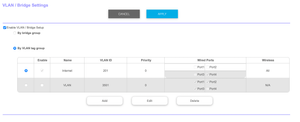
Sorry this is all new to me so forgive me for not explaining things correctly. I deleted the VLAN tagging and just re-enabled it for all ports with VLAN 201. The Ethernet jacks all work in the home now and issue has been resolved. Thanks all.
- FURRYe38Apr 01, 2022Guru - Experienced User
Glad you got it working. Please mark your thread as solved so others will know. Be sure to save off a back up configuration to file for safe keeping. Saves time if a reset is needed.
https://kb.netgear.com/000062080/How-do-I-back-up-the-configuration-settings-on-my-Orbi-WiFi-System
Enjoy. 📡
