NETGEAR is aware of a growing number of phone and online scams. To learn how to stay safe click here.
Forum Discussion

rdouma
Jul 03, 2022Guide
Satellite insists in connecting to router instead of wired satellite
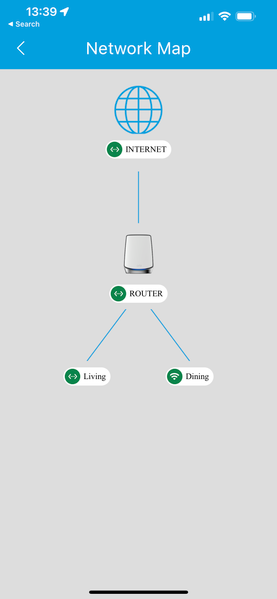
I have the following situation: The router is on the 1st floor. The Living and Dining satellites are on the ground level, so one floor lower. I have trouble having a decent backhaul when...

plemans
Jul 03, 2022Guru - Experienced User
It can daisy chain but it usually actually checks the connection itself to determine which will have better speed/stability.
Sadly its not something the end user can change as its all negotiated within its own settings.
- rdoumaJul 03, 2022Guide
When I have satellite Living as wireless it daisy chains. But when I improve the connection to Living using a cable it stops daisy chaining. So what I mean is, is that a bug? I cannot imagine it being a feature.
- plemansJul 03, 2022Guru - Experienced User
Not sure how it negotiates which it connects to as netgear doesn't advertise that.
If you turn the broadcast power down to 75%, does it impact which it connects to? Maybe you have them to close together.
- rdoumaJul 03, 2022Guide
The satellites are ~12 meters apart in a clear line of sight...Closer is impractical. Concerning lowering the power: it seems there is one global setting for that. That seems like something I wouldn't want, since the range of the wifi is one of the reasons I'm trying to get this to work... (there are devices connected to both satellites, among others Ring cameras outside).
