NETGEAR is aware of a growing number of phone and online scams. To learn how to stay safe click here.
Forum Discussion

scorn242
Oct 20, 2021Apprentice
Sites to block to prevent auto updates: 750 & 850 line.

FURRYe38
Oct 20, 2021Guru - Experienced User
Ok, same story here when I was testing this out on mine in AP mode. Reason for asking is that if I blocked:
http.fw.updates1.netgear.com and or updates1.netgear.com
This caused the RBR to loose internet connection entirely and the front LED to turn ON PINK. Which is why I asked you to see if yours is fully working with these being blocked. Possible there maybe some differences between v3 and v4 sites being used. :smileyfrustrated:
So looking at what others posted,
devcom.up.netgear.com
and
a1599er83nvyl8.iot.us-west-2.amazonaws.com
were being seen as well.
I just had someone test the decom only and it blocked the FW check, however the system still updated regardless. There checking to see if a1599er83nvyl8.iot.us-west-2.amazonaws.com maybe needed as well.
You mention pkgupdates.netgear.com which is new to us however could be the additional key in blocking fully any auto updates from happening.
Mines on v4 again and will check this out for sure.
Thank you for posting. Good info to have.

scorn242
Oct 20, 2021Apprentice
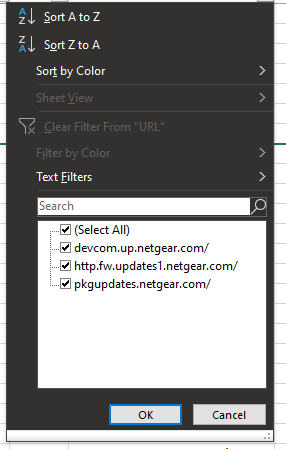
For what it's worth, with NG IP addy's being blocked on *.netgear.com instead of more specific URLs, the result on my end looks like the attached pic. I'll continue to harvest data to see (over time) if the list grows further.
Cheers.

- FURRYe38Oct 20, 2021Guru - Experienced User
Ok kewl. Ya I'm coverting host names to IPs.