NETGEAR is aware of a growing number of phone and online scams. To learn how to stay safe click here.
Forum Discussion

t0ny103
Apr 08, 2024Aspirant
unable to flash router in 960 mesh system
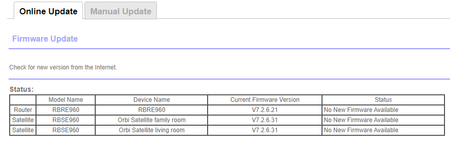
Anyone having this issue with not being able to flash the main router? I was able to flash the satellite's as instructed first, and now no option to update main router. Any advice?
- Apr 09, 2024
On the Manual Update page, the router update is "above the line". Browse to the location of the router firmware file and then upload it.
Satellites appear "below the line".


FURRYe38
Apr 08, 2024Guru - Experienced User
Download the v.31 RBR FW file to your PC, then use the manual tab and after the .zip file is unpacked, send the .chk file to the RBRs web page.
- t0ny103Apr 09, 2024AspirantI tried that and only the 2 satellites appear on the manual update. The main router does not show up on the manual update list as shown on the screenshot I posted.
It’s strange.- CrimpOnApr 09, 2024Guru - Experienced User
On the Manual Update page, the router update is "above the line". Browse to the location of the router firmware file and then upload it.
Satellites appear "below the line".
- t0ny103Apr 09, 2024Aspirant
It worked!! It gave me an error wen I tried this upload option yesterday.
- FURRYe38Apr 09, 2024Guru - Experienced User
Ya, seems odd, like the RBR serial number wasn't included in the AU system but the RBS serials were.
You'll be ok to manually update the RBR by downloading the RBR file and applying it using the manual tab there.