NETGEAR is aware of a growing number of phone and online scams. To learn how to stay safe click here.
Forum Discussion

vertering
Nov 05, 2024Tutor
WLAN backhaul incorrect
Hi, So my home setup consists of a ISP router/modem, for which I have disabled WiFi, a RBR763 connect with a CAT6a cable and RBS763 on the attic, to which my desktop is connected with a CAT6a cab...
vertering
Nov 11, 2024Tutor
Apologies, somehow my last post was not posted.
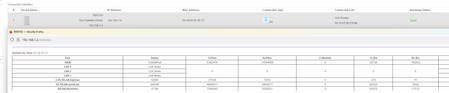
I did as you said, and got the following:
Whenever the attached devices show a 5ghz connection, the backhaul drops to 2.4ghz.
As for building materials: Satellite is placed directly above the router, so it only has to pass wooden floors. And no known military or weather stations nearby.

CrimpOn
Nov 11, 2024Guru - Experienced User
Thanks for posting the screen shot. This shows the WLAN Backhaul as 2401M. This means 2,401 megabits, i.e. 2.401 gigabits. This is the maximum 5GHz backhaul.
- verteringNov 11, 2024TutorYou're correct. It also shows the connection status as 2.4ghz. And again I did have connection speeds associated with 2.4ghz.
But asides from the connection speeds, this clearly seems like a bug in the GUI of Orbi.- CrimpOnNov 11, 2024Guru - Experienced User
If you observe the Show Statistics page over time and it changes back and forth from the 500M speed typical of 2.4G backhaul and the 2401M speed typical of 5G backhaul, that would tend to support the idea that "something is changing" about the environment.
- verteringNov 11, 2024Tutor
No, is does not switch back and forth, but that's also not the issue.
The main issue is that the "Show Statistics" screen and the "Attached Devices" screen show different connection types.
A new screenshot just taken now:
Statistics show a 2.4 ghz connection, while the attached devices show a 5 ghz connection. It's either 2.4 ghz or 5 ghz, so one of those pages does not correctly show the connection type.