NETGEAR is aware of a growing number of phone and online scams. To learn how to stay safe click here.
Forum Discussion

Roc1
May 28, 2024Luminary
Re: Slow upload speeds on router Speedtest
I installed my new 970 last Friday behind an ATT BGW320 Fiber Gateway (I have 5Gb internet service) and I’ve been experiencing the same issue. My download speeds will be 4500-4800MB, my uploads won’t ...
- Dec 28, 2024FURRYe38 , After the previous firmware update (not the update you just announced in the last few days) and after that previous software update, I removed one of my two 970 Satellites (per your suggestion) leaving me with two WiFi 7 mesh nodes in a 2000 sg ft home, the Orbi App speed test results (we ultimately had already traced the issue to faulty upload speed READINGS, not an actual slow upload speed THROUGH-PUT) now correctly reflects 4700-5100Mbps upload speeds with my ATT 5 fiber-gig service.
I’ll try to find your previous post and mark my issue as resolved. Thanks for all your suggestions and assistance!
Roc1
May 29, 2024Luminary
Is the mysterious IP you mentioned the 192.168.10.2? If so, that is the public IP address assigned by the ATT DHCP to the Orbi Router. I think that IP assignment is connected to the Orbi 10G INTERNET ONLY port. But, the Orbi also assigned the router (using its on DHCP) its own IP address of 192.168.1.1. I changed the ATT DHCP IP address starting assignment from 192.168.1.1 to 192.168.10.1 before I connected the Orbi router to the Gateway during initial setup. The ATT Gateway IP address is now 192.168.10.1. The ATT gateway then assigned 192,168.10.2 to the Orbi Router when it asked for one. But the Orbi router DHCP also assigned 192.168.1.1 (that’s why I changed the ATT gateway address list to assign 192.168.10.x IP’s) to itself. The interesting thing (but I’m no expert), I have to use the Orbi IP assignment from itself (192.168.1.1) to log into the GUI interface. But when I look at the ATT Gateway/modem Device List of assigned IP’s, it shows the Orbi router MAC address with IP of 192.168.10.2 as the only one of two devices connected (my laptop plugged into the gateway is the 2nd device I use to access the ATT GUI, it’s assigned 192.168.10.3). So to recap, the ATT Gateway has assigned three IP addresses: the ATT gateway assigned 192.168.10.1 to itself, it assigned the Orbi Router 192.168.10.2, and it assigned my “console” laptop 192.168.10.3 (when connected for configuring Gateway settings). I think when ATT started using the “newer” Nokia BGW320-500 gateway (only offering the Passthrough mode), and then ATT support was flooded with Netgear Customers insisting on help setting up a Netgear router behind the ATT gateway (which ATT wouldn’t do), Netgear then received the angry calls from ATT customers who purchased Netgear Routers demanding setup help, so late last year, Netgear made a business decision that it used less of their customer support time (I.e. saved them labor expenses) and so they started instructing support employee’s and NG documentation stating their routers MUST be configured as AP’s if the Gateway didn’t support Bridging (I.e. only supported Passthrough) and not as routers to all customers calling for router support on Passthroughs. For us who aren’t tech savvy, we don’t realize we overpaid for a device (Router in AP mode) with “restricted” features.

CrimpOn
May 29, 2024Guru - Experienced User
Roc1 wrote:
Is the mysterious IP you mentioned the 192.168.10.2? If so, that is the public IP address assigned by the ATT DHCP to the Orbi Router
Just to be clear, 192.168.anything is a private IP address (by definition).
https://en.wikipedia.org/wiki/Private_network
The forum is not privy to the reasoning behind Netgear decisions. (Plus, I have no personal experience with Tier 1 of Netgear support. As a general observation, I find that Tier 1 support from most companies is not particularly sophisticated.) My issue with this fixation on AP mode is those two Knowledge Base articles which clearly do not say "MUST be set to AP mode" plus the BGW320 User Manual which describes how Passthrough mode works on the BGW320.
It would "shut me up" if you could do the experiment:
- Put the Orbi in the default router mode.
- Connect the Orbi router to the BGW320 (and connect nothing else to the BGW320)
- Log into the BGW320 management.
- Set the BGW320 to Passthrough mode
- After the BGW320 reboots, reboot the Orbi router.
- Observe what IP address is showing on the Orbi router Advanced Tab in the Internet Port box.
If the Orbi does not get the public IP address which matches the public IP address that the BGW320 had, then these articles are wrong and "I got nothin".
- Roc1May 29, 2024LuminaryOk CrimpOn, I’ll do it so we can see if it does make a speed difference, not to shut you up!! My hesitation is that if the ATT Gateway or Orbi drops the current config, I’ll need your help to get me back up to at least the speeds I have now (you know how much I don’t know about networks, I’m really just another “old” pretty face! Give me a few minutes to get into “configuration”. mode. I might have a question or two getting into AP Mode after making so many previous changes, I might have question for you as I go along.
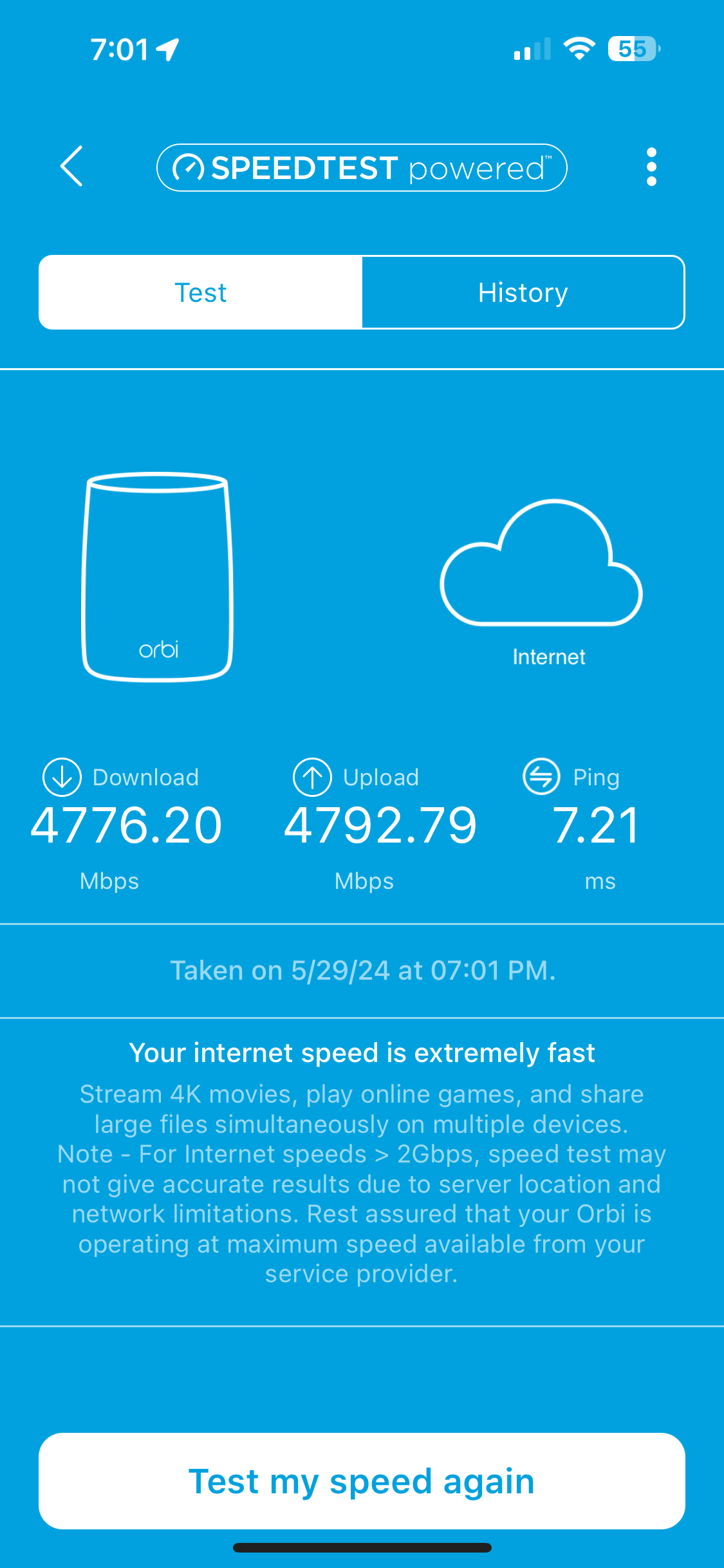
- Roc1May 29, 2024LuminaryCrimpOn, just to have a starting point, I just did the ORBi speed test. Take a look at the results.
- CrimpOnMay 29, 2024Guru - Experienced User
What 'mode' are the BGW320 and the Orbi in for this test?
(I think it's cute that the Orbi reports "extremely fast".)
- Roc1May 29, 2024LuminaryI’ve made no changes yet!! I ran an Orbi Spped test this morning which I just tried to attach, I’ve been saving them as png files which the file box says is acceptable. It shows it’s a png file, but the browse file thinks it’s some hec something file and knocks my reply off the community. The results with my existing config as ATT in pass through mode and Orbi in router mode gave me 4627.31 down, and 935.79 up at 9am this morning. You were just looking at the Orbi speed test results up/down close to 5Gbs!!! What the heck is going on???? It did this over the weekend for one day to. The Orbi Speed test on Sunday jumped up to the below attached speeds, but when I checked again Monday (no changes made!) they dropped back to the lower 1Gb on upload speeds and were low like that (per opening speed test) on Mon Tue, and at least until 9am today (Wed)!! What the heck is going on?!?!?
- Roc1May 29, 2024LuminaryBut that “extremely fast is a marketing lie!! If I could get my Orbi speed test from 9am this morning (4627 down and 935 up) to attach, it too says “Your internet speed is extremely fast” to!!! Sure they are, compared to my 1st internet service ADSL back in 1953!!!
- Roc1May 29, 2024LuminaryOk, I just did another internal Orbi speed test. Back down on upload right now (about 15-20 minutes after the attachment “extremely fast” test results in the reply I sent out a few posts below. Ok, it let me attach the current screen shot to this post.
- CrimpOnMay 29, 2024Guru - Experienced User
Roc1 wrote:
What the heck is going on?!?!?I can think of some potential causes.
- The most obvious answer is that AT&T's fiber performance is not constant. The only way to establish this would be to run the native AT&T speed test many times on the BGW320 itself and record the results. If AT&T's speed test varies like this, that points directly at AT&T.
- Another potential answer is that Orbi's included Ookla Speed Test software is picking servers at random and some of them simply do not support that absurdly high speed. This is one of the disappointments of the way Netgear configured the software. It does not report which server was used. Other versions of Ookla Speed Test allow the user to specify which server to use. The only way to test this would be to connect a computer to the router with an Ethernet adapter that supports 5 gigabit and run the actual Ookla app on the computer.
- Another goofy possibility is that there is some crazy incompatibility between the Ethernet port in the BGW320 and the Orbi Ethernet WAN port that causes it to switch speeds at random. That seems hard to imagine, and impossible to measure.
I feel compelled to point out the economic concept of "diminishing returns" in this investigation. My ISP upstream maximum is 12 megabits/sec, which is more than adequate. Unless there is a serious need to upload 100's of gigabytes of data regularly, whether the upstream capacity is 4 gigabits or 400 megabits is immaterial.
- Roc1May 29, 2024LuminaryOk CrimpOn, I’m going to start the “AP mode” re-config. I know enough about this tech crap, so you’ll have to help me. I’ve constricted my DHCP IP assignments in ATT gateway to just 4 IP’s, don’t I need to expand that back out first to .253 so all my devices can get an assigned IP from the ATT box when I put NG box in AP mode?
- CrimpOnMay 29, 2024Guru - Experienced User
Although an interesting experiment from a theoretical viewpoint, I am not certain that changing the Orbi to AP mode will result in much useful information. (I would spend more time documenting the AT&T BGW320 speed test reports.)
Yes, when the Orbi is in AP mode, every device will receive an IP address from the BGW320, so the BGW320's DHCP pool has to be large enough to supply every device that will be connected to the entire network. Probably not 253 devices total in the whole house.
Speed Test does not appear to be one of the features lost when in Access Point mode, so it will be interesting to see what happens.
- Roc1May 29, 2024LuminaryI’ve run the ATT test over the last 3+ years I’ve had the fiber Gateway plus two satellites. 95 % of the time up/down speeds are 4.5Gb or better. Occasionally during high traffic business week but even then, maybe 10% of time up/down speeds have never been below 3.5Gbs until I connected this Orbi and the ATT speed test uploads have dropped into the .5Gb range. And yes, you are correct about this old man. As an ATT retiree, the 5Gb internet reduced my employee cost/month by $20 over the 1Gb plan(?????), so I have 5Gb plan. I’ve upgrade all the wiring in this house with 10/40Gb fiber, Cat 8, DAC cables to stack the managed 10Gb switches deployed thru out the house. I don’t game, I turn Netflix on once every 2-3 months. I use Amazon and eBay occasionally, and Google frequently to ask questions about everything I don’t know or have forgotten. You are correct, I don’t need more than a fast DSL connection!! But, my Engineering degree, and, I still don’t accept that friends/family/doctor think I’m OCD, but thus, my drive to make this 5Gb connection work. I consider my revelation covered by HIPA, so this stays in the Community!!
- Roc1May 29, 2024LuminaryOk, I thought this happened a few days ago. I’ve already changed the ATT DHCP start and end address from the ATT default values .2-.253 to narrow (in case of a hack attempt?) to .2-.4, I’m on that page to change it back to .2-.253, that’s what it shows now!! ATT is running some program to change this setting back every time I update it! Some of these dramatic speed fluctuations might be caused by ATT fiber police!
- CrimpOnMay 29, 2024Guru - Experienced User
Maybe they don't like 253. Try 2-100.
- Roc1May 29, 2024LuminaryI’ve made changes to the ATT box, now I’m in Orbi Config. Should I turn off “Use Router as DHCP Server”?
- CrimpOnMay 29, 2024Guru - Experienced User
Yes. In AP mode the BGW320 will provide DHCP to every device. I think the entire LAN setup page "goes away" with AP mode.
- Roc1May 29, 2024Luminary253 was what it was before I lowered it. They use 192.168.1.254 as Gateway address, I changed it to 192.168.10.1. Oh yes, another question, should I change the 192.168.10.x on ATT box back to 192.168.1.x which is what it was before I changed it.
- Roc1May 29, 2024LuminaryOk, I haven’t gotten to the AP mode screen, but I’m sure you’re right. I’m going tab by tab.
- Roc1May 29, 2024LuminaryOk, when I turned Orbi DHCP off and “applied it” , it kicked me out of Orbi Config. I was logged in to an IP address the Orbi assigned (192.168.1.1) to itself. I tried the ATT IP assignment for the Orbi (192.168.10.2 ) to log back in. It logged me in, but I’m logged into 192.168.1.1 (the Orbi assigned IP, and it automatically re-populated the “Use Router as DHCP Server”. I apparently disregarded the warning after I “applied” the change and turned of the Orbi DHCP. The pop up says “182.168.1.1 says Please change your computer’s IP address manually if LAN IP subnet will be changed.” Is it talking about my laptop I’m using to connect to Orbi GUI? Where how do I change the laptop IP, or check the “subnet” change?
- Roc1May 29, 2024LuminaryOk, forget my last question, I went straight to AP page and selected it. The Orbi is now rebooting.
- Roc1May 29, 2024LuminaryOk, I got in a mess whe Orbi rebooted, it assigned IP’s from the ATT gateway pool which wasn’t enough for all the Orbi attached devices. I unplugged the Orbi, I’m back in the ATT gui trying to change the IP assignment from 192.168.10.x back to 192.168.1.1 and see if Orbi likes that better.
- FURRYe38May 29, 2024Guru - Experienced User
SO lets keep the ATT router at 192.168.10.1.
This will avoid any conflicts in IP addressing between the ATT router and the RBR which defaults to 192.168.1.1. Lets keep this simple.
Router mode on the RBR when connected to the ISP router, should get a 192.168.10.x address, this is fine.
When you configure the RBR for AP Mode, you can set a static IP address for the AP mode configuration, try 192.168.10.97.
Give 255.255.255.0 for subnet mask (Confirm with the ISP router that it uses this address for SNM.)Gateway configure 192.168.10.1 which the ISP router is the gateway.
DNS input 192.168.10.1 or use a custom DNS addresses for Cloudfare, quad9 or Google, your choice.
Apply the change on the RBRs web page. RBR should reboot. Keeping the 10GB WAN port connected to the ISP Routers LAN port there, I presume it has a 2.5, 5 or 10Gb LAN port on the ISP router? Connect the RBR here to the ISPs LAN ports.
After the RBR reboots, the front LED should turn OFF and any wired PC connected to the back of the RBRs LAN ports should have internet access now.
- Roc1May 29, 2024LuminaryCrimson, you’re the man!! I got in a big mess because of the ATT Gareway I made trying to get the Orbi to work in Router mode. I thought I changed everything manually back properly but I ended up resetting the Gateway. It took me a while to get the router connected back (the gateway assigned it a DHCP address of 192.168.1.66. The Orbi App on my WIFI couldn’t find the Orbi Router to connect. I went into the ATT gateway assigned 192.168.1.1 to the Orbi router (after the ATT reset changed the ATT router default back to 192.168.1.254. I also assigned the satellites the .2 and .3 IP addresses, and then I used the “Allocate” (basically made the DHCP static IP’s) so they won’t change at end of a normal DHCP lease. I had a bit of trouble getting one of my satellites to comeback on line, (remember, all my devices are wired), so I rebooted the Orbi several times and the rogue satellite accept the .3 “static IP” the ATT Gateway offered it and after all my other devices appeared in the Orbi APP, I did an Orbi App Speedtest (using internal Orbi “pass through” AP tester. I’ve attached (I hope it’s the correct file, I’m old and might have attached the incorrect one, at my age, there are no naked body part pictures, so don’t be concerned if it’s not the latest Speedtest results!) the results. Thanks for your help! Do you want me to check any settings for you on the Orbi “pass through” AP to verify if pass through mode is working exactly like Bridge mode? Let me know.
- Roc1May 29, 2024LuminaryFurry, see my latest post on the community addressed to crimson (dam iPhone auto correct!) which should have been ClampOn! I didn’t see your PM as I was busy trying to correct the mess I was in, but after I changed ATT back to 192.168.1.x and assigned .1 to Orbi, the Orbi App opened right up. I found the ATT DHCP assigned IP 192.168.1.67 but I didn’t know how to get into the Netgear App to make the IP change. Before I changed the Orbi into AP mode, its own DHCP server assigned it the 192.168.1.1 (even though before my AP change, the ATT gateway assigned the ORBI router an IP of 192.168.10.1, but I was never able to use that IP to log into Orbi GUI. That’s another reason I went ahead and reset ATT gateway so it would be using 192.168.1.x IP’s. Be safe.
- Roc1May 29, 2024LuminarySorry Crimson/ClampOn/CrimpOn!! Thanks for your help. Let me know if you want me to check any “AP” settings in the Orbi if you want to verify your thoughts that “Bridging” and “Passthrough” with AP mode were the same. Thanks again now since we proved your point, I guess you don’t have to stay quiet on the Community since you were correct!!
- Roc1May 29, 2024LuminaryWell Community, I give up! I just ran another Orbi Internal Speedtest so, changing from Router to AP mode fast up/down speeds didn’t work very long. I give up, my Orbi is possessed!
- FURRYe38May 29, 2024Guru - Experienced User
Something to let NG support know about with your support ticket and case #.