NETGEAR is aware of a growing number of phone and online scams. To learn how to stay safe click here.
Forum Discussion

Roc1
May 28, 2024Luminary
Re: Slow upload speeds on router Speedtest
I installed my new 970 last Friday behind an ATT BGW320 Fiber Gateway (I have 5Gb internet service) and I’ve been experiencing the same issue. My download speeds will be 4500-4800MB, my uploads won’t ...
- Dec 28, 2024FURRYe38 , After the previous firmware update (not the update you just announced in the last few days) and after that previous software update, I removed one of my two 970 Satellites (per your suggestion) leaving me with two WiFi 7 mesh nodes in a 2000 sg ft home, the Orbi App speed test results (we ultimately had already traced the issue to faulty upload speed READINGS, not an actual slow upload speed THROUGH-PUT) now correctly reflects 4700-5100Mbps upload speeds with my ATT 5 fiber-gig service.
I’ll try to find your previous post and mark my issue as resolved. Thanks for all your suggestions and assistance!
Roc1
May 29, 2024Luminary
My ATT fiber comes from outside into our utility room and down into the top what looks like a flat, blank cover for an electrical receptacle (it has a small outward bulge in the center of said beige colored cover apparently where the incoming exterior fiber cable connects directly to an interior white color sheathed unmarked thin cable that I assume is fire rated and is probably inside single mode duplex fiber) that exits the bottom of the blank cover screwed to my sheet rock. I feel certain this is a mechanical connection only, no electrical connections. The white fiber cable terminates in what looks like a Transceiver plugged into the back port on rear of ATT BGW 320 on the port labeled “SFP”. So all my ONT electronics are internal to the Gateway, so no way to connect ATT fiber (or electrical output from a ONT) directly to RJ45 only ports on the Orbi 971 router.
I don’t speak for the whole Community, but I’ve about decided their are packet collisions in NG router taking place on uploads that need a firmware update. But, without knowing how your ATT Gateway is actually configured, or how your Netgear Router is configured, I don’t know if yours is the same problem, but let me ask you to try something for us. If your Netgear Router has an internal (it’s probably Speedtest.net) speed checker, run a speed test and record up and down speeds. Then quickly go into the ATT Smarthome App, and run an internal speed test (ATT also uses Speedtest.net) through the ATT BGW320 Gateway. Record Up and down speeds. Then, with your Okla Speedtest.net App on your cell phone that’s connected to your Netgear WIFI (use fastest 5Mhz or 6Mhz WiFi band your router and cell phone supports) run a third speed test and record Up and down speeds as close together as you can (e.g. don’t run one of the 3 speed tests, wait an hour and run 2nd, etc). Also you didn’t mention if you’ve disabled the 2.4 and 5Mhz WiFi bands in the ATT gateway, but if you haven’t yet, do so before doing these 3 Speed tests. Also do you have the NG Router running in “Router” or Access Point” mode? What ATT fiber plan do you have, the 1GB, 2.5GB or the 5 GB internet speed plan (I might be wrong on the 2.5Mb plan offering). Do you have the ATT Gateway configured in “Passthrough” mode or not? Post the Speedtest device name (NG router, ATT BGW320, or Cellphone with which 5 or 6 MHz WiFi band you were connected to) with each Up/Down speeds. Include your answers to the router/AP/passthrough/plan-speed questions on this thread. Once you do that, I’ll have all the smart members analyze your input, I’m just the old dumb one! I hope you (and all of us in the community!) will be surprised at the variance in the results.
I don’t speak for the whole Community, but I’ve about decided their are packet collisions in NG router taking place on uploads that need a firmware update. But, without knowing how your ATT Gateway is actually configured, or how your Netgear Router is configured, I don’t know if yours is the same problem, but let me ask you to try something for us. If your Netgear Router has an internal (it’s probably Speedtest.net) speed checker, run a speed test and record up and down speeds. Then quickly go into the ATT Smarthome App, and run an internal speed test (ATT also uses Speedtest.net) through the ATT BGW320 Gateway. Record Up and down speeds. Then, with your Okla Speedtest.net App on your cell phone that’s connected to your Netgear WIFI (use fastest 5Mhz or 6Mhz WiFi band your router and cell phone supports) run a third speed test and record Up and down speeds as close together as you can (e.g. don’t run one of the 3 speed tests, wait an hour and run 2nd, etc). Also you didn’t mention if you’ve disabled the 2.4 and 5Mhz WiFi bands in the ATT gateway, but if you haven’t yet, do so before doing these 3 Speed tests. Also do you have the NG Router running in “Router” or Access Point” mode? What ATT fiber plan do you have, the 1GB, 2.5GB or the 5 GB internet speed plan (I might be wrong on the 2.5Mb plan offering). Do you have the ATT Gateway configured in “Passthrough” mode or not? Post the Speedtest device name (NG router, ATT BGW320, or Cellphone with which 5 or 6 MHz WiFi band you were connected to) with each Up/Down speeds. Include your answers to the router/AP/passthrough/plan-speed questions on this thread. Once you do that, I’ll have all the smart members analyze your input, I’m just the old dumb one! I hope you (and all of us in the community!) will be surprised at the variance in the results.
Roc1
May 29, 2024Luminary
Netgear Community, I did acknowledge that I was the old dumb one which you all feel I just confirmed for asking this non-Netgear “interloper” (I’m new to this Community stuff, we called them communes when I was growing up, but he won’t be able to see this post will he??) to provide us speed test data on his router/Gateway problem. He will have Speedtest data points for 2 of 3 issues our NG slow upload issue has in common with his. He will have ATT Gateway Speedtest data, he will also have Okla cell phone WiFi connection speed test data which we also have in common. And, it will be interesting what his router speed test provider results shows vs our NG routers). I do believe we have a potential NG router upload firmware issue, but we might also have a Speedtest difugalty issue going on as well. This might help us determine if it’s an Okla/ATT, Okla/NG, or Okla App speed test issue that might make our NG upload speed problem look worse than it really is. That’s why I asked for data from this “wolf-in-sheep’s clothing” for data points. After we get his Eero(spelling?) data, we can take him/her to “go swim with the fishes” to use a Sopranos line. And no, for you young kids (defined as under 60) on this topic, that line has nothing to do with music!
- Roc1May 30, 2024Luminary3 different OOKLA Speed tests this morning, Page 1/4 Results from IPhone Speed test app
- Roc1May 30, 2024Luminary3 different OOKLA Speed tests this morning, Page 2/4 Results from Orbi 971 Speed test option.
- Roc1May 30, 2024Luminary3 different OOKLA Speed tests this morning, Page 3/4, Results from ATT Gateway speed test to/from the Gateway.
- Roc1May 30, 2024Luminary3 different OOKLA Speed tests this morning, Page 4/4, Results from ATT Gateway speed test to/from my iPhone.
- Roc1May 30, 2024LuminaryCommunity, I spoke to the Gearhead tech group at Netgear. They updated my Case# with our AP/Router Test results from yesterday. I told them the Community feels some of this slow upload speed is firmware related, but there is also an issue with Speedtest.net and we spent over an hour this morning discussing the screen shots of my speed test results from 3 pieces of hardware (my iPhone, Netgear Orbi, ATT Fiber Gateway) all located within a 3’-8’ radius of each other. I attached the 4 pictures in my following 4 posts.
- FURRYe38May 30, 2024Guru - Experienced User
Ok, I'd keep in contact the NG support and thru the support ticket. This needs to be looked at by engineering.
In regards to AP mode, the RBR is configured for AP mode while connected to the ISP router with no IP-Pass thru enabled.
If you have the RBR in router mode, then when connected to the ISP router, IP Pass thru would be enabled.Be sure to update all information to your support ticket so NG has everything. Keep us updated on how it progresses.
- Roc1May 30, 2024LuminaryFurry, ok, I’ll go in to ATT Gateway and turn off Passthrough. I’ll update on speeds after I do.
I’ve been searching this morning for a way to contact Speedtest.net, they and Downdetector are owned by Ookla. I never knew the relationship. I never heard back from my “Contact Form” I submitted to Speedtest.net on Monday of this week. There contact process is bull-crap. They want your name, email, and phone number. Then you have 500 characters to explain your request. After that, when you hit the Submit bar, your information on the form disappears and you don’t get any message acknowledging you submitted anything! Just a blank form! So I filled out the second form asking if they received my first form. I hit submit, info disappeared, and I was looking at another blank form!! If I had another choice, I’d drop Speedtest for being so un-customer oriented. Their Support wants you to submit requests through your Speedtest Account. Ok, so there was a link to become a Speedtest Partner. I clicked it. The lowest tier for joining would allow you to add Speedtest capability on 100 of your servers with some maximum “hits per month”. It was something like $26,000 per year!! I might join for $50 or $100, but if we can’t verify how their product works and we have 3 devices using there product that says the Orbi router is pushing through 600-900Kbps upload, but a cell phone attached to that same router gets 2300Kbps uploading through the router that can handle 600-900Kbps upload, I think I have a few questions before I’ll join!! I found a telephone number for Ookla’s HQ in Seattle. Anyone up for a Roadtrip?!?!?
NG says they won’t close my support Case ticket until they contact me with their suggested resolution. I told the tech, if it takes a firmware update, the ticket could be open for several months!! She understood, or said she did. I’m sure they track how long their support tickets stay open. This ticket could cost somebody a quarterly bonus!! - FURRYe38May 30, 2024Guru - Experienced User
Basic default setting with the ISP router in router mode with ALL wifi disabled and the RBR in AP mode, no IP pass thru at the ISP router, should see constant results. Only item I'd take a look at is testing with a different Ooklas speed test service sites on there app to see if problem follows or not.
Basic default setting with ISP router in router mode with ALL wifi disabled and the RBR in router mode, using IP Pass thru at the ISP router, should see constant results. However possible there is a handling issued between the ISP router and Orbi router while in this configuration that NG and possible the ISP needs to look at but ISP will probably not since there unit is working up to that point. Too bad the ISP can't get you a fiber to ethernet converter unit so there gateway could be removed and the RBR put right behind the converter unit.
Keep all this updated with your support ticket.
- FURRYe38Jun 03, 2024Guru - Experienced User
FYI, new FW available:
- Roc1Jun 03, 2024LuminaryFurry, fyi, Orbi doesn’t (yet) give you “automatic” firmware upgrade capabilities to the latest V9.12.3.3 FW. I “manually” updated my firmware. All you seasoned NG experts know this, but there is a Satellite (970) upgrade and a Router (971) upgrade, both are zip files. When you unzip them on your pc those two files are .chk files (I’d never seen this file extension before, my pc screen file type said something about Disc Fragmentation File or something like that?!?!) Turns out, the Defrag disc process possibly creates files with this extension, BUT, google search also shows that NETGEAR uses this extension for firm ware upgrades. In both the 970 (satellite) and 971 (router) unzipped files, the 2nd included file (with the CHK files) are Release notes for the FW release, but they both have a file name showing 971. There is not a separate (nor does there need to be one) Release Notes file for the 970 Satellites. You don’t use this in the update process anyway. Manually, the firmware update process makes you update one-at-a-time. Updates complete in 3-4 mins, but it takes the Orbi App a bit longer to show the Satellites back online. After satellites, update the Router. Since the Router and Satelites have different IP and Web GUI’s, the update process will make you log in each time to each satellite, then into the Router to do the manual update, and when Router update finishes, the login for Router Web GUI will appear again. So as Fury advised this morning, you do need to log in multiple times. Ok, this first of 3 Posts, I’ve attached a file that shows I am running the new FW version in Router and both Satellites.
- Roc1Jun 03, 2024LuminarySorry Community, I attached the wrong file. The first attachment I sent is a screen shot of Orbi speed test results from yesterday. I’ll attach the firmware file to this post.
- FURRYe38Jun 03, 2024Guru - Experienced User
Glad you got it updated.
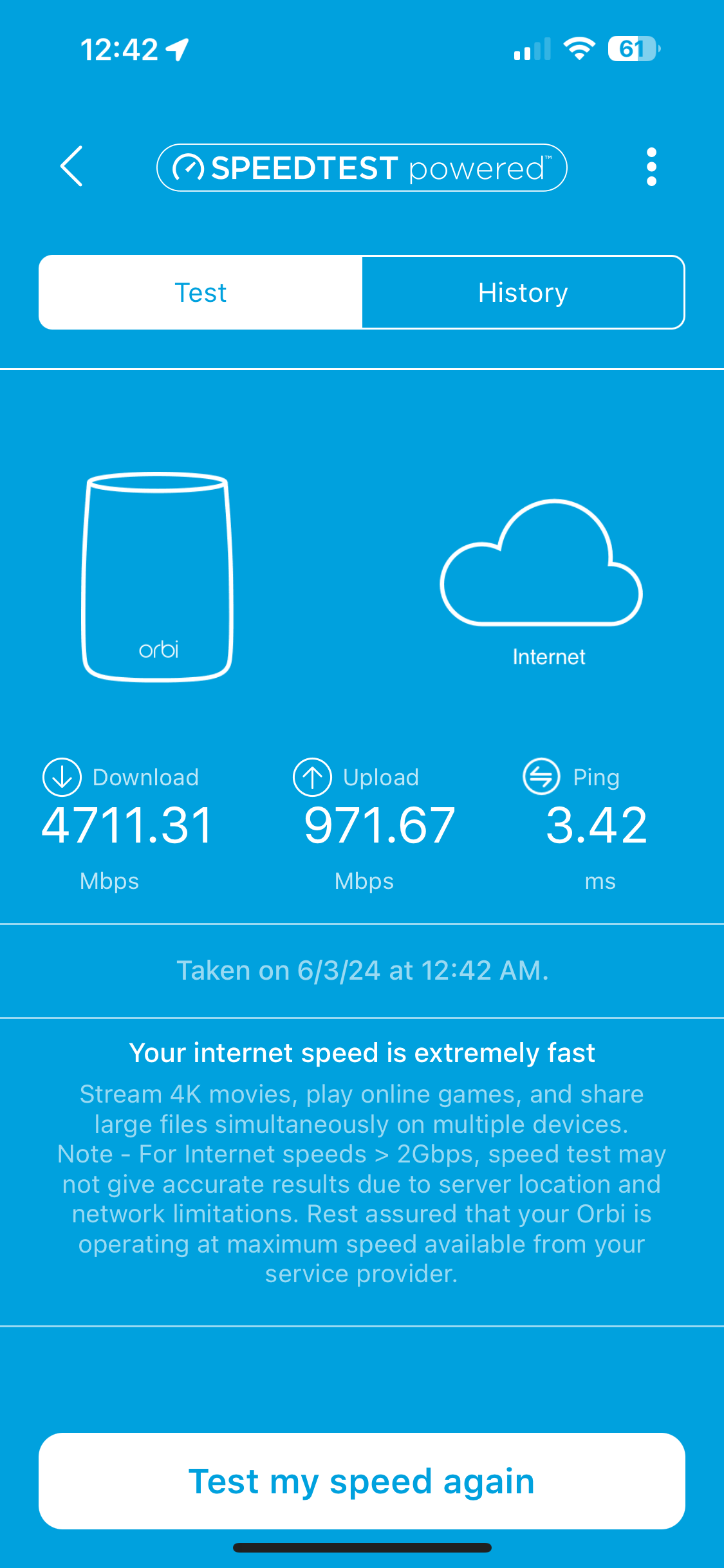
- Roc1Jun 03, 2024LuminaryOk Community, here’s the 3rd file. This is an Orbi speed test (remember, I’m currently operating the Orbi in AP mode) from after the 3 firmware updates completed earlier this afternoon.
- Roc1Jun 03, 2024LuminaryI was disappointed as there appears to be no “slow uplink” fix in this latest release. Currently, I am in AP mode. I’ll reconfigure my Orbi into Router mode, enable Passthrough on my ATT Gateway and run another Speedtest to see if the Uplink speed tests improved.
- FURRYe38Jun 03, 2024Guru - Experienced User
Whats the speed test results with a wired PC connected to the back of the RBR using Ooklas installable speed test app?
Also try this on your wireless device where you tested the Orbi app as well to compare results.
What device do you have Orbi app installed on?
- Roc1Jun 03, 2024LuminaryI always use my iPhone 15 Pro Max (6E) connected to 6Mhz band on Orbi 971 when I’m testing speeds. I’ll attach an ookla iPhone speed test connected to Orbi 971 in router after firmware update. But, these are the similar speeds that I’ve been getting on this app since I joined the Community a week ago (even when internal Orbi app showed slow speeds, and even when my internal ATT gateway showed slow upload speeds. I took this iPhone app speed test after I took the depressing internal Orbi slow upload picture I shared. This was at 5:30 pm CDT after FW upgrade and I went back to Router mode.
- Roc1Jun 03, 2024LuminaryFury, this will blow your mind. With my laptop I was connected to the Orbi Web GUI to save FW updates and do Orbi 971 and 970 manual FW updates. After I did the updates, I reconfigured my Orbi (with wired Web GUI attachment. In the 970 Web GUI in Router mode (not AP mode) there’s a “Speedtest” option listed. Since I was in the Web GUI anyway, I ran it at 6:30-ish. Here’s that screen shot
- FURRYe38Jun 03, 2024Guru - Experienced User
So we know the RBR speed test while in AP mode is working.
Iphone speed maybe different. Possible speed test app issue here on the Iphone.
Would now need to test router mode...
- Roc1Jun 03, 2024LuminaryI’ve been trying to send the 2nd test results I did from the Orbi Web GUI connected directly to my laptop 45 minutes after the last photo I posted. I’ve been getting “An unexpected error occurred” all 3 times I’ve tried to post it.
- FURRYe38Jun 04, 2024Guru - Experienced User
And this is while the RBR is in AP mode configuration with the ISP gateway?
- Roc1Jun 04, 2024LuminaryI finished reconfiguring back to Router/Pasthrough Mode about 6Pm yesterday. The two pictures that we screen shots of my laptop screen (it was connected directly to LAN port on Orbi in router mode). In Advanced/Advanced in Web GUI mode (I was connected with my laptop) the very first test had up/down speeds at almost 5Gb!! But 45 mins later, it was back down again to the last picture that took me hours to send to you last night. That “error” I kept receiving might be an issue with the FW upgrade. About 3 or 4 times yesterday, when I was connected to the WiFi Orbi router on my iPhone, I’d be speed testing, or reading emails, etc, normal daily iPhone usage, and frames would not load or be slow, or I’d get an error on speed test from my iPhone (ATT voice service rarely works inside my house, antenna to far away). I was very confused the first time it happened, but somehow the house WiFi dropped out, and I was on ATT cell service. I’d go into settings and reconnect to Orbi. This happened 3 or so more times, and I think my community message posting error was because I started typing post on house WiFi, it dropped out and cell service turned on. The browser let me finish typing (I’d attached the picture first while on WIFi, but I didn’t notice when I tried to Post, I’d lost WiFi and was in cell mode. That never happened the 3-years I was using my ATT Gateway and satellites.
With my ATT Gateway plus the 2 ea 1Gb Satellite configuration (WiFi 6, not 6E like Orbi), and with the new Orbi plus two Satellites (for the last almost two weeks) I’ve always had full house (4-bar) WiFi coverage inside house, out on front and back porch, and even when I leave the house as I’m driving up the street as the signal strength fades, but I’m still connected to the house WIFI).
The reason I know how far my WiFi reach goes is because I have the NG MR6550 5G Mobile Wireless Router with a 2x2 Mumo external antenna on my SUV that powers up when I start my truck. I have to wait till I’m probably 750-1000ft (depends on weather conditions) up the street before the house WiFi completely dies and the in-truck mobile WiFi starts (it’s WiFi 6E).
If I’m within about 500-750 ft of a Verizon (yes, I have to connect my ATT iPhone to a Verizon mobile router!!), I get right at 1GB up/down data speeds from that mobile router! ATT voice service doesn’t even work at our family property 30 miles East of Bham, or at my rural property 60 miles west of Bham.
Attachment is Speedtest using my iPhone connected to Orbi satellite (cable connected to Orbi router mode) I ran last night when I started cleaning up to go to bed. I also ran a speed test this morning from bedroom satellite using same testing config as last night, it’s close to same speeds as last night.
I’ll run the Ookla iPhone speed tests you want from Orbi later this morning with my laptop connected directly to Orbi port. - Roc1Jun 04, 2024LuminaryWell, my memory failed me In the Orbi Web GUI, select Advanced tab, then Setup, then look for Speed Test. Sorry. See attached pictures of my laptop screen.
- Roc1Jun 04, 2024LuminaryFurry, here’s a picture of Ookla app on my lap top. I’m limited to 1Gb on my Laptop and PC port so this is as good as my 5Gb internet service speed wise does on 1Gb network. Sorry, but notice, regardless of the actual speeds through the Ookla App (650-ish Mb speed on laptop connected to port on Orbi in Router mode, or my iPhone with WiFi 6E connected to Orbi in router mode via WiFi 7 with 1100-1400 speed range), on the Ookla App vs the NG App with internal Ookla speed test or ATT App with internal Ookla speed test), the Up/down speed results are very closely symmetrical??
- Roc1Jun 04, 2024LuminaryFurry, here’s the latest Web GUI Speed test on Orbi Router with my Laptop connected directly to Orbi LAN port
- Roc1Jun 04, 2024LuminaryFurry, here is latest ATT Gateway speed test. Look at Upload speed passing through the Gateway vs the up load speed to my iPhone WiFi 6E that uploads to my phone via the Orbi Router WiFi!!