NETGEAR is aware of a growing number of phone and online scams. To learn how to stay safe click here.
Forum Discussion

sysop
Apr 25, 2025Tutor
Re: Wired vs Wireless
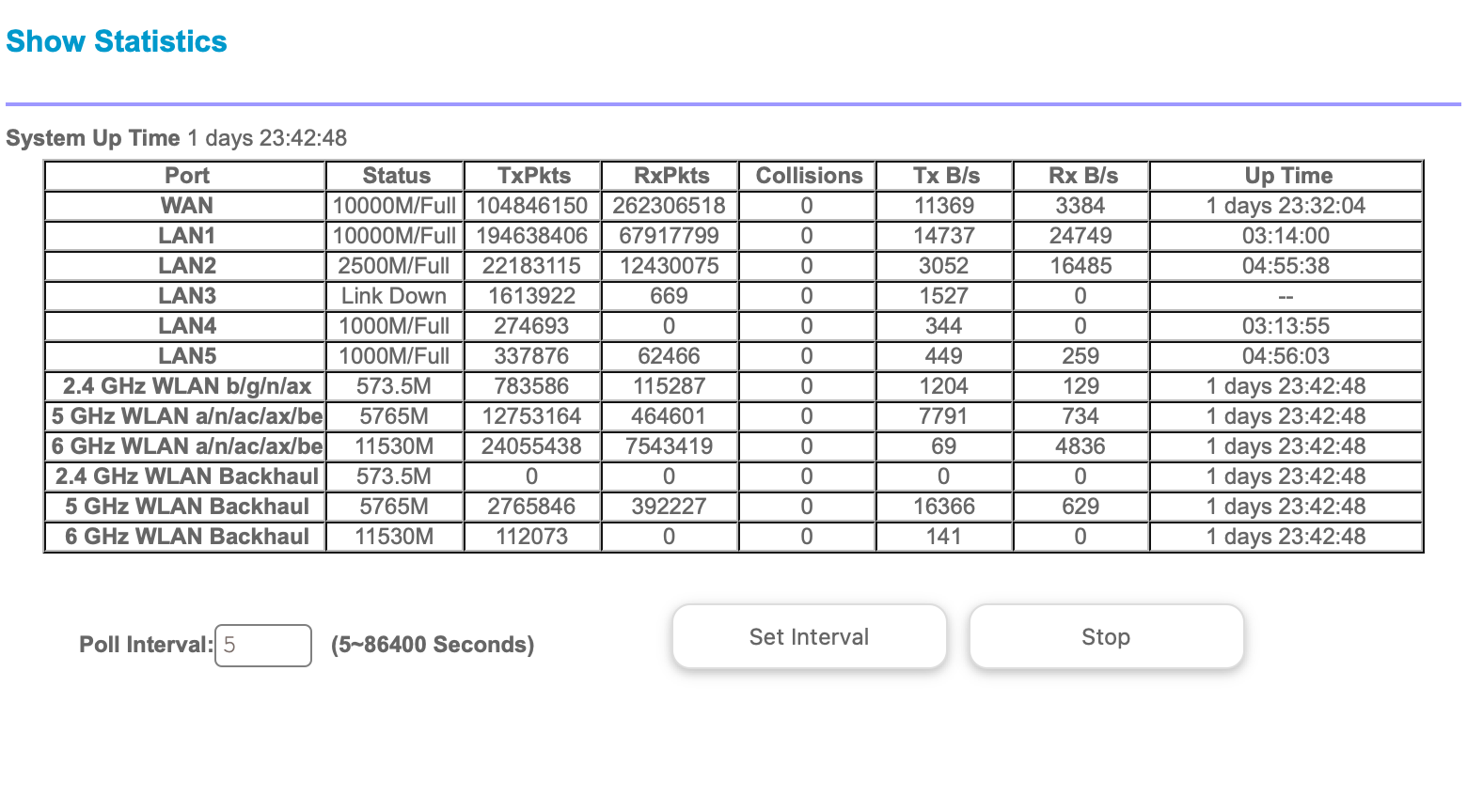
I have a wired backhaul running between the Router and one satellite. I have used a Cat6e, Cat7 and now on a Cat8 cable. 100' I get a faster wireless speed out of the satellite when the wired backhau...
 May 01, 2025
Getting there…It seems the more I do the better it gets. If they are wired backhaul you want to have them away the most you can from each other naturally. But at the same time placement is also a big thing for wireless. I guess I expected more than I am getting thru-put but yes, it’s getting better thanks,
These old houses beachside in Daytona are an issue. Built like a Faraday cage with chicken wire and real plaster. Good for hurricanes but not for RF. I have a satellite at a house I own across the street and just keep ready for friends and family if they want to come down. I get 244Mbps to a AppleTV over there, a ring camera and an Amazon plug over there!
But one in my house won’t go thru 3 walls here to my generator outside with over a 20% signal? Go figure. Now the app, it needs work. But I do like them and keep working on it! Not one to give up. I’ll know it inside and out when done. Thanks for asking and everyone’s suggestions.
sysop
Apr 26, 2025Tutor
It would help if the software was 100% correct as well. Half the time it says wireless things are wired and vise versa. I have never known and Apple watch, iPhone or iPad to have a network jack, but they will show up as wired at times.
Then at times I see 5 of the same things, (same mac address) still connected to a satellite after it's long gone and even shut off. It takes hours to fall off. I have seen as many as 7 on one as you move thru the house. For $1800 I see some issues. I get 2 gig off the router but not the rest of them. Guess it's time to start playing with channels, preamble and be a frequency hog with 40 mhz. Something has to give or I'm trying something else.
Thanks all for the suggestions and help.

donawalt
Apr 26, 2025Mentor - Experienced User
Hey sysop do you have IPv6 enabled on your router? By default it's off, many turn it on of course. The reason I ask, unless you need it for a specific purpose, is because I think IPv6 is a, or the, cause of the weird connection statuses in the router admin device list. On mine, it got so bad, EVERY device showed as wired to the router!
I disabled IPv6 just on the router. Believe me, it's not always working right on any late model apple mobile devices at least, anyway. If you disable it, and the reboot the router and satellites, I have a strong hunch the device list connection status issues will go away. You can probably live with this until hopefully the next FW update fixes it. I have not had an issue for weeks now.
- sysopApr 28, 2025Tutor
Thanks for the tip. I have turned off IP 6 as I don't need it. Didn't help but thanks anyway. I got tired of the system today and seeing great speeds on everything wired but slow on wireless. So got out my spec an and started in. I can see 3 Spectrum WIFI's nodes on poles in my office on channel 44, I'm on 40. So we are overlapping quite a bit. I can't go high enough to get away from them unless I go into DFS territory. Has anyone tried it with any success?
I'm Beachside in Daytona so I don't have any radar or anything (ocean to my east) here except for maybe when a band opening happens on 5G which is rarely. I just thought I may try going up to get away from Spectrum. I can be at 91% sig on mine and they are at 50% so I know they are causing some of this.
I don't want to shorten up the preamble with that kind of signal coming from them because it may cause packet issues. Thanks all....
- FURRYe38Apr 28, 2025Guru - Experienced User
try channel 36 on the RBR. thought maybe some signal noise, channel 40 and 44 shouldn't be to bad unless there area many sources that surround you.
Give DFS a try as well, can always go back to something else.
- sysopApr 30, 2025Tutor
I have come to the conclusion wifi on this model is not going to cut it. I can be 5-15' from the router or the same from a wired backhaul RBS and not get over 1500Mbps. Now my wired things are 2300 plus Mbps all day long.
The app is all over the place. Told me I didn't even have the bandwidth to run a test right out of the router this morning. Logged out and right back in and got almost 2500 thru the app. It's nuts.
I even took a Mac 6' from the router and moved it from wired to wireless and it drops down wireless to 1100 but is 2350 wired. I have changed about everything I can, been in this field 30 years and never been more frustrated with a product that cost $1800. I have scanned with my spec an to see what's out there (I see a lot) changed channels and to no avail.
Anyone tried Eero and had any luck? I'm open for suggestions at this point. Thanks everyone for the help but frustrated to the point I'm over it. I have even given up coverage and speed on WIFI in some spots over the Google system I had do to coverage.
- FURRYe38May 01, 2025Guru - Experienced User
Possible you may have a faulty system as well. Something to get with NG about and ask about an RMA, or get it returned, try another or go find something else. We don't make recommendations to other Mfrs.
Seems like your the only one having this issue so seems to point to something in your environment, configuration or a bad faulty system.
Good Luck.
 Mikey94025May 01, 2025Hero
sysop wrote:I have come to the conclusion wifi on this model is not going to cut it. I can be 5-15' from the router or the same from a wired backhaul RBS and not get over 1500Mbps. Now my wired things are 2300 plus Mbps all day long.
I would be cautious on what realistic wireless speeds you expect. The difference between realistic vs. theoretical is huge. Encryption, etc. also consumes some of the bandwidth. I think 1500Mbs on wireless sounds pretty good.
Search the web for realistic numbers people are seeing. With wi-fi 6 I don't believe you can reliably achieve over 1000Mbs. With wi-fi 7 (is you Mac wi-fi 7?) users "have seen over 1000Mbs": https://www.reddit.com/r/TpLink/comments/1gib41o/so_wifi_7_is_fast_huh_deco_be85/
- donawaltMay 01, 2025Mentor - Experienced User
Mikey94025 wrote:Search the web for realistic numbers people are seeing. With wi-fi 6 I don't believe you can reliably achieve over 1000Mbs. With wi-fi 7 (is you Mac wi-fi 7?) users "have seen over 1000Mbs": https://www.reddit.com/r/TpLink/comments/1gib41o/so_wifi_7_is_fast_huh_deco_be85/
FYI, I don't think there are any Macs that support WiFi 7 yet.
- FURRYe38May 01, 2025Guru - Experienced User
Actually you can see over 1000Mpbs on WiFi6. As long as you have something that supports 4x4 MIMO. Most devices are 2x2 which is more limited and ya, may not see over 1000Mpbs.
- sysopMay 01, 2025Tutor
My Mac is WIFI 6E so I guess I'm doing well with this attached. I guess I just lost some coverage I thought I would have and am overthinking the real world over what happens. Moved a printer on 5 to 2.4 as well.
Used to running 10gig microwave links and it better be there or better for the business I have been in for 30 years.
My spec ann helped me look around and move the channel to get away from Spectrum helped as well. They are saturating 5ghz here. Unreal. I'm still tweaking and getting it better. Thanks all.
- FURRYe38May 01, 2025Guru - Experienced User
So this system is working better with some configuration changes?
- sysopMay 01, 2025Tutor
Getting there…It seems the more I do the better it gets. If they are wired backhaul you want to have them away the most you can from each other naturally. But at the same time placement is also a big thing for wireless. I guess I expected more than I am getting thru-put but yes, it’s getting better thanks,
These old houses beachside in Daytona are an issue. Built like a Faraday cage with chicken wire and real plaster. Good for hurricanes but not for RF. I have a satellite at a house I own across the street and just keep ready for friends and family if they want to come down. I get 244Mbps to a AppleTV over there, a ring camera and an Amazon plug over there!
But one in my house won’t go thru 3 walls here to my generator outside with over a 20% signal? Go figure. Now the app, it needs work. But I do like them and keep working on it! Not one to give up. I’ll know it inside and out when done. Thanks for asking and everyone’s suggestions.