NETGEAR is aware of a growing number of phone and online scams. To learn how to stay safe click here.
Forum Discussion

donawalt
Aug 07, 2024Mentor - Experienced User
Several Bugs found in installing a Orbi 970 system
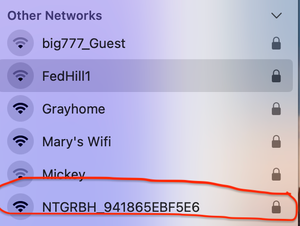
I just installed an Orbi 970 system, router and 2 satellites. I am on FW version 9.12.3.3. They went in place where a comparable Orbi 960 router and 2 satellites were. I set everything up by takin...

FURRYe38
Aug 08, 2024Guru - Experienced User
FYI, Static IPs are set ON devices that are OUTSIDE of a default IP address pool range. Should never be with in the pool range, those are set for IP address Reservations that are set ON the router, not the device. VPN isn't configured for this issue seen with current versions of iPhones.

CrimpOn
Aug 08, 2024Guru - Experienced User
FURRYe38 wrote:
FYI, Static IPs are set ON devices that are OUTSIDE of a default IP address pool range. Should never be with in the pool range, those are set for IP address Reservations that are set ON the router, not the device
Want to echo FURRYe38 comment on static IP. There are all sorts of situations when configuring devices with static IP address (subnet mask, gateway, DNS) can cause network issues. Such as:
- If the same IP address is configured on more than one device, which will lead to an ARP conflict.
- If the static IP address is assigned to some other device by the network DHCP server (Orbi router or whatever DHCP server is managing the network). Again, probably an ARP conflict.
- If the primary network subnet is changed, such as when the Orbi router is connected to a different router and automatically switches from 192.168.0.x to 10.0.0.x. Any device with a static IP in 192.168.0.x will immediately lose internet.
- donawaltAug 08, 2024Mentor - Experienced User
Thanks all. To address questions etc from Roc1 , CrimpOn , FURRYe38 :
1. My DHCP range is 192.168.1.2 - 192.168.1.150. Subnet is 255.255.255.0, router is 192.168.1.1.
2. I have a short list of static IP addressed devices, which Ikeep on a list - 8 of them. They start at 192.168.1.151. So I don't have any contention on static vs. automatic IP addresses.
3. Roc1 I do not use VPN, never have.
4. So far I have found the way to eliminate the WiFi flips to 5G completely on a RBR960 is turn off WiFi 6E. I did eventually get flips even after moving the one satellite. I am now on an Orbi 970 system, after I see it run for a few days to make sure everything is ok I am going to turn 6E back on and see if that router handles it properly.
 Roc1Aug 08, 2024Luminarydonawalt, thanks for providing me another router networking lesson! I finally understand your RBE/iPhone issue.
So, when I installed my RBE971 (it’s behind my ISP Gateway in Passthrough mode,) I elected to use 10.0.0.X as my RBE router’s DHCP IP format so I could reduce my confusion between the RBE and the ISP Gateway DHC pool of 192.168.1.X.
With that said, (I’ll have to look today when I get into the 971 Web GUI) I think I defined my RBE router DHCP pool of assignable IP’s as all 255 addresses, so I don’t currently have any “Private” (LAN) IPs outside my assignable pool like you do to see what my 971 does in a use case like yours to see how my router and iPhone 15 PM work (or not). I’ll check today.
As you can tell, I don’t feel comfortable doing many manual configs (the way you kept some LAN IP’s out of the assignable pool to use for static IP assignments). I never thought of that.
My Gateway (and the RBE 971) already had a config tab where I could “reserve” (I think that’s the word) LAN IP’s and make sure when their lease expired, those devices (and as I add devices, I add Lease reservations to that GUI config tab) would always be assigned the same LAN IP address.
I’m not sure if your “static” IP assignment is the better/preferred way of doing what I’ve tried to do with my Lease Reservations. Since you have 8 “static” LAN IP’s, you could try the Lease Reservation process I used as a work-around for the issue you are running into with 970 and iPhone since those 8 “static” LAN IP devices would then be using a DHCP pool IP?
I think I confused you, with another Community member who was doing something with a VPN. Also, not understanding Networking, I always thought, and associated “Static” IPs with VPN’s as I assumed (wrongly) that a VPN needed/used a “Static” IP. I also always associated Static IP’s with Public (WAN) assignments vs your Private LAN assignments. Sorry for my confusion.
On iPhone WiFi 6E setting, if you keep it turned off, your iPhone will never connect to the RBE with the newer (almost congestion free at this early band deployment stage) 6Ghz band, you will always connected with the 5Ghz band.
If you haven’t already tried this to see how a less congested channel might increase your 5Ghz WiFi speeds, I used the 971 GUI to select one of the new 5Ghz channels (outside the previous available range), but I understand enough about WiFi bands just to be dangerous. These 4 (or was it 5?) new channels are apparently still being used for non-WIFI users who were originally assigned those Channel frequencies by the FCC and they have not completed their move off those channels yet. There’s some verbiage I read somewhere that if you select one of those channels and it interferes with a non-WiFi user, (and I’m not sure how you know this, maybe the FCC Chairman knocks on your door??) either NG, (automatically changes you back into the original 5Ghz channel range??), or somehow you are notified and then you must go back into the 971web GUI and change your 5Ghz selected channel. Or, it might be as “simple” as, if you notice slower WiFi speeds using one of those channels, you will definitely want to change your selection.- donawaltAug 08, 2024Mentor - Experienced User
You don't have 2 different DHCp servers, the ISP Gateway and 971, do you? Bad idea if you do. You should change it to one or the other.
Static is different than reserved. I made static IP addresses because those units were making a lot of DHCP requests for IP, long before their lease expires. "DHCP flooding". Probably still happens, but the devices that did, I gave them static addresses. If they got reserved addresses, that just tells the DHCP server what IP address to give to them and no one else - it would not stop DHCP flooding. With static addresses the dhCP server doesn't even know the device exists. FYI I have my 2 satellites on reserved addresses, so I always know how to get to their status and debug pages.
BTW you can easily shrink your DHCP window from say, .2 to .254, over to .2 to .150, and make a lot of addresses available that you can statically assign if you want. Nothing bad happens, and if a DHCP device client has a IP address outside the new range, the next time its lease expires, it will get an IP in the new range. Nothing will break by doing this.
I know all about 6 vs 5 GHz, for the little speed I am giving up (I get up to 900 Mbps on WiFi 5 vs. 1100 on WiFi 6 on those 2 devices), I don't have the devices popping into 5G cellular as I move around the house - which is totally annoying lol.
Look up Dynamic Frequency Selection if you want to learn more about the DSP channels. It's a little more automated than you surmised!
