NETGEAR is aware of a growing number of phone and online scams. To learn how to stay safe click here.
Forum Discussion

OlaGarp
Apr 03, 2025Aspirant
Unable to install iPhone apps using Orbi RBE771
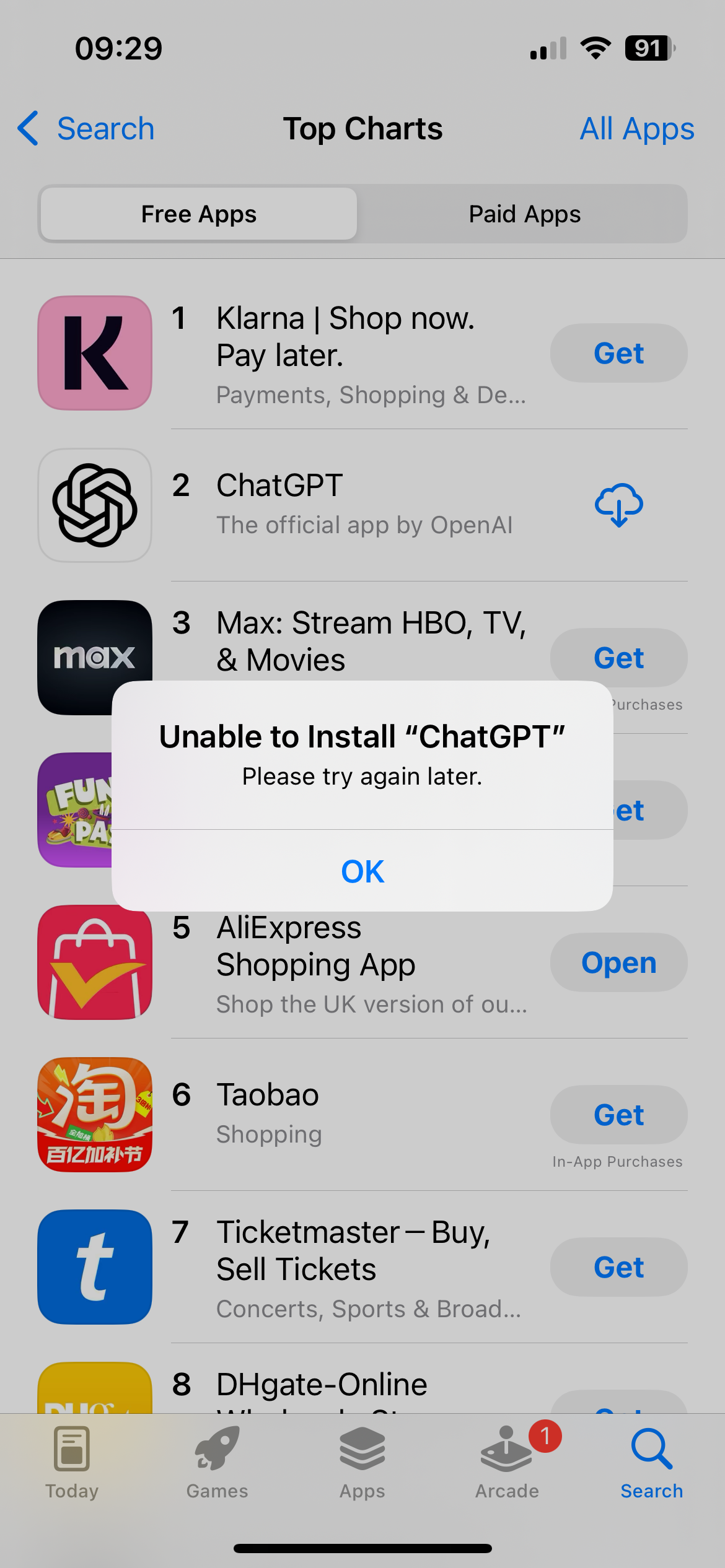
When connected to the RBE771 wifi, I'm unable to download and install iPhone apps. As soon as I turn the wifi off the mobile, the apps download and install. Appreciate any help Ola

FURRYe38
Apr 20, 2025Guru - Experienced User
Let us know if changing the DNS recourse helps. Try using Cloudfare or Quad9.
What is the Mfr and model# of the Internet Service Providers modem/ONT the NG router is connected too? Call up the ISP and ask them for this information.
Any of these enabled on the Orbi system?
Armor, IPv6, Smart Parental Controls or Circle, Traffic Meter.
Be sure to disable any MAC Address randomizers on phones and pads while at home:
https://community.netgear.com/t5/Orbi-App/NETGEAR-Mobile-Applications-and-Apple-Devices-FAQ/td-p/2220016/jump-to/first-unread-message

donawalt
Apr 20, 2025Mentor - Experienced User
I re-read the thread, and I don't see this - how exactly does the download fail - hang forever? error message? something else? And you didn't say, do all other internet actions work fine on WiFi except the apple store - browser works fine, mail, music, streaming, etc.?
- donawaltApr 20, 2025Mentor - Experienced User
OK I have been digging into this - so fun! I have a theory that I think may be the cause. I have a LONG explanation and a very short recommendation on how to fix it - which you can skip to if the details are too much to handle!
If I understand all my reading...
Apple distributes apps via a heavily load‑balanced content delivery network ("CDN"; for Apple, mostly Akamai), often preferring IPv6 endpoints and large HTTPS/QUIC transfers. Many—but not all—Akamai edges that serve .itunes.apple.com offer both A (IPv4) and AAAA (IPv6) dns query records. If your DNS query lands on one of those hosts, the resolver returns both addresses.
Some edge hostnames rotate to an IPv4‑only POP, so the resolver quite correctly returns an empty (NOERROR ∣ NODATA) AAAA answer and a normal A answer. That’s perfectly valid DNS; it just means “no IPv6 here right now.” CDN operators do this constantly as they shift traffic around the globe. I suspect your ISP does this.
Now, I see a number of threads over the years regarding bugs with the Netgear router's dnsmasq forwarder/cache (what receives and forwards dns queries from LAN clients) - not necessarily the 771, but could be there? I have also read that the RBE771 ships with a built-in DNS proxy that advertises IPv6 first, while I presume the R6300v2 router does not given its age - it may not even use IPv6 at all?
So my theory is this: a RBE771 bug lives in its dnsmasq forwarder - its 'dnsproxy'. When a domain has no IPv6 address (including no address 'at the moment' as I explained above), an upstream resolver correctly returns NOERROR / NODATA – that is, “the name exists, but the answer section is empty.” This is sometimes called an "empty AAAA query record". That response is standards‑compliant (RFC 2308) and is what you’ll see from any well‑behaved resolver, whether it’s your ISP, Google DNS, or Cloudflare. Nothing is “bad” or “broken” about it.
My alleged bug in the 771 router is that when it receives that paired response—A record plus an “empty” AAAA—it mis‑caches or mangles the two when it fuses them into its local cache. There have been hints of this in older firmware release notes.
So this mangled result is sent to the iPhone, which sees a malformed AAAA (or a garbled TTL) and, per RFC 6724, tries the IPv6 route first (iPhones always do). That route either doesn’t exist or points to nowhere, so the TCP handshake for the multi‑gigabyte app payload just hangs.
So to me, the workaround fix is one of two things - bypass the router's dnsproxy (which is mangling the AAAA query record), or get it to stop using IPv6 for dns queries (also eliminating AAAA records and their mangling).
Once this is understood, it makes sense - you see the bug on the Apple Store (and maybe it would show some other large CDN sites); it can still resolve apple.com and load normal websites (small objects over IPv4 without the rotating/load balancing of the large CDN sites) but stall on the multi‑gigabyte app packages downloaded from large CDN hosts. The moment you switch to cellular, both the router's dnsproxy and its IPv6 path to the ISP's DNS resolver are removed from the transaction. It works.
So please try this, in this order:
1. Point the router's DNS at 1.1.1.1 or 8.8.8.8 - the 771 router's dnsproxy will still rewrite the packet. If the bug is purely in the proxy's handling of empty AAAA replies, this should fix the hang. Why? Changing only the upstream DNS on the router fixes things because Google/Cloudflare almost never send the “empty AAAA + valid A” combination that causes the bug on the 771's dnsproxy rewrite, from what I have read. But it still relies on the proxy behaving, so it's not a guarantee this fixes it.
2. If it still hangs - disable IPv6 on the router and reboot it. Now the proxy can only return A records, so the iPhone never tries the using IPv6 for queries as they are no longer supported on the network.
You can also test by changing DNS on the iPhone to 1.1.1.1 or 8.8.8.8, and bypass the router entirely. This will accomplish the same thing as step 1 and 2 before you mess with the router. If it works, you can then make the proper changes on the router, or continue to use to local DNS 'fix' on each mobile device that needs it.
Please try this, it's simple to test - and let us know if it fixes the problem!
- donawaltApr 23, 2025Mentor - Experienced User
OlaGarp have you tried my suggestions in the prior post? Were you able to understand my explanation of this?
1. Point the router's DNS at 1.1.1.1 or 8.8.8.8 - the 771 router's dnsproxy will still rewrite the packet. If the bug is purely in the proxy's handling of empty AAAA replies, this should fix the hang. Why? Changing only the upstream DNS on the router fixes things because Google/Cloudflare almost never send the “empty AAAA + valid A” combination that causes the bug on the 771's dnsproxy rewrite, from what I have read. But it still relies on the proxy behaving, so it's not a guarantee this fixes it.
2. If it still hangs - disable IPv6 on the router and reboot it. Now the proxy can only return A records, so the iPhone never tries the using IPv6 for queries as they are no longer supported on the network.
- OlaGarpApr 23, 2025Aspirant
Hi
No prblem opeing and using the App Store app.
If I select an app, after authenticating, I get the Unable to Install "app name". The app icon is displayed with the "get app" symbol. If I tap the icon, it goes grey and the pie-chat progress starts but never finished. Below the icon it says Loading...
If I disconnect from the wifi, the app installed immediately.
As you might have seen, I resurrected my previous router and when connected to it, there are no issues.
Cheers
- OlaGarpApr 23, 2025Aspirant
Image 2
- OlaGarpApr 23, 2025Aspirant
Image 3
- OlaGarpApr 23, 2025Aspirant
Hi
IPv6 is already off.
Change DNS to 1.1.1.1 and that resolved the problem.
Will you report the bug the NetGear? I've run out of technical support.
Thanks
Ola
- FURRYe38Apr 23, 2025Guru - Experienced User
Changing DNS to a custom DNS service resolved the issue. This is a ISP DNS issue not a Orbi issue.
I had noticed something similar. I'm a beta tester for Apples OSX platforms. I noticed a few years ago, pre Orbi 970 series, that when beta builds would be posted, my mac book would attempt to download it, however, seemed to stall out soon after it started the download. Could not figure it out until I happened to change DNS from auto detected DNS on the router I was using back then to a custom DNS, and the builds started downloading correctly. Noticed this on other non Orbi routers as well. No idea why the ISP DNS would cause this.
Something you might ask the ISP about.
- OlaGarpApr 23, 2025Aspirant
How can it be an ISP issue when I successfully install app using my old NetGear R6300v2 with the same ISP settings including DNS?
- donawaltApr 23, 2025Mentor - Experienced User
Given the result that 1.1.1.1 worked, and the R6300v2 works, but RBE771 does not, I actually think it may be a bug in the 771 FW. Some more research:
Internode/TPG’s (@Olagarp's ISP) resolvers:
• DNSSEC-sign most Apple CDN zones and send back very large UDP packets (many > 1500 bytes).
• Set EDNS0 UDP size to 4096 and include extra options such as Client-Subnet.Cloudflare and Google resolvers, by contrast:
• Strip DNSSEC for unsigned zones (Apple’s CDNs are mostly unsigned).
• Cap the UDP payload to 1232 bytes (RFC 8900) and often omit EDNS-Client-Subnet.Large, option-rich answers force the RBE771’s dnsmasq to re-assemble fragments or fall back to TCP. In firmware 10.5.10.x that code path may have a bug, so the proxy sometimes mangles the packet and caches a broken record as I originally described.
A possible clue - the R6300V2 uses an older dnsmasq (2.76) in “forward-only” mode—no reassembling of these big packets with DNSSEC—so it simply forwards the big Internode answer to the client intact. The iPhone is happy with that.
Now, I think the 771's dnsmasq is newer (see below) - so, the IPv6 only solution didn't work because disabling IPv6 removes AAAA look-ups, but the bad packet is still large and still flows over UDP/53. The 771's dnsmasq trips before it ever considers whether the record is A or AAAA, so the hang persists. So the bug is some sort of mangling of the larger messages that's ewer than the FW dnsmasq version the R6300v2 has. It's not related to the AAAA messages as I originally surmised, but they are mangling the message to cause hangs, nonetheless.
Netgear's 771 has a newer version of dnsmasq. Netgear hasn’t published the version number in the GUI, but the GPL-source bundle for the first RBE770/771 firmware (10.5.10.x) contains the tarball /package/dnsmasq-2.85/. So I am guessing it's version 2.85, and has a bug, while the R6300V2 has version 2.76, older and simpler.
Just my 2 cents!
- FURRYe38Apr 23, 2025Guru - Experienced User
How the ISP, Apple and router handles the requests seems like. I've seen this on other routers as well with my ISP.
However, with ISP detected DNS with my Orbi systems. I've not seen my iPhone not able to get apps installed while using ISP detected DNS or custom. I test for both.
Also you have not given the actual model of the ISP modem or ONT your using?
Also what region are you located? - donawaltApr 23, 2025Mentor - Experienced User
OlaGarp I just thought of this....which if you can try this quickly, it could help NG sort this out if it's their issue
On your iPhone, set its DNS servers to your ISP server! That bypasses the 771 router entirely.
If that works, I think that's even stronger evidence it's a 771 issue, since the router is completely bypassed by iPhone going direct to the ISP's DNS server(s). If it doesn't work, that's two different devices (771 and iPhone), two different vendors, exhibiting the apple store problem with the ISP's DNS - placing the finger more at the ISP.
My bet - iPhone direct to ISP's DNS will work 🤔
- FURRYe38Apr 23, 2025Guru - Experienced User
Interesting theory about newer vs older DNS MASQs as well.
Also need to know there ISP Brand and model# of the modem/ONT as well to help check this.
- donawaltApr 28, 2025Mentor - Experienced User
OlaGarp , I hope that you can do this one small last test for us - it's really important, given your unique ISP configuration, because it will let us point Netgear to a definitive test confirming a FW problem if it pans out that way.
The test - which should only take a couple of minutes - set your iPhone up to use your ISP's DNS server(s). Then try to download and install an Apple Store app. If it works - there's enough evidence here, it's an Orbi FW bug, as this test bypasses the Orbi router entirely.
If it also fails - then the problem is on the ISP side, as Apple Store access will have failed both from the Orbi router and from an iPhone direct - two totally different device configurations.
Thanks OlaGarp !
- OlaGarpApr 30, 2025Aspirant
Hi
On my iPhone, changed the WiFi DNS from my Orbi router address to that provided by the ISP. Download an app.
Successfully installed.
Cheers
Ola
- FURRYe38Apr 30, 2025Guru - Experienced User
Need to know there ISP Brand and model# of the modem/ONT as well to help check this.
- donawaltApr 30, 2025Mentor - Experienced User
Thanks OlaGarp ! FURRYe38 IMHO that seems to lock that it's an Orbi router problem - maybe what I theorized. iPhone to ISP works with Apple Store, the R6300V2 uses an older dnsmasq (2.76) in “forward-only” mode, also works, the 771 with the newer v. 2.85 of dnsmasq dns proxy does not. That it works with 1.1.1.1 or 8.8.8.8 is explainable. I thin k the dns proxy is mangling the messages in v. 2.85.
Worth sending this thread to someone at NG FURRYe38 ?
- FURRYe38Apr 30, 2025Guru - Experienced User
Need to get ISP Modem/ONT model# info. But ya, they should open up a support ticket as well on there side. NG needs to know about this.