NETGEAR is aware of a growing number of phone and online scams. To learn how to stay safe click here.
Forum Discussion

Billy1956
May 23, 2024Aspirant
Wired Backhaul ?
I upgraded to the RBE 971 with 2 RBE 970. I have Ethernet Wall Outlets. Router plugged into Arris S33 Modem. Both Satellites plugged into Wall outlets and into Router 2.5 . Web UI shows Wired. Not su...

FURRYe38
May 23, 2024Guru - Experienced User
Looks like it if the RBS are connected to ports 2 and 3?
Yes one can use a MultiGig non managed switch in between the RBR and RBS. XS505M and GS110MX work great with the 9 series. MS105(2.5Gb Non managed)
CAT6A STP cabling is recommended.
- Billy1956May 23, 2024Aspirant
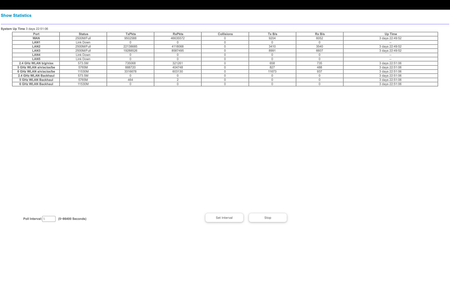
Thank You, Which switch would you recommend? can you tell if I am getting any backhaul at all now. The only thing I see
is in the 5g backhaul is 464 Txpkts and 2 Rxpkts. They have not changed since set up last Sunday.
- FURRYe38May 23, 2024Guru - Experienced User
Are the RBS connected to Ports 2 and 3 on the RBR?
Another way to check this is to log into the RBS web page and look at the large wifi icon there, if the RBS are ethernet connected, this icon will show as Gray.
Also log into the RBRs web page and look at the Connected Devices page. Were the RBS are listed, you'll see a connection status. This will show as "Wired" here if the RBS are ethernet connected.
- Billy1956May 23, 2024Aspirant
Yes the satellites are in ports 2 and 3. and say Wired in the web UI. Please bear with me I am not very Tech Savvy. So I should be looking at ports 2 and 3 TxPkts etc as the numbers for current backhaul and not the 3 last lines which spell out backhaul?