NETGEAR is aware of a growing number of phone and online scams. To learn how to stay safe click here.
Forum Discussion

mjz
Dec 31, 2019Apprentice
AX4 - RAX35 How to enable led "blinking"
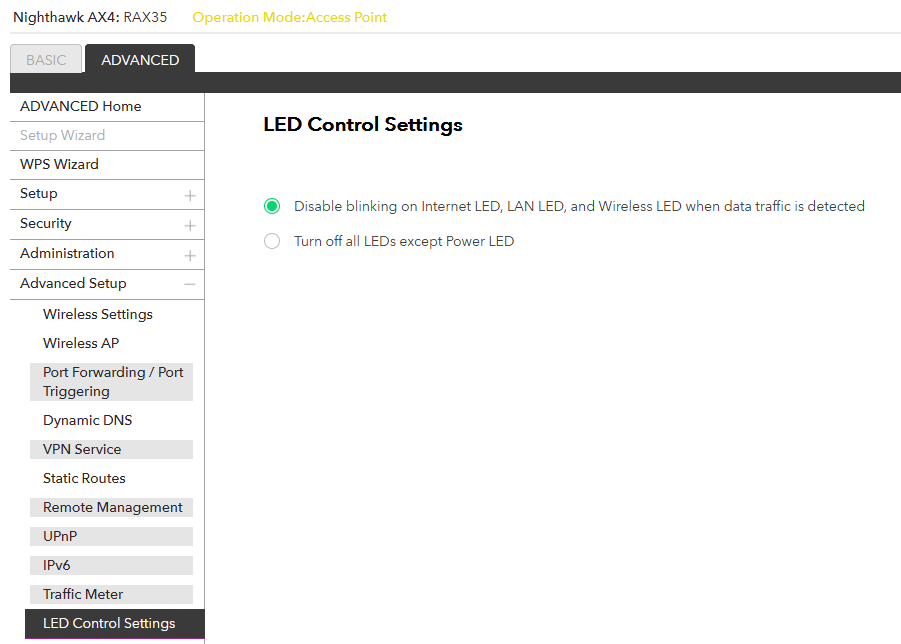
I tried setting the LED lights on my router to "enable blinking" to show traffic, but there is no such setting on this new router? There are only two options - turn off all leds or disable blinking....

Christian_R
Jan 02, 2020NETGEAR Employee Retired
Hello mjz,
Are any of the LED lights able to display any sort of blinking? Please refer to page 10 of the user manual for the LED descriptions.
http://www.downloads.netgear.com/files/GDC/RAX35/RAX35_UM_EN.pdf
Christian
- mjzJan 02, 2020Apprentice
Hi Christian,
No LED's are blinking even though I am sending traffice through the router.
LED's are 'lit' up showing that my wireless radio's (2.4 & 5.0 ghz) are on as well as power and Internet connection. All green.
Router is working, just no blinking is possible apparently. The web interface does not have a "enable blinking" option. I can only 'disable' blinking or turn off all LED's except power.
Strange ...
- mjzJan 02, 2020Apprentice
- mjzJan 02, 2020Apprentice
Click on link below to see screen shot of LED settings page:
https://www.dropbox.com/s/bfv7jhnlq3zrh0f/Capture.PNG?dl=0
- Christian_RJan 03, 2020NETGEAR Employee Retired
Mjz,
Thanks for providing a screenshot. I have sent you a message.
Christian
- mjzJan 03, 2020Apprentice
I replied to your message.
Interesting that there is no way to enable LED blinking.