NETGEAR is aware of a growing number of phone and online scams. To learn how to stay safe click here.
Forum Discussion

Cj877
Nov 05, 2021Aspirant
AX6 AX5200 Constant [Fraggle Attack] In Logs
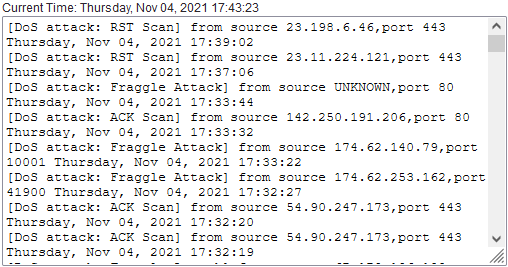
Hey so I've had my ISP out multiple times to help try and isolate a recent packet loss problem that has been reoccuring for the last month or 2 now. At first it would happen during the day and then s...

FURRYe38
Nov 07, 2021Guru - Experienced User
Some of the logs being seen on NG routers has been know to be false positives or just what the router is reporting. However id say get the ISP to replace the modem first thing, something with a broadcom chip set.
NGs CM1000 thru 2000 are all broadcom based.
They can change the IP address on the modem, they can do that at any time. Though they change it automatically, or if you keep the modem fully OFF maybe over night, this can trigger a new lease on the WAN IP.
SHow the tech these WHOIS entries...
Cj877
Nov 07, 2021Aspirant
FURRYe38 wrote:Some of the logs being seen on NG routers has been know to be false positives or just what the router is reporting. However id say get the ISP to replace the modem first thing, something with a broadcom chip set.
NGs CM1000 thru 2000 are all broadcom based.
They can change the IP address on the modem, they can do that at any time. Though they change it automatically, or if you keep the modem fully OFF maybe over night, this can trigger a new lease on the WAN IP.
SHow the tech these WHOIS entries...
Gotcha. They won't be replacing the modem. I will be returning the one I bought and doing the replacement myself. I will never use ISP given modems. I would like to mention this packet loss only appears during the day and stays clear around 11PM-11AM then it begins again. I have a forum group chat with xfinity support and they told me to contact CSA 'as this is a security issue' when i showed them the WHOIS entries. Their Supervisor Tech is set to visit this thursday as well since the last 2 couldn't isolate it.
- FURRYe38Nov 07, 2021Guru - Experienced User
Ok, check with the ISP to see what brand and model modems they support by users before you buy. Same here, I prefer my own modem.
Ok, seems like this problem is going higher than the ISP. Since this happens during the day and not might time, tells me something someone is activaly doing this during the day. Something you might try, power OFF the modem for as long as you can when this happens during the day.
I'd also power OFF as many devices you have connected as well...then power a device on 1 at a time while checking the router logs. Just checking to see if something from the WAN side is trying to access or ping someting on the LAN side. If you have time.
- Cj877Nov 07, 2021Aspirant
FURRYe38 wrote:Ok, check with the ISP to see what brand and model modems they support by users before you buy. Same here, I prefer my own modem.
Ok, seems like this problem is going higher than the ISP. Since this happens during the day and not might time, tells me something someone is activaly doing this during the day. Something you might try, power OFF the modem for as long as you can when this happens during the day.
I'd also power OFF as many devices you have connected as well...then power a device on 1 at a time while checking the router logs. Just checking to see if something from the WAN side is trying to access or ping someting on the LAN side. If you have time.
Ok I settled with the CM1000. I have it hooked up and I still am receiving the loss.
I have no blocked everything except my PC. I don't know if I can do the modem off all day with my family but for now I can mess with the devices since nobody is home. - Cj877Nov 07, 2021Aspirant
ALSO. For those time frames it can be completely random when it's good and bad BUT always in that time frame.. and during the day it's for sure the worst. Night time I can play with pretty much no interruption. Just to reclarify that.
- Cj877Nov 07, 2021Aspirant
No matter if its just my PC allowed to connect, the packet loss is still there. I noticed when it was only the PC allowed on there I get a [DoS attack: Fraggle Attack] from source UNKNOWN,port 58052 Sunday, Nov 07, 2021 15:47:29
- Cj877Nov 07, 2021Aspirant
Cj877 wrote:No matter if its just my PC allowed to connect, the packet loss is still there. I noticed when it was only the PC allowed on there I get a [DoS attack: Fraggle Attack] from source UNKNOWN,port 58052 Sunday, Nov 07, 2021 15:47:29
When I allowed my phone I received [DoS attack: Fraggle Attack] from source 174.-.-.-,port 58052 Sunday, Nov 07, 2021 15:55:04
i removed the IP for safety reasons but it comes back from comcast in the area of course. - Cj877Nov 08, 2021AspirantAs of 12:30 AM I have left the router and modem until I get home around 4PM CST today.
- Cj877Nov 08, 2021AspirantBoth unplugged*
- FURRYe38Nov 08, 2021Guru - Experienced User
👍
- Cj877Nov 08, 2021Aspirant
[Time synchronized with NTP server] Monday, Nov 08, 2021 14:42:10
[DoS attack: ACK Scan] from source 52.2.107.53,port 443 Monday, Nov 08, 2021 14:42:05
[DoS attack: Fraggle Attack] from source 174.62.224.178,port 47430 Monday, Nov 08, 2021 14:42:05
[DoS attack: RST Scan] from source 44.240.231.235,port 443 Monday, Nov 08, 2021 14:42:05
[Internet connected] IP address: 174.62.141.57, Monday, Nov 08, 2021 14:42:04
[DoS attack: Fraggle Attack] from source 174.62.140.79,port 10001 Monday, Nov 08, 2021 14:42:02
[DoS attack: Fraggle Attack] from source 174.62.140.32,port 2190 Monday, Nov 08, 2021 14:41:58
[Internet disconnected] Monday, Nov 08, 2021 14:41:33
[DoS attack: Fraggle Attack] from source UNKNOWN,port 2190 Monday, Nov 08, 2021 14:41:13
[DoS attack: Fraggle Attack] from source 98.46.9.128,port 2190 Monday, Nov 08, 2021 14:41:02
[DoS attack: Fraggle Attack] from source 174.62.252.244,port 10001 Monday, Nov 08, 2021 14:41:01
[admin login] from source 192.168.1.2, Monday, Nov 08, 2021 14:41:01
[DHCP IP: (192.168.1.4)] to MAC address 8A:87:CC:55:C9:50, Monday, Nov 08, 2021 14:40:52
[DoS attack: Fraggle Attack] from source 174.62.252.244,port 10001 Monday, Nov 08, 2021 14:40:30
[Internet connected] IP address: (MY IP), Monday, Nov 08, 2021 14:40:29
[DoS attack: Fraggle Attack] from source 174.62.140.79,port 10001 Monday, Nov 08, 2021 14:40:27
[DHCP IP: (192.168.1.3)] to MAC address 8C:85:80:8B:1F:AE, Monday, Nov 08, 2021 14:40:18
[DHCP IP: (192.168.1.2)] to MAC address 44:8A:5B:21:C8:40, Monday, Nov 08, 2021 14:40:11
[Internet disconnected] Monday, Nov 08, 2021 14:40:11
[Initialized, firmware version: V1.0.4.100_2.0.64] Monday, Nov 08, 2021 14:40:09