NETGEAR is aware of a growing number of phone and online scams. To learn how to stay safe click here.
Forum Discussion

LSarfati
Mar 21, 2024Tutor
Connecting LAX20 & RAX75 together
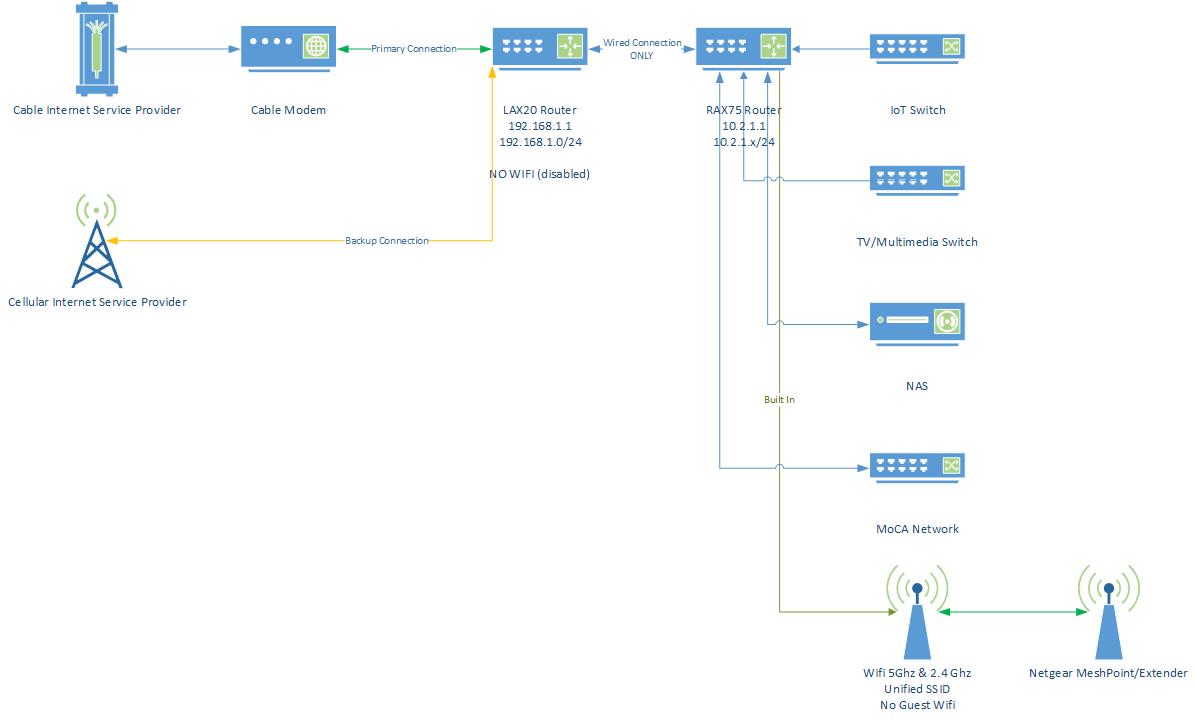
I'm wondering if this is possible... Cable Modem -> LAX20 (Since it can do both Cable Modem Connection & Cell) -> RAX75 -> Rest of network. Now, I plan on shutting off the WiFi on the LAX20, ...

FURRYe38
Mar 21, 2024Guru - Experienced User
I'd set the RAX75 for AP mode while leaving the LAX20 has you main host router:
https://kb.netgear.com/20927/How-do-I-change-my-NETGEAR-router-to-AP-mode
LSarfati
Mar 21, 2024Tutor
I would prefer NOT to do that, as I want all the WiFi to go through the RAX75 (More Channels). I have a huge network (over 64 devices) and want all communications between the 2 routers to be hardline, not WiFi. I also want to segment off the Core Network (which would be off the RAX75) from the DMZ Network (LAX20). The attached diagram may help to explain.
- FURRYe38Mar 22, 2024Guru - Experienced User
AP mode would be a hard line between the RAX and LAX router.
- LSarfatiMar 22, 2024Tutor
I think you may be missing a big part of this. I don't want a Flat Network; I want a tiered network with 2 DHCP Sources. One will be confined to a /28 (the 192.168.1.x Tier {DMZ} the LAX20), and the other will be shrunk to a /25 (The 10.2.1.x Tier {Secure} the RAX75).
Because I'll need 2 DHCP Servers (1 on each segment), I don't think Access Point (AP) mode will work. My understanding of how AP mode works in Netgear is that it turns off the AP Device's ability to issue DHCP. (I'd like it if the LAX20 supported LACP Aggregation on its ethernet ports so that I can utilize the LACP Uplink on the RAX75)
Now, Based on the drawing and what I asked for at the beginning, Will what I want to do work?
- FURRYe38Mar 22, 2024Guru - Experienced User
So you your looking at double NAT here: https://kb.netgear.com/30186/What-is-Double-NAT
Which should work then.