NETGEAR is aware of a growing number of phone and online scams. To learn how to stay safe click here.
Forum Discussion

SettingSun
Nov 21, 2024Aspirant
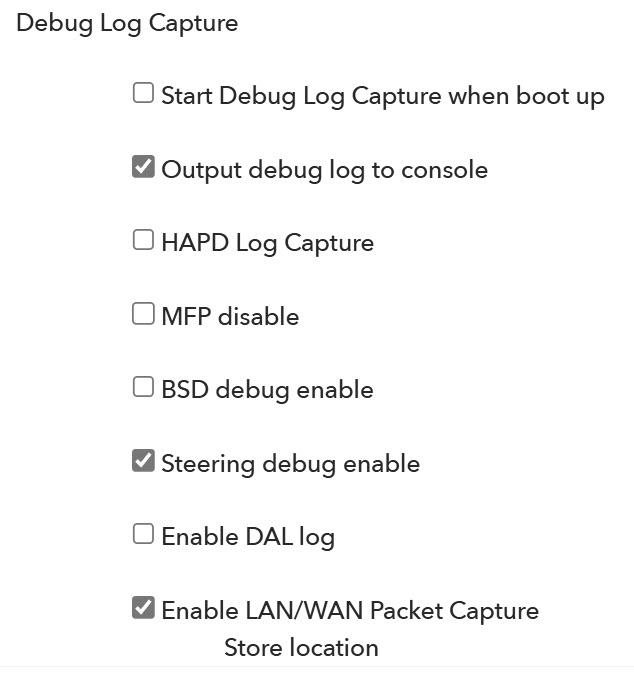
Debug Log settings
I have been unable to find any information on the following questions that I have on the debug selections available by using the debug console (192.168.1.1/debug.htm): 1. HAPD Log Capture 2. MFP Di...
SettingSun
Nov 25, 2024Aspirant
Yes, every other time that I had lost my internet connection to the router the Internet LED had turned amber. That is why I found it so unusual that I still had full internet access even though the light was amber.
I did power down both the modem as well as the router just to make sure that any connectivity issues would be reset. The light did turn back to its normal white once everything had gone through its power up cycle.
I had done a factory reset and setup. This did not stop the periodic loss of internet connectivity by the router.
Has anyone successfully used the debug.htm GUI to review the router logs? Can anyone shed any insight in what the settings are for?

FURRYe38
Nov 25, 2024Guru - Experienced User
Might keep an eye on this and if the Internet LED turns amber again, may need to have the ISP check the ISP side of the service and up to the modem.
Swap LAN cables between the modem and router. CAT6 UTP is recommended.
Might try using the multi gig port as the WAN port to see if this exhibits the same thing.