NETGEAR is aware of a growing number of phone and online scams. To learn how to stay safe click here.
Forum Discussion

XliteChase
Nov 11, 2021Aspirant
Hourly disconnections - RAX45 (Every 60 minutes exactly)
Router model: Night Hawk AX4300 Issue: For the past two weeks, every60 minutes, my connection will drop for 15-20 seconds, then restablish without issue and maintain without drops for 60 minut...

FURRYe38
Nov 11, 2021Guru - Experienced User
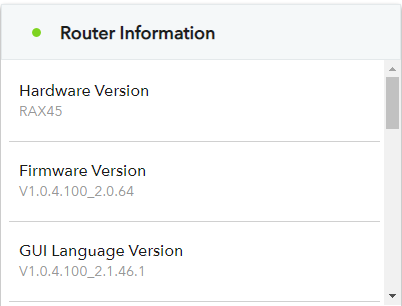
What Firmware version is currently loaded?
What is the Mfr and model# of the Internet Service Providers modem/ONT the NG router is connected too?
Are there LED indications seen when this happens on the router?
Is Armor, Access Controls or Traffic Meter enabled?
Is DST set correctly for your time zone?
Any Wifi Neighbors near by? If so, how many?
XliteChase
Nov 11, 2021Aspirant
What Firmware version is currently loaded?
A: V1.0.4.100_2.0.64 (Confirmed most up to date my GearHead support)
What is the Mfr and model# of the Internet Service Providers modem/ONT the NG router is connected too?
A: The ISP is Hargray, I live in an apartment that is pre-wired so I do not have access to the providers Modem. I did check the service room connected to my apartment, and only found a fiber splitter box.
Are there LED indications seen when this happens on the router?
A: Will check next hour when it occurs again and update accordinly.
Is Armor, Access Controls or Traffic Meter enabled?
A: Armor is enabled, access control is not on, Traffic meter is not on
Is DST set correctly for your time zone?
A: Yes, the current time shown is correct.
Any Wifi Neighbors near by? If so, how many?
A: There's only 5 total networks in range, 2 of which are mine, 2 of the others are one persons 5ghz and 2.4ghz network.
- FURRYe38Nov 11, 2021Guru - Experienced User
XliteChase wrote:
What Firmware version is currently loaded?
A: V1.0.4.100_2.0.64 (Confirmed most up to date my GearHead support)
What is the Mfr and model# of the Internet Service Providers modem/ONT the NG router is connected too?A: The ISP is Hargray, I live in an apartment that is pre-wired so I do not have access to the providers Modem. I did check the service room connected to my apartment, and only found a fiber splitter box.
Are there LED indications seen when this happens on the router?
A: Will check next hour when it occurs again and update accordinly.
Is Armor, Access Controls or Traffic Meter enabled?
A: Armor is enabled, access control is not on, Traffic meter is not on
I would disable Armor to see if this problem still happens. This may take a full on factory reset and setup from scratch with out enabling Armor.
Is DST set correctly for your time zone?
A: Yes, the current time shown is correct.
Any Wifi Neighbors near by? If so, how many?
A: There's only 5 total networks in range, 2 of which are mine, 2 of the others are one persons 5ghz and 2.4ghz network.