NETGEAR is aware of a growing number of phone and online scams. To learn how to stay safe click here.
Forum Discussion

cybot
Nov 10, 2022Luminary
IPv6 6to4 tunnel option broken? RAXE500
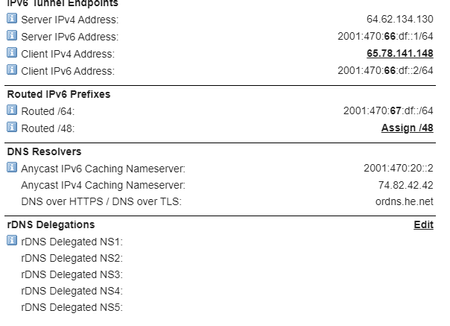
RAXE500 firmware V1.0.10.86_2.0.40 I am having trouble getting my IPv6 tunnel to work with my new RAXE500. the settings are all entered correctly, and when i use the 'ping -6 ipv6.google.com' comman...

FURRYe38
Nov 11, 2022Guru - Experienced User
Can you capture DEBUG logs, enable both debug and WAN to LAN captures before setting up the configuration, the after the configuration is setup, run your tests to check the configuration, then after save off the logs.
 cybotNov 11, 2022Luminary
trying to access the router debug page (192.168.1.1/debug) results in a page from the router
404 Not Found
The resource you have requested is not available.
- FURRYe38Nov 11, 2022Guru - Experienced User
You need 192.168.1.1/debug.htm
- cybotNov 11, 2022Luminary
ahh... ok. that was why it wasn't working then.
I seem to have a bigger problem. I told the router to reboot using the interface, and it seemed to reboot, but it was immediately apparent that something had gone south. all my devices (PC, Android, Roku, Nintendo, etc.) were no longer able to reconnect to the network once it was back up. the devices (windows included) would connect but then drop the connection. I was connected for a few second long enough to discover that the router had stopped handing out ANY ipv4 setting at all. several power button cycles did not fix the issue. indeed, they seemed only exacerbate the problem. the router was no longer letting me log in, with windows and android there were authentication issues. I know for a fact that i was entering the right password each time. issue only seemed to get better once i disconnected the internet cable from the router and then did a power cycle. even then things did not immediately go back to normal. i had to wait 30 minutes and before the router finally let me logon to the network. after wards i plugged the internet cable back in, and the router picked up the settings passed by the modem. I am now able to get back into the network, and the admin pages. But I am most certainly NOT a happy camper at the moment. this is a brand new router, I expect it to at least function like it's supposed to for at least a little while.