NETGEAR is aware of a growing number of phone and online scams. To learn how to stay safe click here.
Forum Discussion

cybot
Nov 10, 2022Luminary
IPv6 6to4 tunnel option broken? RAXE500
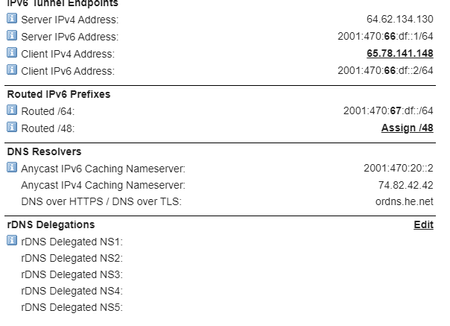
RAXE500 firmware V1.0.10.86_2.0.40 I am having trouble getting my IPv6 tunnel to work with my new RAXE500. the settings are all entered correctly, and when i use the 'ping -6 ipv6.google.com' comman...

FURRYe38
Nov 12, 2022Guru - Experienced User
Thanks I'll pass this on to NG for review.
For reference, what is the Brand and model# if your ISP modem/ONT and who is your ISP?

cybot
Nov 16, 2022Luminary
modem is a nexuslink 5630u. ISP is Consolidated Communications of Roseville, CA
looks like the issues i have been having (non ipv6 related issues) can all be traced back to my use of the readyshare feature of the router. I am not sure why or how all those issues could be caused just by hooking up an external HDD. it's not like I am trying to something weird or unusual. I am trying to use the router and the readyshare as intended. Unless there is some sort of issue that is firmware based, I am at a loss. The drive IS accessible via the network, so why it's casing these sort of issues is weird to me. when the drive is unplugged from the USB port, issues (non-ipv6 related) disappear.
- FURRYe38Nov 16, 2022Guru - Experienced User
So IPv6 6To4 Tunnel works if you disconnect the USB Drive? Please explain more...
- cybotNov 17, 2022Luminary
No, the IPv6 issues are not solved by unplugging the drive from the routers USB port. but ALL of the other issues seeming to at least partly stem from router DNS related issues ARE. the IPv6 tunnel issue is not connected with the other issues i have been having.
- cybotNov 17, 2022Luminary
i have separated out the two issues to reduce confusion
link to the other issue is here : RAXE500 using readyshare cause router to malfuncti... (netgear.com)
- FURRYe38Nov 17, 2022Guru - Experienced User
So with no USB and ReadyShare being enabled, IPv6 6To4 problem is still happening?
- cybotNov 17, 2022Luminary
that is correct
- FURRYe38Nov 17, 2022Guru - Experienced User
Ok just making sure. Lets keep these two issues separate. 😉
- cybotNov 17, 2022Luminary
indeed. The fact that i am having so many issues with a brand-new router makes me wonder if i am one of the unfortunate people to pick up a router that was bad out of the box. I am still well within the 90 days of free support, so I am wondering if I should try to start an RMA. I would prefer to do that over returning the router to where i bought it from (amazon.com)
- FURRYe38Nov 18, 2022Guru - Experienced User
I would and would at least let NG know what your seeing in regards to IPv6 AND the HDD Readyshare issue.
- cybotNov 18, 2022Luminary
Oksy, I think i have found an answer, for this issue at least with (probably) all netgear routers which seems to have issues with the 6to4 tunnels. hurricane electric is a 6in4 tunnel provider which is a subset of 6to4, and is now for what ever reason considered outdated. for whatever reason the netgear routers no no longer accept 6in4 traffic using the 6to4 ipv6 settings page. However, All is not lost. Hurricane Electric, who i use for my IPv6 Tunnel has started to support 6RD IPv6 tunnels. the setup is a little different but is supported on most netgear routers. I for one would have had no way of even beginning to know how to set it up had i not stumbled across this blog page (link below) with detailed instructions on how to use a Hurricane Electric tunnel with 6rd. once i followed the easy to use instructions, test.ipv6.com came back with 10/10 results. previously it was 0/10 (obviously) and when the tunnel was working previously the results were 7/10. so using 6rd is an actual improvement over using 6in4 over 6to4.
Link : Using Netgear R7800 with Hurricane Electric 6in4 Tunnel – The Sarth Repository (yimingliu.com)
- cybotNov 18, 2022Luminary
as a last step i tried browsing to ipv6.test-ipv6.com, which actually showed i had an MTU issue. I had left the MTU setting in the IPv6/6rd settings page at default which was 1480. I changed it to 1500 and the warning on the page went away.
- cybotNov 26, 2022Luminary
Fixing the ipv6 tunnel settings seems to have solved ALL my issues. not sure why incorrect ipv6 settings caused the router to act so flaky though. I do have one oddity to report however. the other day some of my devices (or the apps on the devices) started reporting a lack of internet connection, despite strong evidence to the contrary. today I went into the router's advanced settings only to fond that the IPv6 settings had reverted back from 6RD to 6to4. i switched the setting back, and strangely enough, the settings i had used for 6RD, were still entered. once i switched the settings back to 6RD, and the ipv6 LAN settings back to Auto Config, IPv6 started worki. ng again. the device and apps stopped reporting lack of internet connection as well.
On another front, Verizon is putting up some new towers and I have reserved one of ten available slots for their home internet service. It will mean that I will need to switch the RAXE500 to bridge mode, but that is something that is probably minor. we will probably sign up for the trial to try the service. at around $5 for around 300Mbps speed and no throttling or data caps, it is too good of an offer to pass up, especially since the service we are currently live does not plan to extend their 2Gbps fiber service to where we live. Only issue is, since my current ISP no longer offers the service plan we are using, if we find the Verizon service unacceptable and decide to switch back, we won't be able to as the 'low speed broadband' plans are no longer offered.
- FURRYe38Nov 27, 2022Guru - Experienced User
So what did you do exactly to fix the IPv6 6to4 Tunnel problem?
Be aware that there is new FW available for the 500:
cybot wrote:
Fixing the ipv6 tunnel settings seems to have solved ALL my issues. not sure why incorrect ipv6 settings caused the router to act so flaky though.