Forum Discussion

NetGerWard
May 30, 2023Aspirant
netgear nighthawk ax12 rax120v2 randomly disconnecting
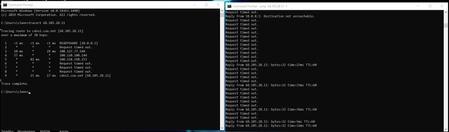
My Netgear Nighthawk ax12 rax120v2 randomly disconnects after about 9 months of continuous use. After performing a traceroute, my computer is able to connect locally to the router when this occurs. H...
- May 31, 2023
Please load up this beta:
Factory reset the router and setup from scratch. A complete pull of the power adapters for a period of time after the factory reset then walk thru the setup wizard and setup from scratch with a wired PC and web browser. Recommend setting the default DHCP IP address pool range to the following after applying and a factory reset: 192.168.#.100 to 192.168.#.200.
https://kb.netgear.com/24089/How-do-I-specify-the-pool-of-IP-addresses-assigned-by-my-Nighthawk-router
NetGerWard
May 30, 2023Aspirant
This also happens every day at the same time, around 5-7pm.

FURRYe38
May 30, 2023Guru - Experienced User
What Firmware version is currently loaded?
What is the Mfr and model# of the Internet Service Providers modem/ONT the NG router is connected too?
Be sure your using a good quality LAN cable between the modem and router. CAT6 is recommended.
What is the first 3 characters of the routers serial number in back?
- NetGerWardMay 31, 2023Aspirant
What Firmware version is currently loaded?
Router Firmware Version V1.2.8.40
What is the Mfr and model# of the Internet Service Providers modem/ONT the NG router is connected too?
The modem is a Arris touchstone CM8200
Be sure your using a good quality LAN cable between the modem and router. CAT6 is recommended.
The ethernet cable between the modem and router is a cat8 that when tested with an ethernet tester are all properly wired in the correct order.What is the first 3 characters of the routers serial number in back?
6JY- FURRYe38May 31, 2023Guru - Experienced User
Please load up this beta:
Factory reset the router and setup from scratch. A complete pull of the power adapters for a period of time after the factory reset then walk thru the setup wizard and setup from scratch with a wired PC and web browser. Recommend setting the default DHCP IP address pool range to the following after applying and a factory reset: 192.168.#.100 to 192.168.#.200.
https://kb.netgear.com/24089/How-do-I-specify-the-pool-of-IP-addresses-assigned-by-my-Nighthawk-router- NetGerWardMay 31, 2023Aspirant
Alright, this solution has been implemented. I will keep you posted on the results in this threat. Thankyou for this suggestion I was very lost as to why this was occuring!!!!