NETGEAR is aware of a growing number of phone and online scams. To learn how to stay safe click here.
Forum Discussion

DaveWesterman
Jan 27, 2025Aspirant
NetGear RAX45 Access Control Preventing Access to Allowed Device
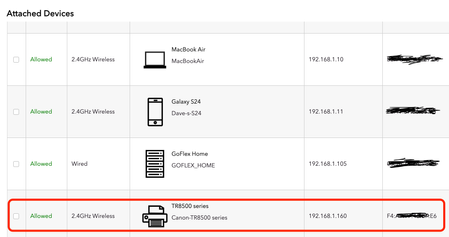
I have a NetGear RAX45 with the latest firmware. We have always had Access Control turned on, to allow only our devices. Just within the last couple weeks, we can no longer connect to our Canon print...

michaelkenward
Jan 28, 2025Guru - Experienced User
Is the printer on wifi?
The usual way to fix wifi printers is to find the printer maker's utility, the software that runs on your operating system. Then use that to connect the printer to the wifi.
The router just broadcasts wifi. It is then down to the printer to play ball. There isn't much that you can do on a router, beyond fixing it to a particular IP address, that affects what the printer gets up to.
Where possible, using the WPS feature can simplify things.
Just another user with time on their hands.
- DaveWestermanJan 28, 2025Aspirant
Thanks for your answer. The printer is on wifi. But it has worked for years up until a few years ago with Access Control on. Now, I have to turn Access Control off in order to be able to print to it from any of our devices. So the problem is with Access Control somehow.
- FURRYe38Jan 28, 2025Guru - Experienced User
What happens if you try to remove the printer from the Access Controls list and feature?
- DaveWestermanJan 28, 2025Aspirant
Thanks for the suggestion. I can't find any way to delete a device that's already in the list, so I tried Blocking it, then Allowing it again. That didn't fix it.
If I have Access Control turned on, and Block All New Devices on, it won't work. If I change that to be to Allow All New Devices, that works. But that defeats the whole purpose of us blocking devices that we don't know.
So it seems like Access Control is not getting a match when it compares the MAC and IP addresses. But when I turn off AC, I'm not seeing a different device in the list of connected devices. Strange.
- michaelkenwardJan 28, 2025Guru - Experienced User
DaveWesterman wrote:
The printer is on wifi. But it has worked for years up until a few years ago with Access Control on.
That or something has happened in Windows, for example.
What firmware version do you have. Please don't say "the latest". The Nighthawk app or a web browser and the graphical user interface (GUI) can miss updates.
The best way to check is to look at the GUI or the Router Information page in the Nighthawk App and check the firmware version reported there. Then visit the support pages for your device and to look at the library of available updates. There may be a newer version there.
I never use access control. It seems like a waste of time and an invitation to trouble. I trust everyone here who uses my network.
Have you reset the router and set it up afresh?
You say "I’ve power recycled the NetGear and the printer". Did you do it in the required order?
Be sure to restart your network in this sequence:- Turn off and unplug modem.
- Turn off router and computers.
- Plug in and turn on modem. Wait 2 minutes for it to connect.
- Turn on the router and wait 2 minutes for it to connect.
- Turn on computers and rest of network.
Just another user with time on their hands.
- DaveWestermanJan 28, 2025Aspirant
Thanks! I will give all that a try
