NETGEAR is aware of a growing number of phone and online scams. To learn how to stay safe click here.
Forum Discussion

David1212
Oct 17, 2020Tutor
New RAX200 firmware 1.0.3.102_1.0.56. ???
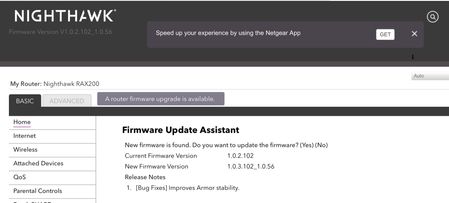
Netgear may have made a mistake in pushing out firmware 1.0.3.102_1.0.56 for the RAX200 router. This firmware is not listed on the Netgear Support site. This firmware is showing as an download on...

roger1955
Oct 18, 2020Apprentice
David1212,I installed, with no issues. Attached devices all are shown properly. After installing, I performed a factory reset using the pin hole. Then I setup my router accordingly. That was 2 days ago, I have not encountered any bugs, disconnects or router going into a frozen state.
David1212 wrote:Netgear may have made a mistake in pushing out firmware 1.0.3.102_1.0.56 for the RAX200 router. This firmware is not listed on the Netgear Support site. This firmware is showing as an download on both the app and when logged in with a browser.
After the router automatically loaded this firmware, several bugs appeared. The attached devices page shows the wifi connections as “(null)”, devices several actively using the network do not appear on the device page. Attached is a photo of the router's page suggesting that the firmware be loaded.Please have Netgear confirm if this firmware is compatible with the RAX200.
David1212 wrote:Netgear may have made a mistake in pushing out firmware 1.0.3.102_1.0.56 for the RAX200 router. This firmware is not listed on the Netgear Support site. This firmware is showing as an download on both the app and when logged in with a browser.
After the router automatically loaded this firmware, several bugs appeared. The attached devices page shows the wifi connections as “(null)”, devices several actively using the network do not appear on the device page. Attached is a photo of the router's page suggesting that the firmware be loaded.Please have Netgear confirm if this firmware is compatible with the RAX200.I installed, with no issues. Attached devices all are shown properly.