NETGEAR is aware of a growing number of phone and online scams. To learn how to stay safe click here.
Forum Discussion

David1212
Oct 17, 2020Tutor
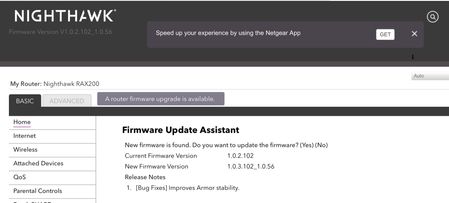
New RAX200 firmware 1.0.3.102_1.0.56. ???
Netgear may have made a mistake in pushing out firmware 1.0.3.102_1.0.56 for the RAX200 router. This firmware is not listed on the Netgear Support site. This firmware is showing as an download on...

roger1955
Nov 02, 2020Apprentice
Yes,
IPV6 work......by default IPV6 is disabled. Do you know how to enable it?
IPV6 work......by default IPV6 is disabled. Do you know how to enable it?

Yousef
Nov 02, 2020Guide
It will copy all PPPOE configuration automatically as last time I tried to switch, its need something special?
- roger1955Nov 02, 2020ApprenticeJust go to the ADVANCE TAB then IPV6. You’ll see it’s disabled. Select auto config then click on apply in the bottom right corner. Afterwards google ipv6 test and run it to confirm.
- YousefNov 02, 2020GuideYes I did it's working better now in some area and some meshes taking little bit longer than usual to reach the speed in testspeed I do have 530mb before reached faster to 510 mb by phone test now 430 mb lol I will try it with games for few days and test it if it's better to keep it or disable it.
Thanks a lot. - roger1955Nov 02, 2020ApprenticeCool, just remember with ipv6 enabled it just provides another way to travel the internet. You have 2 roads to travel ( ipv4 & ipv6) with the equipment making the choice.
- YousefNov 02, 2020GuideYes, it's really faster than the others but the question is what's the difference between the others option to enable it ? Some options not clear to me 100%
- roger1955Nov 02, 2020ApprenticeIt depends on the type of internet service you have. Most have the the regular service through your ISP. So you choose Auto config and let your router make the choice. Going back a few F/W the f/w was broken and it just didn’t work. It tried by selecting something other than DHCP, I believe it choose PPOE which was not the correct, thereby resulting in a funky connection, in turn failing the IPV6 test. You can google each type of IPV6 connection to get a better understanding. Also some ISP’s don’t provide IPV6 capabilities. I have Xfinity, which has been for years.
- YousefNov 02, 2020GuideYes now I got it, its clear better than ipv4 but need to see because it's my first time I am running it, I will see the difference in games as well, yeah my ISP wasn't running it but now I think yes it's working just fine.
Thanks I hope next update will be better without any issues. - roger1955Nov 02, 2020ApprenticeYou’ll see a difference in multi-player gaming. This f/w seems to be OK. I still get random freezes where the router just stops working, and that’s been happening with all the F/W’s. Most of the time I just depress the power button to turn off the press again to turn on. This usually solves the zombie state the router was in. LOL!
- YousefNov 02, 2020GuideYes but I really want it to be stable not disconnected everytime, I hope it will be just fine without any issue we need to use what we paid for and it's better to have a better stable update in the future.
- roger1955Nov 02, 2020ApprenticeYes, I agree. I’m chalking it up to new tech, (wi-fi-6 ) which Netgear rush to get the products out. I lucked out when I bought mine for 300. This wealthy person bought it, fiddled around with it for a couple days and decided they didn’t want it . I viewed the posting and decided to jump on it. It was never registered, so I registered it with full support. Only thing is, I don’t have a receipt, but I have no intentions on returning it. If it just flat out dies.....good riddance! LOL! No........ I’ll be mad! Hopefully the wrinkles will get worked out. Best wishes!