NETGEAR is aware of a growing number of phone and online scams. To learn how to stay safe click here.
Forum Discussion

gjblajian
Jan 03, 2022Star
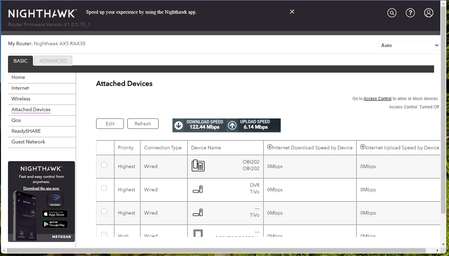
Nighthawk AX5 RAX30 Connected Devices IP Addresses
I have a RAX30 and unlike my R7000 the IP addresses are not showing up in my connected devices list. Is there a firmware update that corrects this issue? The android app shows MAC addresses but does ...
- Jan 03, 2022
I checked all my running devices and they're all displaying the IP address.
If its bothering you, options? (not great options)
1. try a factory reset. maybe the last update caused an old setting to create the issue. Sometimes a factory reset can fix that.
2. try downgrading the firmware. I wouldn't do this as the last update fixed a lot of issues. I'd use the access control page to find IP addresses and see if the next update fixes that issue.

plemans
Jan 03, 2022Guru - Experienced User
2 things.
1. do they show up properly in the app?
2. have you tried a different browser/pc? It looks like the name is rendering 2x. Usually its the name with the IP address below it. So curious if its a browser/device issue.
gjblajian
Jan 03, 2022Star
1. The IP addresses do NOT show up in the Netgear Nighthawk app
2. I have tried multiple browsers, the issue (lack of IP address) is present in all of them.
- plemansJan 03, 2022Guru - Experienced User
do they show up in the access control?
What modem/gateway are you connected to?
did they ever show up?
- gjblajianJan 03, 2022Star
Oddly, the IP Addresses DO show up on the Access Control page. I would not have even thought to look there had you not asked.
My modem is an Arris SB6190
I want to say that they did show up early on in the testing but a later update must have removed them from the connected devices list. They were definitely ALWAYS listed in the connected devices with my Netgear R7000.
- plemansJan 03, 2022Guru - Experienced User
I checked all my running devices and they're all displaying the IP address.
If its bothering you, options? (not great options)
1. try a factory reset. maybe the last update caused an old setting to create the issue. Sometimes a factory reset can fix that.
2. try downgrading the firmware. I wouldn't do this as the last update fixed a lot of issues. I'd use the access control page to find IP addresses and see if the next update fixes that issue.