NETGEAR is aware of a growing number of phone and online scams. To learn how to stay safe click here.
Forum Discussion

gjblajian
Jan 03, 2022Star
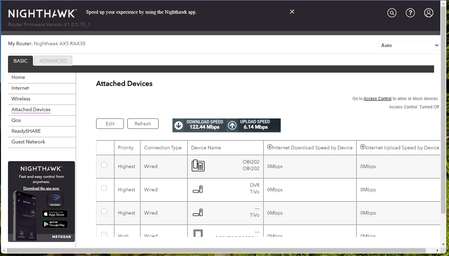
Nighthawk AX5 RAX30 Connected Devices IP Addresses
I have a RAX30 and unlike my R7000 the IP addresses are not showing up in my connected devices list. Is there a firmware update that corrects this issue? The android app shows MAC addresses but does ...
- Jan 03, 2022
I checked all my running devices and they're all displaying the IP address.
If its bothering you, options? (not great options)
1. try a factory reset. maybe the last update caused an old setting to create the issue. Sometimes a factory reset can fix that.
2. try downgrading the firmware. I wouldn't do this as the last update fixed a lot of issues. I'd use the access control page to find IP addresses and see if the next update fixes that issue.
gjblajian
Jan 03, 2022Star
Oddly, the IP Addresses DO show up on the Access Control page. I would not have even thought to look there had you not asked.
My modem is an Arris SB6190
I want to say that they did show up early on in the testing but a later update must have removed them from the connected devices list. They were definitely ALWAYS listed in the connected devices with my Netgear R7000.

plemans
Jan 03, 2022Guru - Experienced User
I checked all my running devices and they're all displaying the IP address.
If its bothering you, options? (not great options)
1. try a factory reset. maybe the last update caused an old setting to create the issue. Sometimes a factory reset can fix that.
2. try downgrading the firmware. I wouldn't do this as the last update fixed a lot of issues. I'd use the access control page to find IP addresses and see if the next update fixes that issue.
- gjblajianJan 03, 2022Star
Definitely will not downgrade the firmware, but may investigate the factory reset. Thank you for your assistance and for pointing me to the Access Control page. Ate least the IP addresses are accessible somewhere.