NETGEAR is aware of a growing number of phone and online scams. To learn how to stay safe click here.
Forum Discussion

khairulaz1
Aug 25, 2026Initiate
Nighthawk RAX43 WiFi not functioning
Not sure why after a power cycle suddenly my RAX43 wifi is not working. Tried reset now I cant even join the NETGEAR wifi network. Its not detecting. On webpage routerlogin i can see the wir...
- Sep 02, 2026
Did a factory reset prior but not successful too.
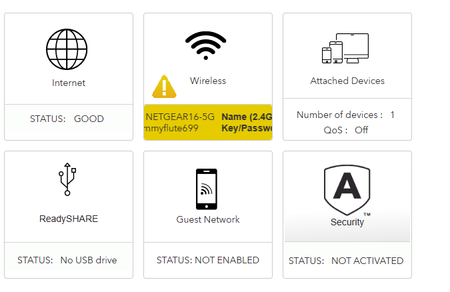
However, manage to sort out by reinstalling a 2020 firmware. Then updating it back to the latest firmware. Now the wifi is working and configureable. As can be seen on the pic, the lights for 2.4 and 5.0 are not lighting up. I even reinstall the firmware to one version earlier but same issue persist. Thus, decided to install the very first firmware available.
Thanks.

schumaku
Aug 25, 2026Guru - Experienced User
Have a chat with your cat.
There is a button on the RAX43 allowing to disable and enable WiFi:
khairulaz1
Aug 25, 2026Initiate
Button already turned on with light.
Settings for Enable Wireless Router Radio also checked.
- FURRYe38Aug 25, 2026Guru - Experienced User
Try a factory reset and setup from scratch?
- khairulaz1Sep 02, 2026Initiate
Did a factory reset prior but not successful too.
However, manage to sort out by reinstalling a 2020 firmware. Then updating it back to the latest firmware. Now the wifi is working and configureable. As can be seen on the pic, the lights for 2.4 and 5.0 are not lighting up. I even reinstall the firmware to one version earlier but same issue persist. Thus, decided to install the very first firmware available.
Thanks.
- FURRYe38Sep 02, 2026Guru - Experienced User
Glad you got it working. Please mark your thread as solved so others will know. Be sure to save off a back up configuration to file for safe keeping. Saves time if a reset is needed.
Enjoy. 📡
