NETGEAR is aware of a growing number of phone and online scams. To learn how to stay safe click here.
Forum Discussion

tennell
Jul 19, 2021Aspirant
NIghthawk RAX50 - Certifiate
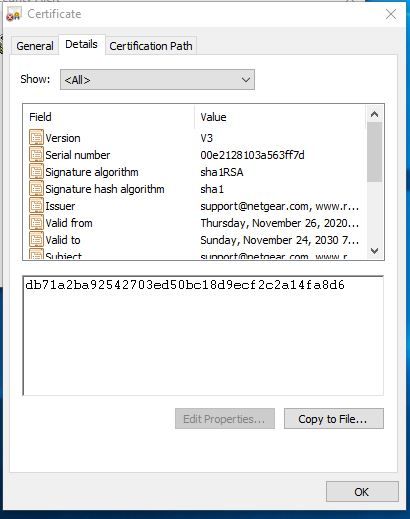
I have been getting prompted to install a security certificate. The information on the certificate looks legit from netgear, but the certificate is NOT trusted. Is there some one from Netgear monitor...

plemans
Jul 19, 2021Guru - Experienced User
Photos have to be approved by a moderator.
You can attach them by clicking on "choose file" while replying and we can see it right away.
When are you getting the request?
tennell
Jul 19, 2021Aspirant
I restarted both my computer and the router so I am not certain which event triggered the prompt for the installation of the certificate. My guess would be the computer.
Screen shot attached again per your message. Thank you

- plemansJul 19, 2021Guru - Experienced User
But what are you doing to get the prompt?
trying to login to the router?
Just browsing online?
whats actaully causing it to pop up?
do all devices get the prompt? only 1?
and modem do you have?
- tennellJul 19, 2021Aspirant
I went back to duplicate the occurence. the security alert pops up on my computer after i reboot the RAX50 router. I can login to the router although this security message appears without attempting to login. Everyhing works fine and I can get online, i just find it odd to get thie security prompt especially since I have had this router for a year. I can easily dismiss and go about my business, by bypassing the message, but if its legit and improves the integrity of my connection i would consider installing.
This is the only computer on the network, other devices are tablets, cell phones, and video players. I do NOT receive any alerts other than on my windows PC. Running Windows 10 Profesional. I have attached another screen shot to show the initial notice that pops up after rebotting the router.
- plemansJul 19, 2021Guru - Experienced User
do you have netgear genie install?
A netgear wifi adapter?
so you reboot the router, the computer could just be sitting there, and you get this popup?
