NETGEAR is aware of a growing number of phone and online scams. To learn how to stay safe click here.
Forum Discussion

richie1965
Sep 27, 2021Aspirant
Nighthawk RAXE500 Readyshare Issue
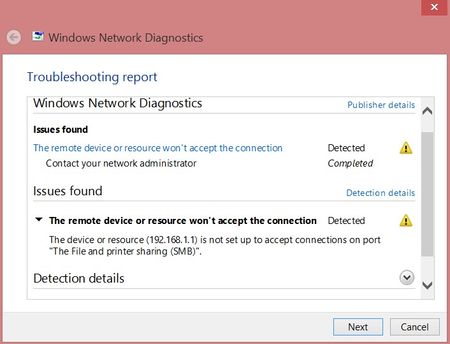
Just purchased and setup a new Nighthawk RAXE500. Everything is good except for Readyshare. When trying to access Readyshare from any of my Windows PCs, I get the error that Windows cannot acces...

Razor512
Sep 27, 2021Prodigy
If using a VPN, make sure it is set to allow local traffic. Also some VPN applications that offer split tunneling, will cause smb issues.
If the above does not apply to your use case, then try the following.
- Press Windows + R to bring up the run dialog.
- Run the command appwiz.cpl
- Click on Turn Windows features on or off
- Find the SMB 1.0 entry
- Check the SMB 1.0 Client option and then click on OK.
Beyond that, also consider that if the network is set as a public network rather than private, then smb sharing will not work.
If needed, also try enterign this in the address bar of a folder. \\readyshare
If it finds the share with tha taddress but not \\192.168.1.1 then it may mean that the router is using a different IP.
Razor512
Sep 27, 2021Prodigy
Forgot to add, for some reason, images take a while before they become visible.

- richie1965Sep 27, 2021Aspirant
"Forgot to add, for some reason, images take a while before they become visible."
Yes, I discovered that a little while after making my first post. Live & learn.
- Razor512Sep 27, 2021Prodigy
It may be worth a try.
To change your workgroup, press WIndows + R and then run the command: control.exe sysdm.cpl
Windows uses a workgroup name of WORKGROUP by default.
- richie1965Oct 04, 2021Aspirant
I actually changed the workgroup in the router settings to match my local network. Didn't help.
currently working with Netgear support. It's been elevated to Engineering so far.
Thanks for your suggestions and willingness to help. If anything is determined that I can report here, I'll follow up later.