NETGEAR is aware of a growing number of phone and online scams. To learn how to stay safe click here.
Forum Discussion

TitaniumOdyssey
Oct 26, 2020Follower
RAX120 v1.0.2.136 IPv6 DNS?
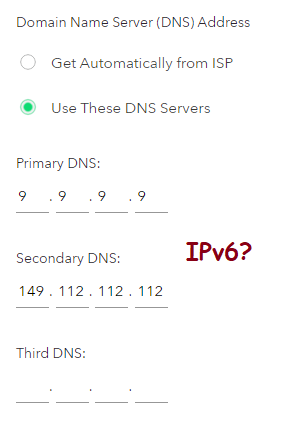
RAX120 router Firmware v1.0.2.136 (most recent at time of writing) Use custom DNS servers There are no fields for IPv6 DNS servers. There seems to be no way to enable custom IPv6 DNS for this rou...
trewendy
Nov 12, 2020Initiate
I am having the same issue. There is no IPV6 under advanced setup or anywhere else (I clicked on every option and combination). It should be there but is not. TOPOLOGY do you have the same router and firmware? RAX120, v1.0.2.136 and Windows 10?
Topology wrote:TitaniumOdyssey, it may be helpful to look at the router options available at “ADVANCED | Advanced Setup | IPv6 | IPv6 Domain Name Server (DNS) Address.”

Newfiedrool
Nov 13, 2020Virtuoso
Click advance then on the left menu click advanced setup then you will see the option on the left and 10 down is ipv6.
- trewendyNov 14, 2020Initiate
Thanks when I looked there it was not obvious there were more options under the advance and I needed to scroll down the list to see more.