NETGEAR is aware of a growing number of phone and online scams. To learn how to stay safe click here.
Forum Discussion

derekcannady
Dec 23, 2021Guide
RAX120 V2 Constant Random Reboots
The router reboots frequently sometimes every 30 minutes. I have noticed that the router reboots under heavy system load of +50% on the processor. The only way I have been able to drastically lesse...
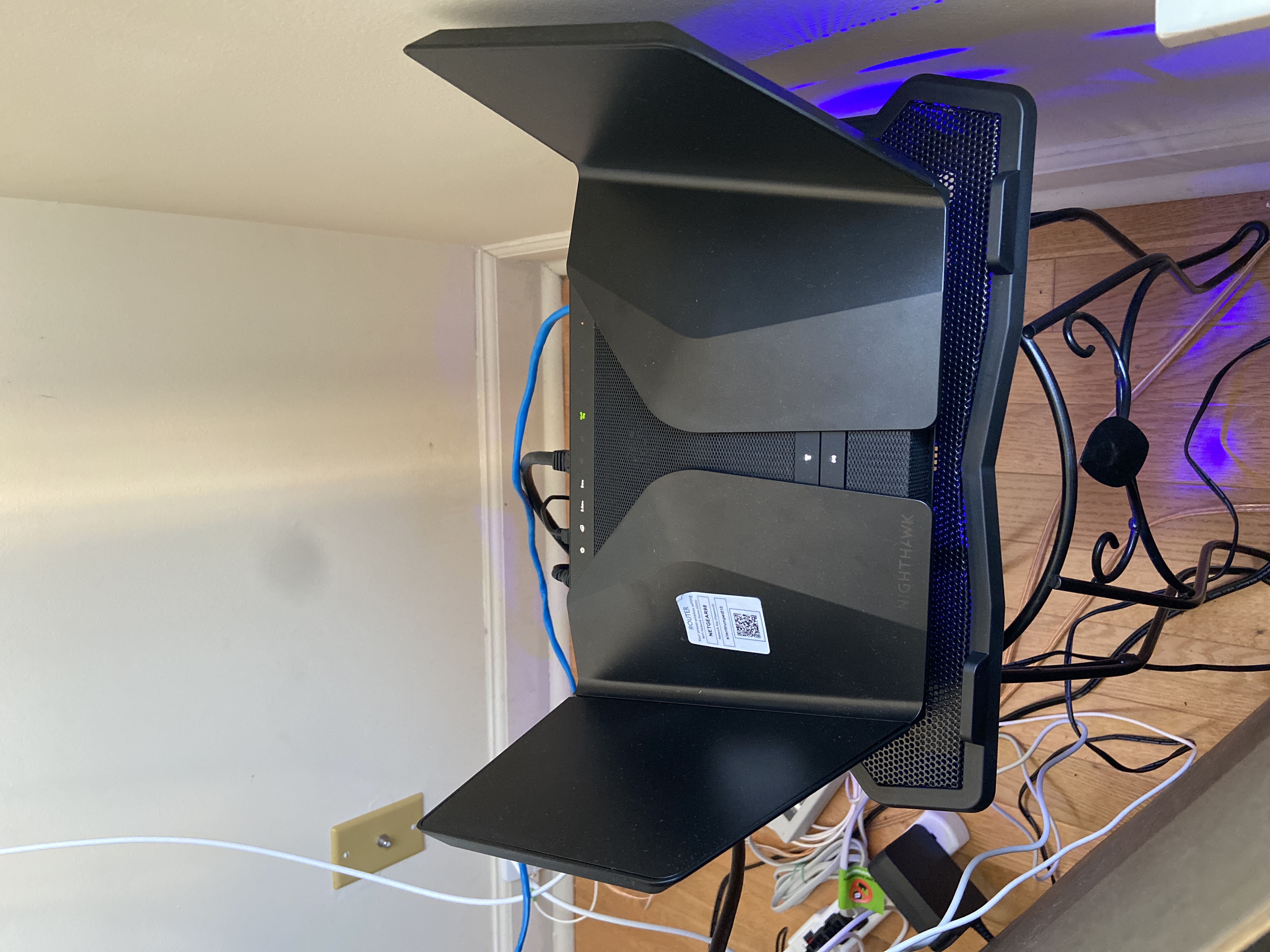
- Jun 11, 2022Installed beta firmware 1.2.3.33 on it and then turn fan on in debug.htm. Just check mark it , don’t click on apply.
And bought a cool pad from amazon $10 . 4 days in a row no restart and router works perfect.
Laptop Cooling Pad,ESGAMING Laptop Cooling Stand Laptop Cooler 10-15.6 Inch 2 USB Ports 2 Fans with Blue LEDs https://a.co/d/dXVVnxw
AvgNetBoi
Dec 07, 2021Tutor
Hi,
My router keeps randomly restarting. Network provider is doing fine - stable connection without any disturbances (I tested on different router while Nighthawk is going down. I also contacted the provider and they said there's been no problems on their side. I did turn off auto firmware updates but it did not help. I tried to browse logs but it only shows new logs from the boot up moment. My home network setup is super straightforward - minimal setup to make it work, did the Netgear app setup.
My setup is:
Nighthawk AX12 RAX120v2
Firmware V1.2.3.28
Router Mode
Router restarts few times a day, not more than 10.
Any suggestions would be really appreciated!
Thanks!
jmcorra
Mar 18, 2022Tutor
I've been encountering the same problem and in working with Netgear Tech support who have been very helpful, concluded that the router should be exchanged which has been in service for 6 weeks. Prior to the installation of this RAX120v2, I had for 6 years a Nighthawk R8000 which never rebooted on its own; hence, the setup and location (prior to current) is exactly the same with of-course the exception upgraded router to a Rax120v2. Netgear support tried the obvious things in their problem determination. Plug the router directly into a wall outlet eliminating an extension cord, they reinstalled the latest firmware V1.2.3.28, and when the problem of random rebooting continued, they had me perform a factory reset. None of the aforementioned corrected the problem which could occur in my case, once every 3-4 days or 2-3 times in a single day. Seemingly the only constant with the reboots, is a variable when considering current conditions, and elapsed time in-between the random reboots. Unfortunately when I inquired with Netgear Support, they informed me that this device does not log error codes, nor can any traces or traps be implemented which is surprising to me. This leaves open the question for all, (clients, and Tech Support) of determining what the root cause of this random rebooting of the RAX120v2 is. My exchange for the same device has been requested and if this solves the problem one could assume a hardware problem, and should it reoccur, it's likely an unidentified logical problem and I'll need to select a different model.
- jcassady88May 10, 2022Aspirant
Good morning... Did your router replacement to another model resolve your issue? I am receiving the constant reboots and wonder if I just swap a new unit or go to another product such as Linksys or TP Link. Well, during this message, my router decides to reboot, once again. Pray for me!!!!!
- AvgNetBoiMay 10, 2022TutorAh I am praying for you, I know the pain! Everything I tried failed so I went for a different router from a different brand - I got Linksys Velop to up my chances with HomeKit compability and it works like a charm. Not a single restart from day 1.
- jmcorraMay 10, 2022Tutor
Good Morning. I received a replacement of the Netgear RAX12 and unfortunately I encountered the same problem with random reboots with the new router. I did notice that when I approached 30 attached current devices (utilized or idle, i.e. devices, IOT's, etc.) the random re-boots would trigger. I can't be sure but suspect this may be a trigger event. Regardless, I thought it was time to move on and I replaced my Netgear with a ASUS router one month ago and I've not encountered any random reboots with the ASUS device.
- jcassady88May 10, 2022Aspirant
Yeah, I fortunately "bit the bullet" and purchased a TP-Link AX6000 WIFI 6 (Archer 6000) router about 10 minutes ago (Amazon will have it here at my home between 5:00pm-10:00pm today, fingers crossed). NG decided that I had enough problems and will be sending me a replacement router. Once I receive it, look out store I purchased it from, it's coming back for a "Full Refund'!"
I have always used Netgear and am very sad to go, but got to say goodbye sometimes..... Farewell Netgear community, in a few hours, I will no longer be a part of this lovely community....