NETGEAR is aware of a growing number of phone and online scams. To learn how to stay safe click here.
Forum Discussion

derekcannady
Dec 23, 2021Guide
RAX120 V2 Constant Random Reboots
The router reboots frequently sometimes every 30 minutes. I have noticed that the router reboots under heavy system load of +50% on the processor. The only way I have been able to drastically lesse...
- Jun 11, 2022Installed beta firmware 1.2.3.33 on it and then turn fan on in debug.htm. Just check mark it , don’t click on apply.
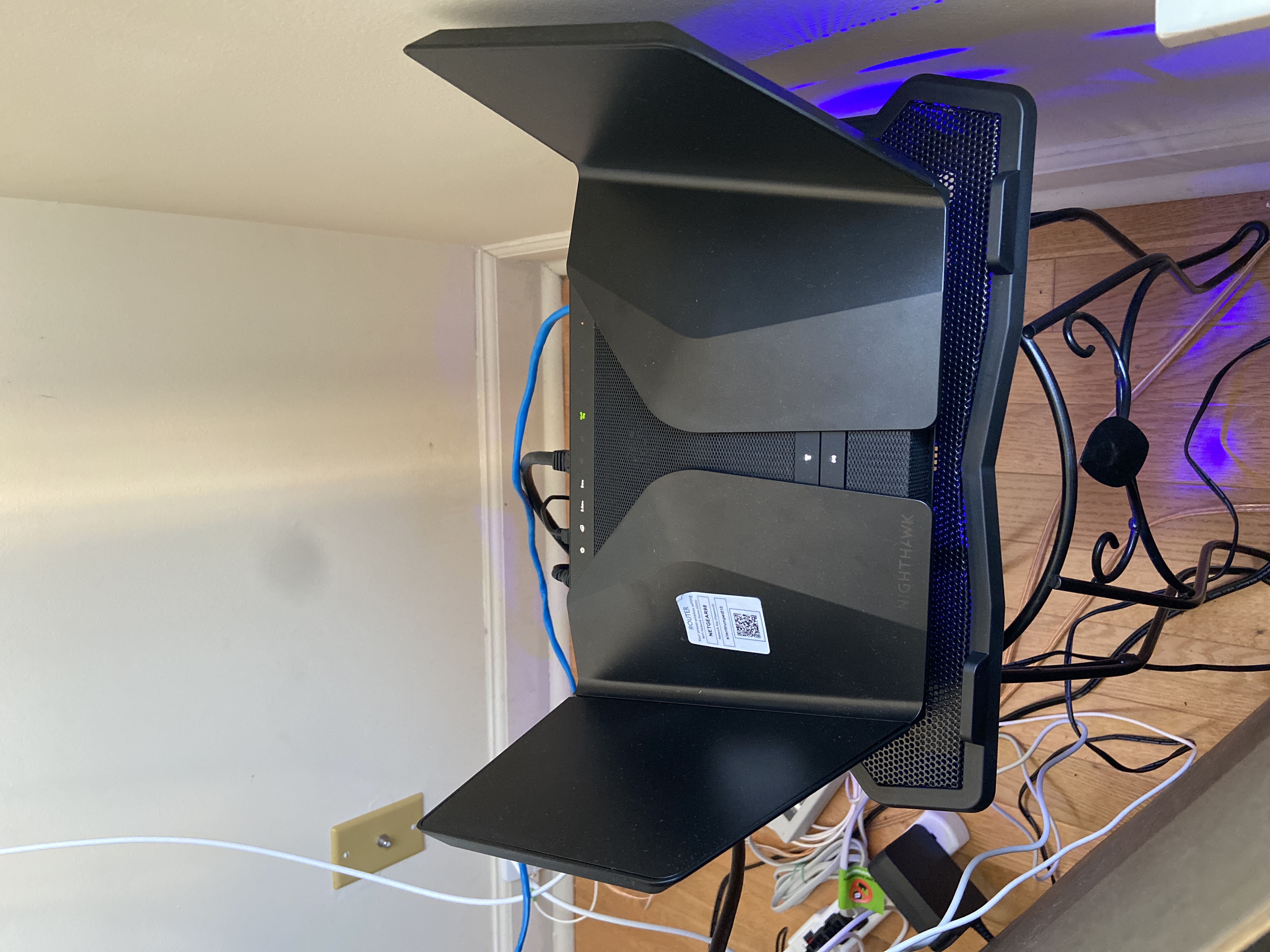
And bought a cool pad from amazon $10 . 4 days in a row no restart and router works perfect.
Laptop Cooling Pad,ESGAMING Laptop Cooling Stand Laptop Cooler 10-15.6 Inch 2 USB Ports 2 Fans with Blue LEDs https://a.co/d/dXVVnxw

FURRYe38
Aug 24, 2022Guru - Experienced User
What is the Mfr and model# of the Internet Service Providers modem/ONT the NG router is connected too?
Be sure your using a good quality LAN cable between the modem and router. CAT6 is recommended.
What all devices do you have connected to the router?
What channels are you using? Auto? Try Auto and 48 on 5Ghz. Or try setting manual channel 1, 6 or 11 on 2.4Ghz and 40 to 48 channel on 5Ghz.
Any Wifi Neighbors near by? If so, how many?
muniz_ri wrote:
No luck with the beta fw...even after I performed a reset and set up the router from scratch.
I have just about given up on this router but for what will likely be my last experiement, I pulled out my old LinksysEA7500 which, although the wifi range isn't as strong, is rock solid stable.
I re-connected the Linksys to my modem and turned off it's wifi radios. I connected the RAX120 via ethernet cable to the Linksys router and set the RAX120 into AP mode. I suspect the RAX120 was having difficulties when the isp lease renewed and just curious to see what happens while in AP mode.
Topology
Aug 25, 2022Virtuoso
_NDS_, are you running NETGEAR Armor on your RAX120v2? It might help with the DoS/DDosS issue and, maybe, thereby help with the reboot problem….
- muniz_riAug 25, 2022Apprentice
***Update***
My RAX120 continues to run with no issues using my current setup, i.e. as a client in AP mode to my LinksysEA7500 router with a static ip assigned to the RAX120. The RAX120 log is completely clean with no issues so far.
It seems the LinksysEA7500 has no problem renewing the DHCP lease from my ISP (Cox) whereas the RAX120 does which leads me to believe that their is a bug in the RAX120 fw. For reference...I am using a Motorola MB8611 modem.
I will update again if I experience any more reboots and if not I will report that also in about 1 month.
- FURRYe38Aug 25, 2022Guru - Experienced User
muniz_ri Would you be willing to return the RAX back to router mode with your ISP modem and enabled debug logging long enough to see this reboot happen and then capture the debug logs?
muniz_ri wrote:
***Update***
My RAX120 continues to run with no issues using my current setup, i.e. as a client in AP mode to my LinksysEA7500 router with a static ip assigned to the RAX120. The RAX120 log is completely clean with no issues so far.
It seems the LinksysEA7500 has no problem renewing the DHCP lease from my ISP (Cox) whereas the RAX120 does which leads me to believe that their is a bug in the RAX120 fw. For reference...I am using a Motorola MB8611 modem.
I will update again if I experience any more reboots and if not I will report that also in about 1 month.
- FURRYe38Aug 25, 2022Guru - Experienced User
Thank you. I guess also enable WAN/LAN debug as well. Lets give them all they can get.
Thank you for your time.
muniz_ri wrote:
Yes, I will do that this weekend. I had not thought about doing that but now that you mention it, I am also curious to see those results.
- _NDS_Aug 25, 2022Apprentice
I found this post of yours dated April 1st 2022 where you said that a pure sine UPS has solved the problem with random reboots
UPS devices with PFC/APC / Line-Interactive should correct any power fluctuations on the fly without going to the battery but if you have a crummy power source in a large condo building like mine that UPS will need to switch to DC a couple times a day. How gracefully this power correction or switch to DC happens varies by APC UPS model number seems to matter quite a bit to this particular router.
https://blog.tripplite.com/line-interactive-vs-on-line-ups-systems
This is the PFC/APC UPS device I previously was using which I thought was a pure sine wave but in fact was a modified sine wave which was causing my RAX120v2 to randomly rebooted 8 times a day if I left 2.4GHZ WMM Enabled. With 2.4GHZ WMM Disabled the router was much more stable but I think it still rebooted like once a week?
https://www.amazon.com/gp/product/B06VY12HW4
This PFC/APC UPS I switched to is pure sine wave and let my router run 20+ days in a row with the 2.4GHZ WMM Enabled. I had a cable internet issue at one point where Spectrum internet was down in LA one day so I did a manual router reset and the system has stayed strong again with no random reboots so it sure seems like this was the root problem for my router.
https://www.amazon.com/gp/product/B00429N19M
Could you please let us know if you still have your RAX120 and the problem with random reboots is gone for good?
- beachmilesAug 25, 2022Apprentice
Unfortunately the random rebooting problem returned after like 20 days of uptime with like one every other day for a week and then I will get 10 days good, etc. Very strange. I re-disabled the WMM for the 2.4Ghz and get roughly the same reboot schedule.
So its extremely hard to troubleshoot. I tried the beta firmware a week ago and I still am getting about the same amount of random reboots.
I even added a beefy fan underneath the router as some people claim that helped remove the reboots but that also did not help with the random reboots for me.
- FURRYe38Aug 25, 2022Guru - Experienced User
Would you be willing to return the RAX back to router mode with your ISP modem and enabled debug logging long enough to see this reboot happen and then capture the debug logs?
beachmiles wrote:
Unfortunately the random rebooting problem returned after like 20 days of uptime with like one every other day for a week and then I will get 10 days good, etc. Very strange. I re-disabled the WMM for the 2.4Ghz and get roughly the same reboot schedule.
So its extremely hard to troubleshoot. I tried the beta firmware a week ago and I still am getting about the same amount of random reboots.
I even added a beefy fan underneath the router as some people claim that helped remove the reboots but that also did not help with the random reboots for me.
- _NDS_Aug 29, 2022Apprentice
I do not want this thread and the issue to go away.
FURRYe38 what was the outcome of the investigation of the muniz_ri logs by NG? Please update us.
So far in this community it was established that:
- changing power adapter stops the RAX120V2 from rebooting for prolonged periods of time - 30 days in my case, 18 days with beachmiles, but then reboots come back
- changing the router default IP address seems to help by extending the interval between reboots. Is it true muniz_ri?
- cooling the router by permanently enabling the Thermal Fan through debug settings and adding external cooling extends the interval between reboots
- disabling 2.4GhHz WiFi WMM extends the intervals between reboots
- The beta fiirmware provided by NG via DarrenM does not seem to help. Do we know how many different versions there are?
In July 2021 mariosuper47 posted the following in the RAX120V2 random reboots thread of the time (now closed):
The RAX200 worked OK for the first few weeks with random reboots. I tried many troubleshooting steps and then I ran out of my return windows. Random reboots got worse! Basically the router failed! Contacted Netgear which was absolutely no help.
My experience with RAX200 was remarkably similar to the initial poster on this thread. I tried everything and finally gave up and bought a new ASUS router. I configured the ASUS and everything worked as represented. I put the RAX200 in a box hoping for miracles, but not expecting one. 2 months later I viewed a video where some guy took apart his Netgear router and fixed some kind of random issue. I did learn how Netgear puts devices together and how to take them apart. So I decided to take a day and see what the RAX200 looked like inside since it had no value to me as it was.
I do not RECOMMEND anyone try this but I thought that I would SHARE my discovery!
I discovered that the Power Adapter plug that powered the router seemed outsized and that it did not seem to fully insert into the socket on the router mother board . I also found the socket on the router mother board was not properly soldered and secured to the mother board (ie. it moved around - up and down). I could not fix the solder joints but I had the idea to put a non-conductive spacer between the MB and the socket module preventing it from moving up and down. It took me several hours to get this done and get everything back together because I am very much an amateur. Aftert this bit of "jury rigging", I found that the power plug would fully insert into the socket which wasn't possible before.
I decided to try the RAX200 in its former place of honor which had been taken over by an ASUS. Wow! It worked perfectly. The power adapter plug fit fully into the socket and it have been running for 2 months without a reboot. I have multi-gig internet and numerous peripherals that now work perfectly. I realize that my amatuer fix may fail at some point but I feel quite satisfied that I have gotten something out of my $500 investment and that I can once again experience network excellence.
It seems to me that quality control at Netgear has not been up to its, heretofore, high standards. Perhaps, my story of disappointment and discovery can lead to a return to quality control that has made Netgear's reputation what it is.
mariosuper47, could you please confirm that you described a problem with RAX200 and not RAX120? RAX200 does not appear to have the random reboot issue.
In Sep 2021 mkhanshaw posted the following:
Alright - With the help of these posts and my experience - I think I see the problem (literally see it).
So my rebooting started happening whenever additional load (anything over nominal compute) was happening...aka streaming (Video calls, Netflix vs Roku, etc). The additional load was creating heat. That, combined with a loosely mounted power port for the ac adapter appears to be the cause of the reboot. The loose power port also prevents you from firmly inserting the male connector...and I could FEEL the heat around this area on mine.
...
Although I did not take the time to disassemble my Router in an attempt to fix with a soldering iron (because my intent was just to return to amazon and be done), I DID relocate the router to a cold tile floor, add fan to conduct heat away from it...and what do you know....kept connection.
I concur that the power connector on my RAX120 is loose and does not appear to fully go in to the power socket. I imagine that when the router gets hot the connectivity may get lost just purely due to loss of electrical contact due to expansion of loose parts with heat.
FURRYe38has NG ever investigated the loose power socket issue? I can literally cause the router to reboot if I shake the cable from the power adapter.
- muniz_riAug 29, 2022Apprentice
Changing the default IP address helped to eliminate the DoS entries in the log but did not help with the reboots.
But what has helped as has the potential to be a workaround is running the RAX120 in AP mode plugged into my old Linksys router. I have had this setup all weekend with no reboots so far.
- TopologyAug 29, 2022Virtuoso
Perhaps the experience of JFZoidberg on the use of the model AD2003F10 power adapter (see this thread) will be an encouraging solution to the RAX120v2 router reboot problem? Time will tell....
- _NDS_Aug 29, 2022Apprentice
Hi Topology
After DH27 posted his experience with RAX120V2 rebooting even when powered through the ADS-65MIA-19 I am not holding my breath!
After these two months I support the hypothesis that heat is causing the substandard power connector to lose contact eventually.
Otherwise I can't explain how changing the power adapter in my case removed the problem for 30 days, but not rectified it.
The heat may come from new (vs V1) Qualcomm chip and could be caused by different reasons - like excessive 2.4GHz traffic with WMM enabled, prevention of DDoS attacks that the router logs all the time, lots of 2.4Ghz clients, poor positioning etc. There is no common pattern of what people have been reporting otherwise.
The silence from NG on this topic, however, is puzzling. The problem has been reported since V2 release in Dec 2020 and we do not know if they were even able to reproduce the issue! Someone in the NG engineering division should step up to this challenge and find the root cause.
I have retired my RAX120V2 to its box for now, but may consider using it as an AP for my garden if the issue is not resolved. 😉
- muniz_riAug 30, 2022Apprentice
**Update**
I noticed that the fan was not running this morning. I checked the log and confirmed that the router rebooted overnight. There goes my hope for AP mode as a workaround.
- FURRYe38Aug 30, 2022Guru - Experienced User
Ok so tells me that the fan was working but the router rebooted. The thermal fan check box doesn't persist thru a reboot so it will default to disable during a reboot.
I'll put this in as well.
Was WMM disabled on the 2.4Ghz radio?
Was this with the beta FW installed as well?
- FURRYe38Aug 30, 2022Guru - Experienced User
Does disabling WMM change this?
Does the router feel warm or extra hot when this happened?
- _NDS_Aug 30, 2022Apprentice
FURRYe38In my experience the router never felt 'extra hot' enough to initate a thermal shutdown. The fan in mine was working as expected, kicking in when the router was warm to touch. With the Thermal Fan permanently on the router felt cool to touch and I have not caught it rebooting. But judging by what others said it still might reboot even when cool.
DH27it would be worthwhile chechking if unplugging and plugging back in the power connector at the back gives your any prolongred uptime.
IF you decide to check please switch the router OFF with the button at the back prior to unplugging. 🙂
- muniz_riAug 30, 2022Apprentice
I agree, heat has not been an issue. I keep the fan always on from the debug screen and that keeps the router cool.
I did more research today and read that the R700p has the same issue and the workaround was to disable mu-mimo: https://community.netgear.com/t5/Nighthawk-WiFi-Routers/R700p-reboots-randomly/m-p/2073833/highlight/true#M187147
Will try that next.
- muniz_riSep 02, 2022Apprentice
I received my ADS-65MI-19A AC adapter from Singapore today. First things that I noticed were 1) how much bigger it is than the adapter that came with my router. 2) It's a noticeably snugger fit into the router's power socket. 3) And last, the router rebooted much, much faster after I plugged in the new adapter and pressed the router's power button. This was encouraging.
I will let you know if it at least extends the interval between random reboots.
- muniz_riSep 03, 2022Apprentice
**Update**
I was streaming TV on Roku just now and went to check the router to see if the fan was on and it sure was. This is the first time that the fan has started on its own based on the load and heat.
There is definately something to the theory that these units shipped with the incorrect/defective power adapter. The power adapter may not be the only cause of the random reboots, but the adapters that shipped with the router are definately suspect.
- _NDS_Sep 03, 2022Apprentice
Thank you for keeping us posted!. Could you please let us know if you are still using the beta firmware and whether you put your RAX120V2 back into the router mode.
In my experience too the thermal fan was working correctly on the router when powered with the ADS-65MIA-19 adapter. Moreover, when I kept the fan constantly on via the firmware debug page, the router was cool to touch even under load.
FURRYe38when will we get any update from NG on the issue? They went quiet after dismissing the power adapter hypothesis.
- muniz_riSep 03, 2022Apprentice
Yes, I changed it back to router mode and still on the beta fw.
I have also been trying a couple other things that I came across like moving all devices to 2GHz and moving them one by one to 5GHz to see if any of them are causing the reboots. I also changed my SSID's to remove an underscore ("_") from the names. I read that using underscores in the SSID's used to be problematic, idk. And a couple other things.
Paid too much money and desperately trying to get this thing to work as it should.