NETGEAR is aware of a growing number of phone and online scams. To learn how to stay safe click here.
Forum Discussion

derekcannady
Dec 23, 2021Guide
RAX120 V2 Constant Random Reboots
The router reboots frequently sometimes every 30 minutes. I have noticed that the router reboots under heavy system load of +50% on the processor. The only way I have been able to drastically lesse...
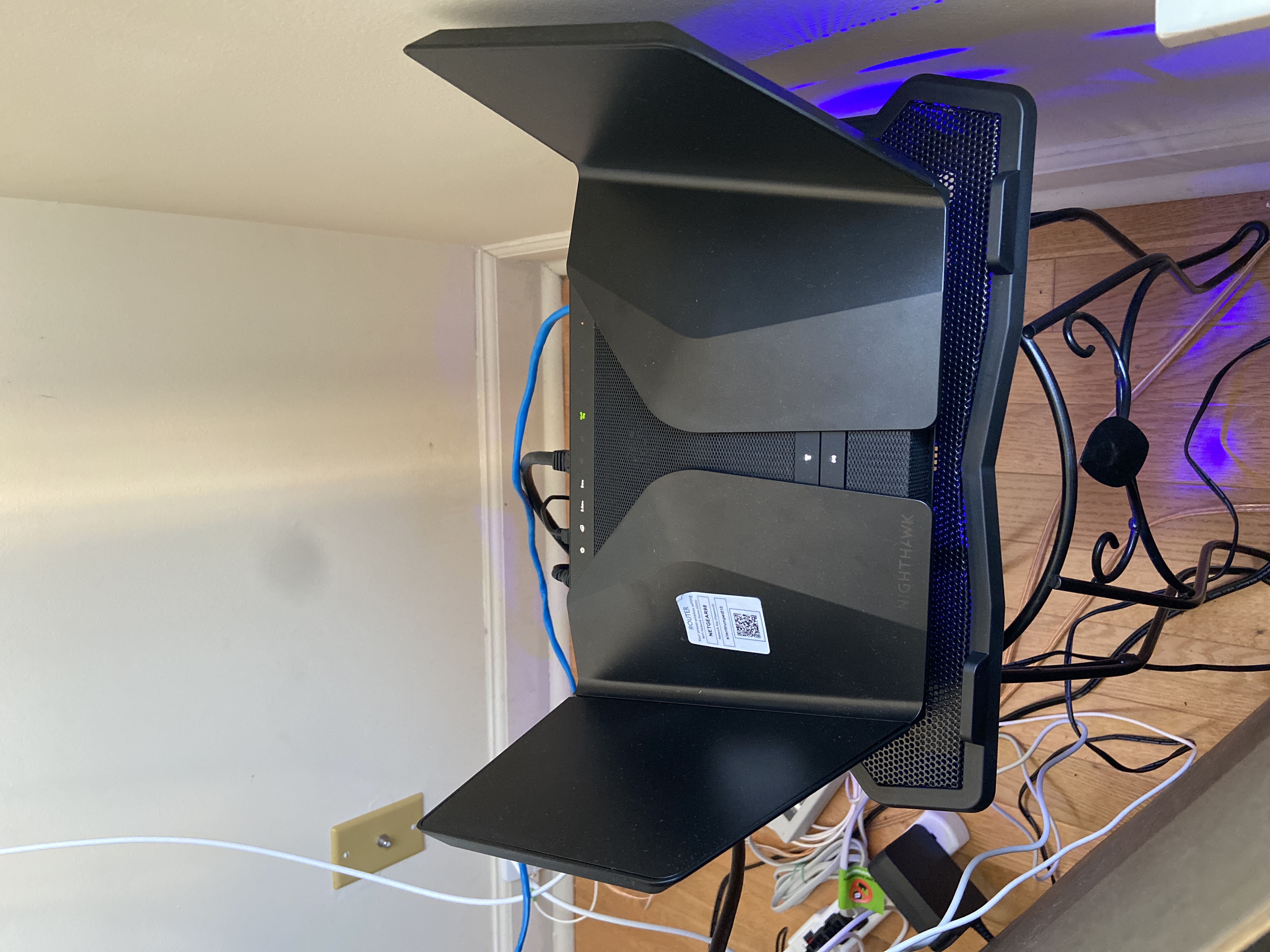
- Jun 11, 2022Installed beta firmware 1.2.3.33 on it and then turn fan on in debug.htm. Just check mark it , don’t click on apply.
And bought a cool pad from amazon $10 . 4 days in a row no restart and router works perfect.
Laptop Cooling Pad,ESGAMING Laptop Cooling Stand Laptop Cooler 10-15.6 Inch 2 USB Ports 2 Fans with Blue LEDs https://a.co/d/dXVVnxw
_NDS_
Sep 03, 2022Apprentice
Thank you for keeping us posted!. Could you please let us know if you are still using the beta firmware and whether you put your RAX120V2 back into the router mode.
In my experience too the thermal fan was working correctly on the router when powered with the ADS-65MIA-19 adapter. Moreover, when I kept the fan constantly on via the firmware debug page, the router was cool to touch even under load.
FURRYe38when will we get any update from NG on the issue? They went quiet after dismissing the power adapter hypothesis.
muniz_ri
Sep 03, 2022Apprentice
Yes, I changed it back to router mode and still on the beta fw.
I have also been trying a couple other things that I came across like moving all devices to 2GHz and moving them one by one to 5GHz to see if any of them are causing the reboots. I also changed my SSID's to remove an underscore ("_") from the names. I read that using underscores in the SSID's used to be problematic, idk. And a couple other things.
Paid too much money and desperately trying to get this thing to work as it should.
- muniz_riSep 06, 2022Apprentice
All has been solid and I am going on four days without a random reboot. This is the longest stretch of time that the router has gone without a random reboot.
My current setup is using router mode with the beta firmware and the fan "always on" setting in the debug screen disabled. However, in addition to replacing the power adapter I have also changed my SSID's to remove an underscore. My SSID is now all lower case letters and numbers. I have also removed my iphone xr (work phone) from the network. I found a few posts online where the iphone caused routers to crash. Strange but trying whatever I can at this point.
I will update again if the router reboots and if does not reboot...I will update again in about one month. Hope that I didn't just jinx myself. We'll see.
- FURRYe38Sep 07, 2022Guru - Experienced User
Though not complete root cause or resolution, I've asked muniz_ri to revert all his changes back to his normal configuration to see if the router continues to work with the newer adapter or still sees a reboot. Need to ensure that under normal configuration, the router continues to work with out a reboot. I'll be bring this info to NG today.
- muniz_riSep 07, 2022Apprentice
I have reverted the changes except for the new power adapter and my new SSID's (it's too much hassle to change all of my devices). I will continue this setup for at least another week if no reboots and will then plug in the old power adapter to test. I will keep everyone posted.
- FURRYe38Sep 07, 2022Guru - Experienced User
👍
- muniz_riSep 08, 2022Apprentice
**Update**
I asked my wife this morning to re-connect her Samsung Galaxy S10e to the 5GHz network (she was still using the 2GHz network). As soon as she did the router rebooted.
I then changed the password to the 5GHz network and asked her to again reconnect to the 5GHz network. There was no reboot that time after she reconnected. She then left the house and as soon as she did, the router rebooted once again.
I then searched the web for other similar instances and found these posts:
https://community.tp-link.com/en/home/forum/topic/180710
I will continue testing to see if I can reliably reproduce the issue by connecting and disconnecting her phone to the network to better understand what is happening.
- FURRYe38Sep 08, 2022Guru - Experienced User
FYI,
muniz_ri NG wasn't able to see anything meaningful from yours logs. I passed along your experiences so far including what you posted a bit ago. Interesting that you one device seemed to cause a reboot.
NG just released a new FW version which I recommend you load up and try.
I would factory reset and setup from scratch. Use your normal configuration and don't check the thermal fan or disable WMM work arounds. Lets try using your original configuration. Also please put the original Power adapter back online as well and test with it. The original PS should work that comes stock in the box.
muniz_ri wrote:
**Update**
I asked my wife this morning to re-connect her Samsung Galaxy S10e to the 5GHz network (she was still using the 2GHz network). As soon as she did the router rebooted.
I then changed the password to the 5GHz network and asked her to again reconnect to the 5GHz network. There was no reboot that time after she reconnected. She then left the house and as soon as she did, the router rebooted once again.
I then searched the web for other similar instances and found these posts:
https://community.tp-link.com/en/home/forum/topic/180710
I will continue testing to see if I can reliably reproduce the issue by connecting and disconnecting her phone to the network to better understand what is happening.
- FURRYe38Sep 08, 2022Guru - Experienced User
I've passed this on to NG regarding the possible differences seen between model# Power Adapters. NG didn't gleam anything from muniz_ri debug logs that were sent so couldn't get anything from that. Possible that the reboot wipes out what caused the reboot. I asked them to take a closer look between the 19v 3amp power adapters to see if there could be any cause from these adapters. NG released FW yesterday and they said may have some fixes in this version for these reboot issues. Will need users to try this with there original power adapters and with out any work arounds to see if this version of FW doesn't anything to resolve that. Won't know if or when NG will give feedback to the power adapter review.
- FURRYe38Sep 08, 2022Guru - Experienced User
👍
- _NDS_Sep 11, 2022Apprentice
Thanks for the update muniz_ri, just to confirm - you are running your RAX120V2 with the original power adapter right now - AD2073F20?
Are you based in the USA?
FURRYe38 I will keep mine running throughout the day today on ADS-65MIA-19 and will report back if experience a reboot or not. However, from the past experience, one day may not be suffcient to catch it.
- muniz_riSep 12, 2022Apprentice
The router rebooted twice this morning within one hour and in the middle of a video conference call.
I give up and have ordered a new TP Link AXE5400. Hope there is a fix down the road so that I can sell the RAX120 and recover some of the money that I have spent. Good luck everyone.
- DH27Sep 12, 2022Tutor
Same for me, I gave up on the RAX120 after a week of usage. I bought the RAX200 instead which has worked without flaw for the past three weeks. Compared to the RAX120, I can recommend the RAX200 wholeheartedly as I have not had a single reboot throughout this timeframe. Only downside is that the wifi range is a tiny bit smaller than the one of the RAX120.
- FURRYe38Sep 12, 2022Guru - Experienced User
Do you still have your 120v2?
If so what FW version is loaded on it? You try the Beta?
What model power adapter do you have with yours?
DH27 wrote:
Same for me, I gave up on the RAX120 after a week of usage. I bought the RAX200 instead which has worked without flaw for the past three weeks. Compared to the RAX120, I can recommend the RAX200 wholeheartedly as I have not had a single reboot throughout this timeframe. Only downside is that the wifi range is a tiny bit smaller than the one of the RAX120.
- DH27Sep 12, 2022Tutor
Unfortunately not, I had to send it back to Amazon for a refund. I didn't try the beta, but I had the power adapter ADS-65MIA-19 with the European plug extension. The power adapter didn't seem to be the root of the problem for me.
- FURRYe38Sep 12, 2022Guru - Experienced User
Ok, thanks for letting us know. Ya seems to bet more then just the power adapter.
- _NDS_Sep 12, 2022Apprentice
Thank you for updating us on your experience with the new firmware in relation to the reandom reboots.
I had the router running for 24 hours without a reboot yesterday, when I was not working and could afford a random reboot. While the router has not rebooted on me, my impression was that the issue of variable internet connection speeds has resurfaced in this new firmware.
The clients - both wired and wireless were seemingly taking more time than usual to load webpages, photos and videos.
I, therefore, followed the same path as muniz_ri and packed the router into its box, until its fixed to the point that I won't feel ashamed of myself to sell it on. Clearly the feeling that the Netgear company does not seem to share.
- dude8370Sep 13, 2022StarSame here. Reboots without warning with new firmware. Factory reset and everything done as well. Factory power adapter as well. I'm thinking of opening this up and checking solder joints as replacement is close to impossible. And I've moved on to the archer ax11000.
- Kubac78Sep 17, 2022Tutor
New firmware didn't change anything. The router is still randomly reboots.