NETGEAR is aware of a growing number of phone and online scams. To learn how to stay safe click here.
Forum Discussion

orangeshed
Jun 13, 2021Aspirant
RAX50 TxPkts and RxPkts always zero
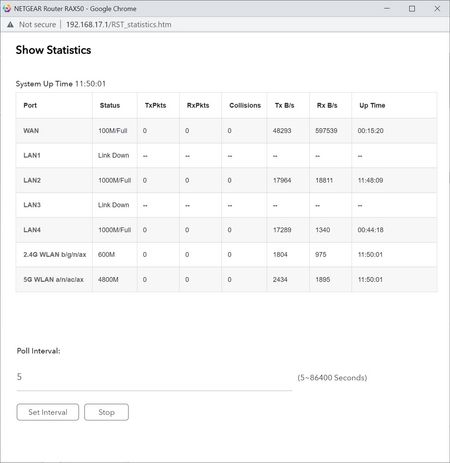
I have noticed that the port statistics on my RAX50 router always show 0 for the TxPkts and RxPkts columns. This is obviously wrong for the ports that are connected, as there has definitely been acti...

Razor512
Jun 13, 2021Prodigy
I recommend doing a factory reset, as that is nor normal behavior. I am running the same firmware version on my RAX50, with no issues with the statistics page.
PS whenever doing a factory reset as a troubleshooting step, you can do a backup of your settings file before trying it, thus if your issue remains after a reset, you can just restore the backup to save the setup.
Though if it does fix the issue, do not restore a backup file since many config backups are typically a dump of the NVRAM, thus any corruption there will become part of the backup file.
Beyond that, for your specific issue, a factory reset and a fresh setup is likely your best bet since I have not seen this issue happen on either of the listed firmware versions.
- orangeshedJun 14, 2021Aspirant
Thanks for the advice Razor512 .
I tried doing a factory reset earlier today. I had a feeling that restoring the config from backup would restore the problem, so re-entered all my settings from scratch.
And after changing everything back to how it was before ... TxPkts and RxPkts were all zero. This is what it looked like 4 hours after the factory reset:
Unfortunately I was so certain that doing this would work that I didn't check the stats between every config change, so I don't know which setting caused this, or even if it was like this all the way through because something is permanently broken in my hardware.
Tomorrow I will try the factory reset process again and check the stats at regular intervals during the config updates.
- orangeshedJun 15, 2021Aspirant
I tried another factory reset, and looked at the stats as early as I could in the setup process, and all the TxPkts and RxPkts values were still zero:
So I guess that means either there's something wrong with part of the hardware on my RAX50 or else it remembers something through a factory reset that causes the problem.
Interestingly it does remember some things through a factory reset, because after my two factory resets on consecutive days my traffic meter statistics are still showing last month's usage correctly:
Anyone know if those figures are remembered on the device itself or somewhere in the Cloud? If it's on the device it would be interesting to know if there's a secret way to do a real factory reset that includes absolutely everything.
I'm going to open a support case about this.
- Razor512Jun 15, 2021Prodigy
Netgear doesn't store that info in the cloud, thus it seems some deta is being left behind after the factory reset.