NETGEAR is aware of a growing number of phone and online scams. To learn how to stay safe click here.
Forum Discussion

BuggyRAX75
Jan 28, 2025Aspirant
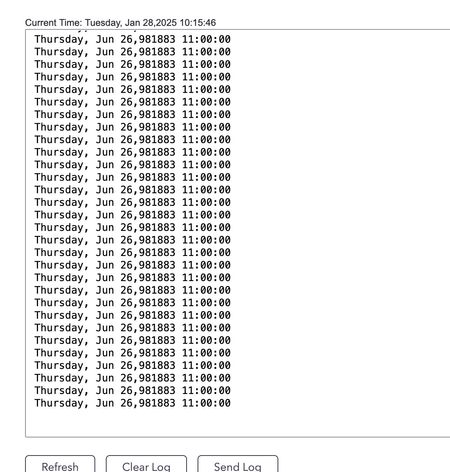
RAX75 shows dates 900k+ years in the future in logs
My RAX75 that has the latest firmware and shows dates of 900k+ years in the future when it drops wifi and the UI becomes very slow. The wifi radios drop randomly and sometimes do not recover full...

FURRYe38
Jan 28, 2025Guru - Experienced User
What is the Mfr and model# of the Internet Service Providers modem/ONT the NG router is connected too?
Be sure your using a good quality LAN cable between the modem and router. CAT6 is recommended.
What channel configurations are currently set on the router?
Any Wifi Neighbors near by? If so, how many?
Is Smart Connected enabled?
What WiFi devices do you have connected?
Does this happen with ethernet connected devices?
Be sure to disable any MAC Address randomizers on phones and pads while at home:
https://community.netgear.com/t5/Nighthawk-App/NETGEAR-Mobile-Applications-and-Apple-Devices-FAQ/td-p/2220015/jump-to/first-unread-message
Try disabling the following and see:
Armor, IPv6, Smart Parental Controls or Circle, Traffic Meter.
Do you happen see a feature called Protection Engine on the routers web page under Advanced Tab/Security?
BuggyRAX75
Jan 28, 2025Aspirant
What is the Mfr and model# of the Internet Service Providers modem/ONT the NG router is connected too?
ARRIS ET2251
Be sure your using a good quality LAN cable between the modem and router. CAT6 is recommended.
I am.
What channel configurations are currently set on the router?
Auto on the 2.4, 44 on the 5g.
Any Wifi Neighbors near by? If so, how many?
Sure, about 14 networks.
Is Smart Connected enabled?
Yes
What WiFi devices do you have connected?
12 computers and iot devices.
Does this happen with ethernet connected devices?
Yes, I've seen it drop wifi and wired at the same time.
Be sure to disable any MAC Address randomizers on phones and pads while at home:
This seems to only effect the ability of the ios app to connect to the router. Private wifi address is set to fixed.
Try disabling the following and see:
Armor, IPv6, Smart Parental Controls or Circle, Traffic Meter.
All of these have always been off.
Do you happen see a feature called Protection Engine on the routers web page under Advanced Tab/Security?
There is nothing called "Protection Engine" under the advanced tab/security section.
- FURRYe38Jan 28, 2025Guru - Experienced User
Do any of the top LEDs on the router turn AMBER when this happens?
Something to try with the logs, Disable ALL logs there, then apply the change. Might do this after you've factory reset and setup from scratch.
- BuggyRAX75Jan 28, 2025Aspirant
None of the lights change to amber unless a reboot of the router happens and they are reactivating.
I did the factory reset / re-setup earlier today. I will leave logging on for now so we can see if the issue of the logs showing a day 900k years in the future still exists the next time this crashes. If it crashes after that I can see if disabling some/all logs helps if there is some logging function or logrotate issue occurring.
- FURRYe38Jan 28, 2025Guru - Experienced User
Ok, ya if it happens again, try disabling ALL logging.
Keep us posted.
- BuggyRAX75Feb 05, 2025Aspirant
I also noticed on a reboot it got stuck on a 2022 date, but am not sure how often that updates post reboot. I noticed NTP is set to use the default Netgear server, I didn't see any update for 10 mins or so to the date post reboot but swapping to pool.ntp.org and rebooting helped that issue or may have just initiated the time sync with the setting change but I got a correct date/time on reboot by changing to pool.ntp.org. As I saw evidence that pool.ntp.org worked post reboot I left that as my NTP setting.
However, the crash happened again a short while after that so I disabled all logging and have not seen a router crash for days. I did see some denial of service attack messages in the logs prior to disabling them also but the device should not crash from them and if the logging engine is susceptible to attack this way it is certainly something netgear should look at and fix.
Not really acceptable to have to turn off logs device to resolve this long term though.
I hope to RMA this and have netgear investigate the issue come up with a fix and update the firmware.
Hopefully they update the 3 year old 2022 firmware once they know what is occurring here.
- FURRYe38Feb 05, 2025Guru - Experienced User
You'll need to contact NG support about this then.
Good Luck.
- BuggyRAX75Feb 05, 2025Aspirant
I got a dm from the admin and sent contact info for support.
Moments after I replied above I saw the crash again but this time with logs off so it may be a deeper issue.
Turning logs back on showed a clear example of this happening.
Given all that I sent in a bugcrowd report for netgear security to check out as well per their link at https://www.netgear.com/about/security/
- FURRYe38Feb 05, 2025Guru - Experienced User
Might ask about an RMA to see if another RAX router does same thing.
Keep in contact with NG support. - BuggyRAX75Jun 23, 2025Aspirant
I do not think they will RMA the device. If they ask me to RMA it I will send it in to them certainly.
I am still in contact with them and am still seeing this issue. It just occurred again this morning actually so I sent them a fresh log.
This has been occurring for months so when I see new data I send more in to them.
I had a user DM me that this is happening to them as well recently.
There has not been a firmware update to the RAX75 since 2022 so hopefully this gets looked at soon.
- FURRYe38Jun 23, 2025Guru - Experienced User
Something to try as well while your waiting on NG, might revert back FW version or two to see if anything changes.
Not much else we can do here while waiting on NG.