NETGEAR is aware of a growing number of phone and online scams. To learn how to stay safe click here.
Forum Discussion

phoyte
Sep 19, 2019Star
RAX80 - slow speeds
Model RAX80 - Firmware - 1.0.1.60 Purchased August 2,2019 I bought this router a few weeks ago and noticed that I wasnt getting the speeds. This morning I had our ISP out to the house to confirm tha...

PDWhite
Feb 03, 2020Apprentice
They are replacing mine with a one. And just in time, too.
Last night the 2 Ghz Wi-Fi throughput slowed down to 2 Mbs. I powered it down and restarted it. This time it didn't boot. I waited for about a minute and.. nothing. I powered it off for a minute and reconnected the power and it did boot up. But the 5 Ghz signal is now non-existant. This must be a chip failure, but now I'm thinking the chips are getting hammered by a bad power power supply. A bad PSU can be a very expensive problem, especially if it appears to be working correctly and is overlooked as a problem. (Unfortunately, I've been there more than once. It is a frustrating, bummer of a problem.)
Good/bad software programming or issues stemming from hardware design are certainly important, but there is no way to make judgement on any of this if the power supply is causing everything else to sputter and misfire. - In a way, I'm glad the bad power supply showed itself.
During the relatively short periods that this RAX80 was running well, I was very impressed with it. The problem was that it wouldn't stay that way for very long. Now I know why. (At least, I hope/think I do...)
And so I am hoping to blissfully place the replacement on the shelf in my wiring closet and plug it in. If it sits there and quietly does its job, I will be a happy camper. - I am keeping my fingers crossed.
PDWhite
Mar 02, 2020Apprentice
The (non-Netgear) replacement for my RAX80 should arrive on Tuesday. However, since it is the middle of the night and no one else is using out Wi-Fi, I thought I'd attempt yet another reconfiguration of the RAX80 as a sanity check. - Note: these results still occur whether the unit is configured for this house or the factory default settings... I also turned much touted AX functionality off to see if that made a difference; it did not.
The same problems I've been commenting on in several places on the various RAX80 Community threads still occur, namely 5 GHz band not running at the advertised max speed, (4800 Mbps,) as per the on-line specifications. When set to that speed, the 5 GHz signal appears and disappears periodically on a signal scanner, but won't connect to any device in the house, including a newly purchased Intel-based AX adapter card for my Intel desktop system. I also turned much touted AX functionality off and on. but it made no difference. - Since the system was rebooted only moments ago, I haven't seen whether it goes into comatose mode, but I expect to see that bug manifest itself again after the unit has been running a while.
My sanity check also included a visit to the Netgear Store's RAX80 product web page. In there, it specifies the 4800 Mbps 5 GHz speed several times, as well as a few other niceties that don't appear to work as they should. I also scrolled down to the user reviews at the bottom and discovered that all of the reviews included there were rave reviews; which was a big factor for my decision to buy the RAX80 in the first place.
Bottom line: After using my original RAX80 and the two replacement units they sent, these problems still exist. - It should be noted that during the first 30 days after the original purchase, I created a case requesting a fix for the problems, or give me a refund. The defect saga continues. Honestly, I cannot remember when I purchased a device that was as unsatisfactory as the RAX80 has been. The reseller has agreed to take it back and refund my purchase price; I will be glad to finally be rid of it.
- mordekaiMar 08, 2020Initiate
Been in a similar boat since late last year. I was able to get it stable for about two months in the middle, but after a power outage and the router rebooting I'm right back to somewhere between 10 minutes and 24 hours before I drop from 700Mbps throughput to ~5Mbps throughput. It only affects AX chips in my house, of which I have three. They're not all affected at the same time though, and each adapter can be disabled/enabled and function again for a time independent of any impact on the others.
For my part I can't figure out if the issue is the AX200 chip from Intel (the only AX chip I'm aware of still) or the RAX80. My understanding is that adapters based on the AX200 chip do work fine with other AX routers, just not Netgear's. I had hoped turning off/on the QOS would have made a difference, but out of several dozen attempts to fix the issue including the QOS fix, nothing has permanently fixed the issue.
In any case, if anyone does ever see this problem addressed, please update here. And if you're reading this Netgear support staff, please help your management understand that this is not a user issue, and that it is widespread. I've seen this particular issue generate negative reviews for the RAX series, and my guess is more will keep coming in until this is properly addressed.
- mayeen12Apr 12, 2020Star
I have the same WAN speed problem
i get 360 --= >> QOS off >> goes to 500 mbps, than QOS ON >> goes 940 mbps > 1-2h later >> goes down to 360 MBPS!!!
IT'S NOT MY MODEM - I get 940 ALL DAY ALL NIGHT -- direclty connecting the modem to the PC
I think netgear knows of this problem, but not many people have 1 gig conneciton, or technical enough to pin point the issue to the router.
I have 4 netgear high end routers which i purchased in 2 years for different locations.
My main house has AX8 or RAX80 - only place with 940 mbps WAN .
WAN side on NETGEAR is problamatic.
netgear FIX this or else you will lose customers and you will have bad rep, as more customer will go on GBPS internet provider. - mayeen12Apr 15, 2020Star
I want a solution to this problem, i don't wanna spend another 500$ on a different router
- phoyteApr 15, 2020Star
This has been a problem since the beginning of the RAX80. I bought one initially and had to return it for the same lack of speed issues. Got another router that works great and is not Netgear. Might want to do the same. I see that they have now introduced another model that's supposed to be even faster. Something is worng with this Netgear picture. Get a new canvas.
- phoyteApr 15, 2020Star
Forget about being fixed - I think they would have found one by now. Replace? You really want to replace this with another RAX considering? Refunded - depends where your bought it from. Best buy refunded my entire purchase. Good luck.
- mayeen12Apr 15, 2020Star
Stupid me - I intailly blamed by ISP .. didn't return in within the 30 day period.
NOW --- I'm stuck with the god dam router.. I can't return to best buy
Going through this forum, there is MANY MANY router reporting the same issues WAN limited to 500 MBPS
- mayeen12Apr 15, 2020Star
Can someone at netgear wake the hell up ..
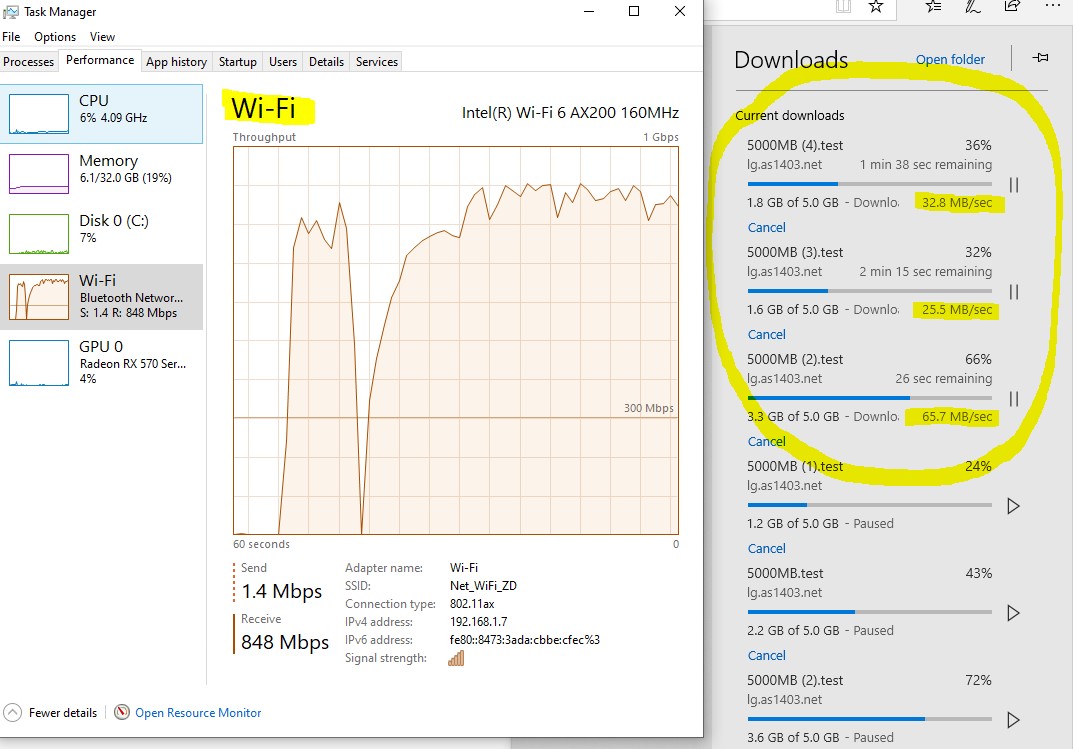
here is example
- phoyteApr 15, 2020Star
If you bought it at BB then you might want to try to return it by telling them the whole story and see if they would refund it. Worth a try. Depending on how long ago you got it might also want to check with our CC company to try.
- mayeen12Apr 15, 2020Star
phoyte wrote:If you bought it at BB then you might want to try to return it by telling them the whole story and see if they would refund it. Worth a try. Depending on how long ago you got it might also want to check with our CC company to try.
I don't think best buy should not be losing money, and take back the device, there is something WRONG with the product. the manufacture needs to own up.. and find a solutions.
I purchased it in Dec 2019
- majeremiahApr 15, 2020Tutor
I am way past 30 days, wasting to much time hoping for a solution.
Got mine at Costco, I will see if they will take this one back. I already sent the first one back, so they should understand this product is garbage.
- mayeen12Apr 17, 2020Star
I finally fixed my problem :)
Final Results, I'm getting FULL 940 to 985 MBPS download (From Internet & Internal NAS Drive) - both in wired and wifi mode.
PLEASE NOTE** All my clients are wired or AC or AX devices.
Step 1 - Get the latestest firmware
Step 2 - Turn OFF QOS
Step 3 - Turn OFF Traffic Meter
Step 4 - Turn OFF Access Control
Step 5 - Test you MTU from a wired connection > https://kb.netgear.com/19863/Ping-Test-to-determine-Optimal-MTU-Size-on-Router
Step 6 - Adjust your MTU settings >> https://kb.netgear.com/24015/How-do-I-change-the-MTU-size-on-my-Nighthawk-router
Step 7 - Use WiFI Analizer - FIND THE BEST CH for WiFI - I put AUTO for 2.4 and CH36 for 5ghz
Step 8 - ENABLE BEAMFORMING > DISABLE MUMIMO > ENABLE AX
- So there is couple of other things i did, like use non netgear NTP server.. not sure if that even matters