NETGEAR is aware of a growing number of phone and online scams. To learn how to stay safe click here.
Forum Discussion

Purpledeer
Sep 27, 2023Aspirant
RAX80 wirelesss cannot be turn on
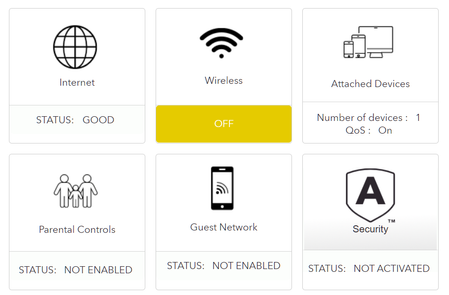
The router wireless function turn off suddenly without any modification to the setting, the wired connection is not affected and are working fine. the WiFi and WPS light is lighting up all the time. ...
- Sep 27, 2023
Try a 30-30-30 reset. If this fails to bring back the wifi radios, then you may have a HW failure. Time to contact NG support and ask about RMA options.
https://my.netgear.com/support/contact.aspx
https://www.netgear.com/support/contact.aspxFYI, Your ISP Modem already has a built in router and wifi. This would be a double NAT (two router) condition which isn't recommended. Even if it's wifi is disabled. This would be a double NAT condition which isn't recommended. https://kb.netgear.com/30186/What-is-Double-NAT
https://kb.netgear.com/30187/How-to-fix-issues-with-Double-NAT
Couple of options,
1. Configure the modem for transparent bridge or modem only mode. Then use the NG router in router mode. You'll need to contact the ISP for help and information in regards to the modem being bridged correctly.
2. If you can't bridge the modem, disable ALL wifi radios on the modem, configure the modems DMZ/ExposedHost or IP Pass-Through for the IP address the NG router gets from the modem. https://kb.netgear.com/25891/DMZ-on-NETGEAR-routers
https://kb.netgear.com/24086/How-do-I-set-up-a-default-DMZ-server-on-my-Nighthawk-router
3. Or disable all wifi radios on the modem and connect the NG router to the modem, LAN to LAN configure AP mode on the NG router.
https://kb.netgear.com/20927/How-do-I-change-my-NETGEAR-router-to-AP-mode
Try option #2 first..
Purpledeer
Sep 27, 2023Aspirant
Thank you for your reply!
The temperature is normal. Same as before when the WiFi function still works.
The WiFi didn't turn on and stay like that even after the factory reset. It's like disable by default. The WiFi didn't work at the beginning after factory reset and nothing is broadcasting, even no hidden SSID. The wireless page shows 'wireless router radio' and 'SSID Broadcast' are enabled.
I tried Auto and all channels including DFS channels but still no luck and now are leaving it on Auto. There are around 10 WiFi neighbor nearby.
WiFi devices connected before are mainly phone, tablet, laptop, PC and NAS, but now is only the wired PC and NAS because only the wired port works.
It's a Huawei HG8045 router and modem combo with WiFi function disable. It works fine and other router connected to it works fine too.
I am using an AMP CAT6 cable and double check it is working fine. So I don't think that is the problem
The temperature is normal. Same as before when the WiFi function still works.
The WiFi didn't turn on and stay like that even after the factory reset. It's like disable by default. The WiFi didn't work at the beginning after factory reset and nothing is broadcasting, even no hidden SSID. The wireless page shows 'wireless router radio' and 'SSID Broadcast' are enabled.
I tried Auto and all channels including DFS channels but still no luck and now are leaving it on Auto. There are around 10 WiFi neighbor nearby.
WiFi devices connected before are mainly phone, tablet, laptop, PC and NAS, but now is only the wired PC and NAS because only the wired port works.
It's a Huawei HG8045 router and modem combo with WiFi function disable. It works fine and other router connected to it works fine too.
I am using an AMP CAT6 cable and double check it is working fine. So I don't think that is the problem

FURRYe38
Sep 27, 2023Guru - Experienced User
Try a 30-30-30 reset. If this fails to bring back the wifi radios, then you may have a HW failure. Time to contact NG support and ask about RMA options.
https://my.netgear.com/support/contact.aspx
https://www.netgear.com/support/contact.aspx
FYI, Your ISP Modem already has a built in router and wifi. This would be a double NAT (two router) condition which isn't recommended. Even if it's wifi is disabled. This would be a double NAT condition which isn't recommended. https://kb.netgear.com/30186/What-is-Double-NAT
https://kb.netgear.com/30187/How-to-fix-issues-with-Double-NAT
Couple of options,
1. Configure the modem for transparent bridge or modem only mode. Then use the NG router in router mode. You'll need to contact the ISP for help and information in regards to the modem being bridged correctly.
2. If you can't bridge the modem, disable ALL wifi radios on the modem, configure the modems DMZ/ExposedHost or IP Pass-Through for the IP address the NG router gets from the modem. https://kb.netgear.com/25891/DMZ-on-NETGEAR-routers
https://kb.netgear.com/24086/How-do-I-set-up-a-default-DMZ-server-on-my-Nighthawk-router
3. Or disable all wifi radios on the modem and connect the NG router to the modem, LAN to LAN configure AP mode on the NG router.
https://kb.netgear.com/20927/How-do-I-change-my-NETGEAR-router-to-AP-mode
Try option #2 first..
- PurpledeerSep 27, 2023AspirantTried a 30-30-30 reset and it is still the same so I believe it is a hw failure. Unfortunately my warranty is ended so I think I need to purchase another router instead.
DMZ is already configured on the modem before so I don't think it's the main problem too.
Thank you again for your reply- FURRYe38Sep 27, 2023Guru - Experienced User
Sorry it didn't work out.
Something I recommend on your next router, install a laptop fan cooler under the router. Helps keep the HW cooler and extends life. Electronics can degrade over period of time due to heat with in. Something I keep under any router I have online.
Good Luck.