NETGEAR is aware of a growing number of phone and online scams. To learn how to stay safe click here.
Forum Discussion

niwat
Jun 11, 2023Aspirant
RAXE300 connect ethernet to Mac mini M2 port 10G ethernet
My ISP provide 2G ethernet speed connect to RAXE300 Multi gig internet port, i want to use lan RJ45 aggregate port lan3 and 4 to 10G ethernet port of mac mini m2 (has only one lan), Can I do that ? I...
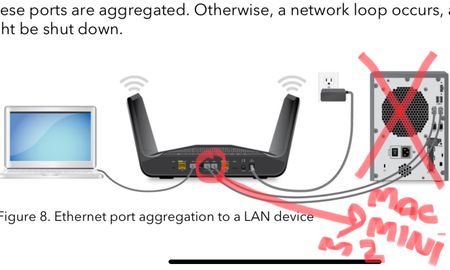
niwat
Jun 12, 2023Aspirant
whai i under stand is i have to buy a special switch, such as
Multi-Gigabit Ethernet Unmanaged Switch (MS108UP)
then connect lan 3 and 4 from raxe300 to this switch after that connect lan rj45 from this switch to mac mini lan port 10G ethernet......am i correct ?

schumaku
Jun 12, 2023Guru - Experienced User
Well, you can't take any advantage of higher bandwidth available with just one 2.5GbE link.
niwat wrote:
whai i under stand is i have to buy a special switch, such as Multi-Gigabit Ethernet Unmanaged Switch (MS108UP)
Well, you can't take any advantage of higher bandwidth available with just one 2.5GbE link. No aggregation possible on the unmanaged switch, and not more ...
niwat wrote:
then connect lan 3 and 4 from raxe300 to this switch after that connect lan rj45 from this switch to mac mini lan port 10G ethernet......am i correct ?
Again, with the unmanaged switch, you can neither get an advantage of the 10 GbE port on the Mac nor configure a lag aggregating two 2.5 GbE ports. Your Mac will be forever limited to the 2.5 GbE link speed. I've not suggested the two 1G/2.5G/5G/10GbE MultiGig switch for no reason.
The only no-cost solution I can suggest is just a single network link connecting the Mac to one of the two 2.5 GbE ports making a 2.5 GbE link.