NETGEAR is aware of a growing number of phone and online scams. To learn how to stay safe click here.
Forum Discussion

kpaskevicius
Mar 13, 2023Aspirant
RAXE500 frequent device drops in house
I'm having a timely issue where my new RAXE500 keeps dropping my family's connection. We originally used xfinity gateway with xfinity pods, which is outperforming this RAXE500 and AX6000 x2 extende...
kpaskevicius
Mar 13, 2023Aspirant
It is Xfinity Gateway, Bridge Mode, to the Netgear Router in router mode.
Currently, router in another's bedroom based on the way the setup must be, but then extender on same middle floor off to the side, and other extender in basement, middle floor and upstairs connect with less walls.

plemans
Mar 13, 2023Guru - Experienced User
You're in a recipe for issues with how you have the extenders.
Mesh extenders aren't designed to be used with multiple ones. You can do so but if they can see each others ssid's, they can end up connecting to each other and have issues/stability problems. Its why I don't recommend them if you're needing more than 1.
Options to see if you can make it work?
1. separate them out. If you're on a 3x level, have an extender in the basement, router in the middle, extender on top. and you might have to turn the extenders broadcast power down. But they should be far enough away from each other to not see each others signal
2. turn one off and centrally locate the router and other extender so you don't have that issue
3. disable smart connect on one (or both) extenders so they're forced to connect to the router and not to each other. Start with one of them.
4. If you're needing 2x extenders and want single ssid function sell the whole setup and move a mesh system thats designed to accomplish what you want. Mesh systems have the router controlling the satellites so they're forced into preset connections. Much more stable.
- michaelkenwardMar 13, 2023Guru - Experienced User
- kpaskeviciusMar 13, 2023Aspirant
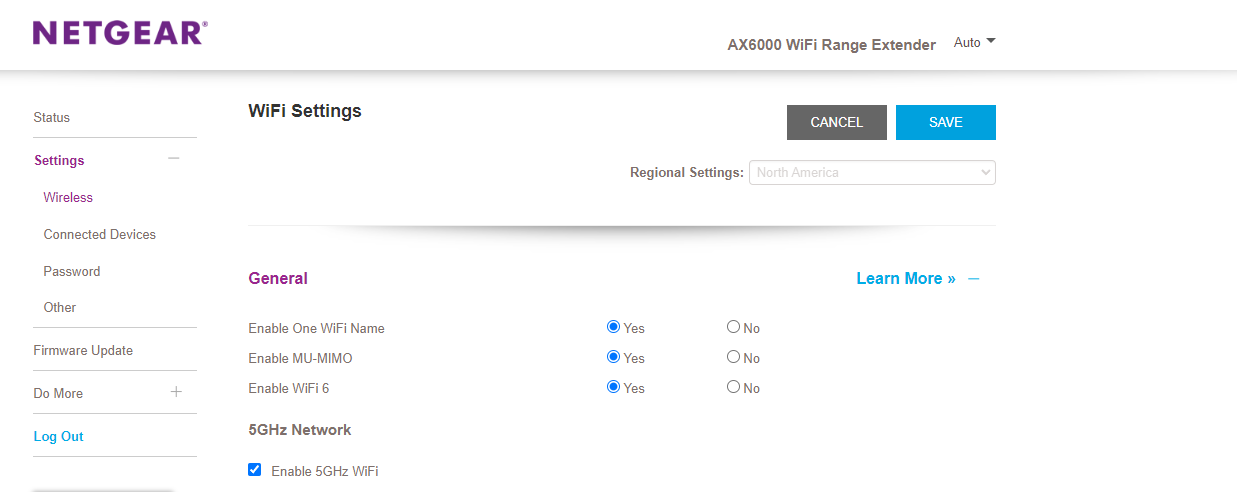
I can't seem to find that option for disabling smart connect. Which would it equate to?
- KitsapMar 13, 2023Master
kpaskevicius wrote:I can't seem to find that option for disabling smart connect. Which would it equate to?
Under General, set enable one Wi-Fi name to No. You will have to provide separate and different SSID's for each band, and then save your changes.
- kpaskeviciusMar 14, 2023Aspirant
Thanks, is there a problem if my extenders show almost no one connected over the router itself?
Update: router is in middle of the house, 2nd floor
extender: in the basement, 1st floor
extender: upstairs, 3rd floor
My main concern is sometimes my phone will have pretty fast Youtube videos, but sometimes will not load things like Weather Channel App or messages, and that is also for my family members.
What could I tweak for that to replicate the xfinity pod ease of use?
- michaelkenwardMar 14, 2023Guru - Experienced User
Kitsap wrote:
kpaskevicius wrote:
I can't seem to find that option for disabling smart connect. Which would it equate to?
Under General, set enable one Wi-Fi name to No. You will have to provide separate and different SSID's for each band, and then save your changes.
Also, manuals are always a good place to start.
Support | NETGEAR
Feed in your model number and check the documentation for your hardware.
Check the section in the manual Enable or disable Smart Connect.